內容簡介
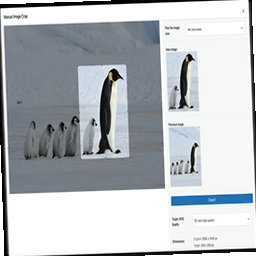
Thumbnail Editor 外掛允許使用者手動編輯 WordPress 媒體庫中的縮圖,解決自動裁剪可能導致的縮圖品質問題,提升網站前端的視覺效果。
【主要功能】
• 手動編輯縮圖,避免錯誤裁剪
• 支援 JPG、JPEG、GIF 和 PNG 格式
• 添加自訂文字和簽名到縮圖
• 提供多種字型選擇
• 增加影像效果,如灰階、素描等
• 可還原編輯過的變更
外掛標籤
開發者團隊
📦 歷史版本下載
原文外掛簡介
When images are uploaded in the WordPress Media library section WordPress creates some thumbnails of that image. The size of these thumbnail images can be mentioned in the Settings->Media section.
But there can be some big issues with these thumbnails. WordPress Crop/Resize these images dynamically when you upload an image. When thumbnails are CROPPED it is very much possible that it gets CROPPED from the wrong section of the uploaded image. This can produce some BAD looking thumbnail images. Which doesn’t look good in frontend of the site. This plugin will allow you to update those thumbnail images manually. The thumbnail image edit interface that this plugin provides is simple and very easy to use.
The shortcodes and functions are provided in the image editor page of the plugin.
Image editor links can be found in WordPress Media Library.
Image files that can be edited are JPG, JPEG, GIF and PNG
Thumbnail Editor PRO
Checkout the PRO version features here. PRO version costs only USD 2.00
Support for Amazon S3 Bucket.
Completely replace thumbnail images and upload new ones.
Add Custom Texts to thumbnail images. You can add signature in the images.
Different Text Fonts are available to choose from.
Add Image Effects like Gray Scale, Sketch, Negative or Add Color Effects to the Image.
Add image Borders with different border colors.
Option to Revert Back the changes you made in the image.