
內容簡介
**總結:**
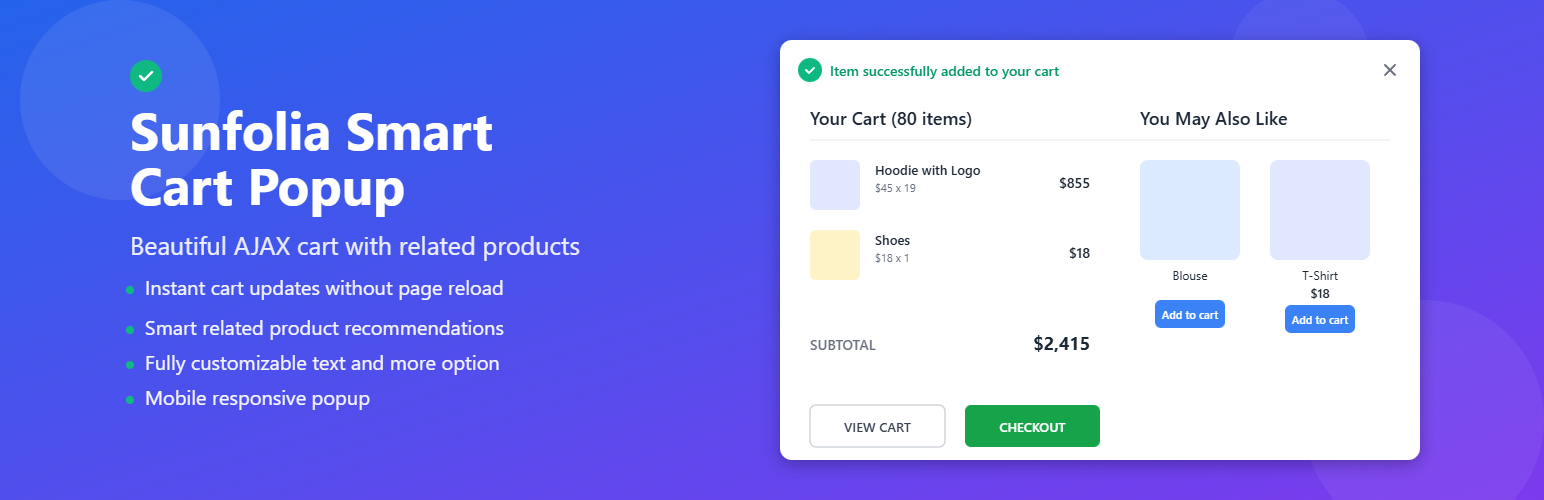
這個WordPress外掛針對WooCommerce設計,當顧客將商品加入購物車時,會顯示一個漂亮的彈出式視窗,展示當前購物車內容並提供相關產品建議。
**問題與答案:**
1. 這個外掛的主要功能是什麼?
- 答: 此外掛會在顧客將商品加入購物車後立即展示彈出式視窗,其中包含當前購物車內容以及建議的相關產品。
2. 這個外掛需要什麼樣的環境條件?
- 答: 這個外掛要求WordPress版本需為5.0或更高、WooCommerce版本需為3.0或更高、PHP版本需為7.2或更高。
3. 這個外掛如何運作?
- 答: 顧客點擊任何產品的“加入購物車”按鈕後,該產品將添加到WooCommerce購物車中,彈出式視窗將出現並包含成功消息、購物車中所有商品的圖片和詳細信息、購物車小計、查看購物車和結帳按鈕,以及可能感興趣的相關產品。
4. 如何找到相關產品?
- 答: 此外掛會根據WooCommerce內建的相關產品算法、相同類別的產品、以及擁有相似標籤的產品來自動找到相關產品。
5. 這個外掛支援哪些瀏覽器?
- 答: 這個外掛支援最新版的Chrome、Firefox、Safari、Edge瀏覽器,以及行動瀏覽器。
外掛標籤
開發者團隊
原文外掛簡介
A WordPress plugin for WooCommerce that displays a beautiful popup when customers add products to their cart. The popup shows the current cart contents and suggests related products.
Features
Automatic Popup Display: Shows popup immediately after adding products to cart
Cart Summary: Displays all items currently in the cart with images, quantities, and prices
Cart Totals: Shows subtotal and quick links to cart and checkout pages
Related Products: Suggests related products based on categories and tags
Quick Add to Cart: Customers can add related products directly from the popup
Responsive Design: Works perfectly on desktop, tablet, and mobile devices
Modern UI: Clean, professional design with smooth animations
AJAX Powered: Fast loading without page refreshes
Easy to Use: No configuration needed – just activate and it works!
Requirements
WordPress 5.0 or higher
WooCommerce 3.0 or higher
PHP 7.2 or higher
How It Works
Customer clicks “Add to Cart” button on any product
Product is added to WooCommerce cart
Popup appears showing:
Success message
All items in cart with images and details
Cart subtotal
View Cart and Checkout buttons
Related products the customer might like
Customer can:
Continue shopping (close popup)
View full cart
Proceed to checkout
Add related products to cart
Related Products Logic
The plugin automatically finds related products based on:
1. WooCommerce’s built-in related products algorithm
2. Products from the same categories
3. Products with similar tags
Browser Support
Chrome (latest)
Firefox (latest)
Safari (latest)
Edge (latest)
Mobile browsers
Credits
Developed with ❤️ for WooCommerce users by Sunfolia Labs.














