內容簡介
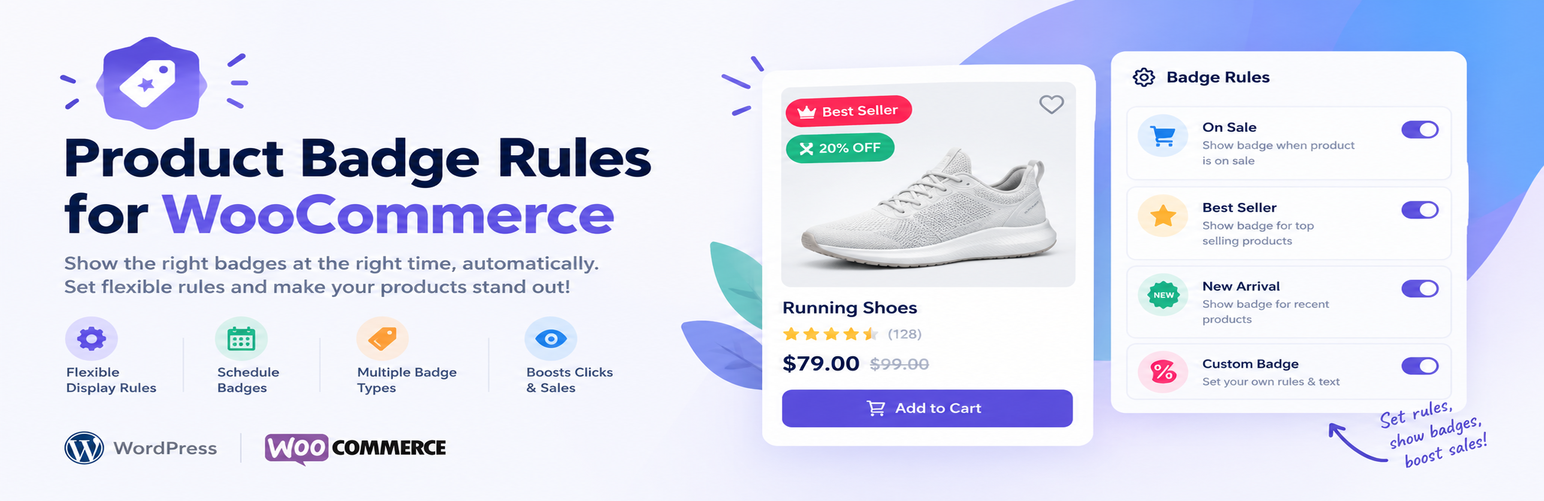
Storzen Product Badge Rules for WooCommerce 外掛可自動為您的網路商店添加智能產品徽章和標籤,無需手動編輯每個產品。只需創建一次徽章並選擇規則,外掛便會根據實時的 WooCommerce 數據自動顯示在正確的產品上。
【主要功能】
• 自動顯示促銷徽章
• 支援多種徽章類型
• 自訂徽章樣式與位置
• 輕量化設計,無前端 JavaScript
• 實時更新,隨價格和庫存變化
• 兼容 WooCommerce 高效訂單儲存
外掛標籤
開發者團隊
② 後台搜尋「Storzen Product Badge Rules for WooCommerce」→ 直接安裝(推薦)
原文外掛簡介
Product Badge Rules for WooCommerce adds smart product badges and labels to your online store, automatically. Instead of editing every product by hand or uploading static images, you create a badge once, pick a rule, and the plugin shows it on the right products by checking live WooCommerce data on every page load.
Show a “Save 30%” sale badge with the real discount, a “New” label on fresh arrivals, an “Only 3 left” low stock badge, a “Sold Out” badge, a Featured label, or a Hot badge on your best sellers. Badges appear on your shop page, category pages and single product pages, and update themselves when prices, stock or sales change.
Why store owners choose it
Set it once, it runs itself – badges follow your WooCommerce data, so they are never out of date.
Boost conversions – sale, urgency and social-proof labels draw attention to the products that matter.
Lightweight – pure CSS badges, no JavaScript on the front end, one database query per page.
Looks good with any theme – choose colours, shape and position to match your brand.
Six built-in product badge rules
On Sale badge – appears automatically when a product is on sale. Use the {pct} token to show the exact discount, for example “Save 30%”.
New Arrival badge – highlights products published in the last X days (default 30).
Featured badge – labels the products you marked as featured in WooCommerce.
Low Stock badge – appears when stock is at or below your threshold. Use the {qty} token to show the quantity left, for example “Only 3 left!”.
Out of Stock badge – clearly flags products that are unavailable.
Hot Seller badge – based on total WooCommerce sales count with a minimum you control.
Badge designer
Custom label text with dynamic {pct} and {qty} tokens
Background and text colour pickers
Four shapes: rounded, square, circle and ribbon
Eight positions on the product image (corners, edges and centre points)
Optional start and end dates, so you can schedule badges for Black Friday, seasonal sales or launches
Priority order, so you control which badge wins when more than one rule matches
Live preview while you edit
Built for speed
A single database query loads all active badges
Two-layer cache: in-memory per request plus a WordPress transient
Pure CSS rendering, zero front-end JavaScript
Styles load only on WooCommerce shop, category, tag and product pages
Compatible with WooCommerce High-Performance Order Storage (HPOS)
More features
Replace the default WooCommerce “Sale!” flash – one toggle hides the standard sale bubble when a sale badge from this plugin is active, so you never see two badges on one product.
Badges column in the product list – see at a glance which products currently show a badge in your WP Admin products table.
Choose where badges show – turn them on or off for shop and archive pages and for single product pages.
Clean uninstall – removes its data when you delete the plugin.
For developers
Filter badgify_render_badge to hide a specific badge in code
Filter badgify_rule_map to register your own custom rule types
Template override: copy templates/badge.php from the plugin to your-theme/badgify/badge.php to change the badge HTML
Namespaced PHP, GPL-2.0-or-later
Pro version
The free version shows one badge per product (the highest-priority match). A Pro version adds multi-badge stacking and more advanced options. Learn more
Privacy Policy
This plugin does not collect, store or transmit any personal data from your visitors. Badge logic runs on your server using existing WooCommerce product data.
Third Party Services
This plugin does not connect to any external or third-party services. All processing happens on your own WordPress installation.