內容簡介
在地圖上標記您的商店的最簡單方法。只需使用 Google Sheets 管理位置。清潔|響應|搜尋|篩選
您曾經因為顧客找不到您的商店而失去顧客嗎?使用Store Locator,您再也不會失去遊客或顧客了。我們基於地圖的商店定位器讓您在單個地圖上添加所有位置並將其嵌入您的網站。更重要的是,在這裡不需要編程!
頂級功能:
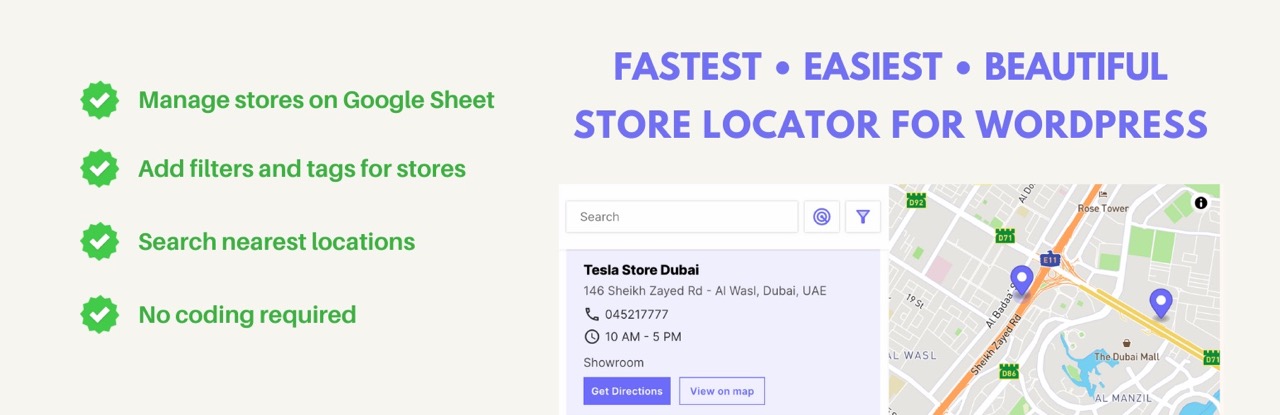
⚡ 快速且互動式的圖表
0️⃣ 零編程努力地建立您的Store Locator
📱 在所有瀏覽器和裝置上高度響應式的 UI
📍 客戶可以根據自己的位置搜索最近的商店
🏪 使用Mapbox API自動計算商店的地理位置
🔎 客戶可以根據標籤或唯一列篩選店家
✍️ 您可以輕鬆地在Google sheet中管理商店位置
🔗 所有地圖都是互動且可通過單個鏈接共用
📋 複製貼上一行短代碼以嵌入地圖到頁面上
🧭 客戶可以從Google Map獲取路線指南
🕰️ 為每個店家提供營業時間 (開放時間和關閉時間)
📞 釘選商號聯絡電話和商務電子郵件地址
🏵️ 選擇與您的WordPress網站相匹配的顏色主題
➕ 不斷添加、更新或刪除Google sheet上的新店舖
🫂 將Google sheet與您的團隊共享以允許他們編輯商店
它是如何運作的?
⚒️ 我們的商店定位器地圖使用Google Sheets中的數據。因此,您首先必須安裝Google Sheets Addon 。
🏙️ 然後,您要創建一個Google表格並添加您的商店地址,從街道名稱、城市、國家開始,包括其他詳細信息,如電話號碼、電子郵件地址和商店特定信息。
🗺️ 填寫數據後,您將運行Google Sheets Addon以生成Store Locator Link。
✂️ 📋 將該鏈接複製粘貼到此WordPress插件中,並將路徑設置為要嵌入Store Locator的頁面。
這就是全部!商店地址在Google sheet內轉換為地圖坐標(經度和緯度)。地理映射在幾秒鐘內完成。如果Google sheet無法識別商店位置,您可以直接在Google Sheet的“坐標”列下添加坐標。商店定位器可在所有移動設備、平板電腦和桌面電腦上運行。它是100%響應式和適用於移動設備的地圖。
Google表格中的協調會在Mapbox生成的地圖上顯示。 (您不需要麻煩使用Google Maps Platform或使用Google Map API密鑰或使用Open Street Map與我們的WordPress插件)。我們負責在地圖上標記標記的點。利用Mapbox,地圖縮放和選擇點之間的切換非常順暢。
在地圖上添加了搜索字段。用戶可以通過地理位置、Zip或Pin在商店定位器地圖上進行搜索。他們也可以通過單擊一下搜索附近的位置。所有商店都會在地圖的一側列出。
為什麼您需要商店定位器?
您的業務需要商店定位器。它是顯示所有位置的最佳工具,任何客戶都能輕鬆找到您的商店或辦公室,並獲得準確的結果和地圖點。任何具有多個位置的業務的完美工具。
不再混淆和頭痛管理您的客戶!這種有用的工具將所有位置帶到一張地圖上,讓任何顧客都能找到您的商店或辦公室。
外掛標籤
開發者團隊
② 後台搜尋「Store Locator for WordPress📍」→ 直接安裝(推薦)
📦 歷史版本下載
原文外掛簡介
Easiest way to plot your stores on a map. Manage locations just using Google Sheets. Clean | Responsive | Search | Filters
Have you lost a customer because they couldn’t find your store? With WordPress Store Locator, you’ll never lose visitors or customers again. Our map-based store locator for WordPress lets you add all the locations in a single map and embed it on your website. What’s more, there’s no coding involved here!
TOP FEATURES of Store Locator WordPress:
⚡ Blazingly fast and interactive map
0️⃣ Build your Store Locator with Zero Coding effort
📱 The Store Locator WordPress have a highly responsive UI on all browsers and across devices
📍 Customers can search the nearest store based on their location
🏪 Geo locations of stores are automatically calculated using Mapbox API
🔎 Customers can filter stores based on tags or unique columns
✍️ Store Locator WordPress plugin can easily manage store locations inside Google Sheet
🔗 All maps are interactive and shareable via a single link
📋 Copy-paste a single line of short code to embed the map on a page
🧭 Customers can get route guidelines to a location from Google Map
🕰️ Provide business hours (opening time and closing time) for each store
📞 Set contact number and business email address for each store
🏵️ Choose a colour theme to match your WordPress website
➕ Add, update or remove new stores from the Google sheet seamlessly
🫂 Share the Google sheet with your team to allow them to edit stores
How Does The WordPress Store Locator Work?
⚒️ Our WordPress Store Locator Map is powered by data from Google Sheets. So first, you have to install a Google Sheets Add-on
🏙️ Then create a Google sheet and add your store addresses starting from street name, city, country, with other details like phone number, email address and store-specific information.
🗺️ Once the data is filled, you will run the Google Sheets Add-on to generate a Store Locator Link.
✂️ 📋 Copy-Paste the link inside this Store Locator WordPress plugin and set the path to the page where you want to embed the Store Locator WordPress.
That’s all! Store addresses are converted to map coordinates inside Google Sheet (longitudes and latitudes). Geo-mapping is done in seconds with the Store Locator WordPress Plugin. If Google Sheets doesn’t recognize a store location, you can add the coordinates directly under the “Coordinates” column in the Google Sheet. Store locator works on all mobile devices, tablets and desktops. It’s a 100% responsive and mobile-friendly map.
The coordinates in the Google sheet are shown on the map generated by Mapbox. (You don’t have to bother about the hassle of working with Google Maps Platform, or using Google Map API keys or even with Open Street Map with our Store Locator WordPress plugin). We take care of plotting the points on the map with markers. Map zoom in and map zoom out are available with Mapbox, and it moves from marker to marker swiftly.
A search field is added to the map. Users can search on the store locator map by location, ZIP or PIN. They can also search for locations near them with a single click. All stores are listed on the side of the map.
Why do you need a WordPress Store Locator?
Your business needs a store locator. It’s the best tool to show all the locations in one map, and any customer will be able to find your store or business office easily, with accurate results and map points. The perfect WordPress Plugin tool for any type of business that has multiple locations.
No more confusion and headaches for your customers! This useful tool brings all your locations together in one convenient map, so they’ll never miss you. They can find the address and location of all of your stores, offices, and warehouses with ease, so if they’re looking for that last-minute birthday present or need help fixing their car, they will know exactly where to find you.
Having a store locator not only helps to convert online visitors into offline customers, it also enhances their overall shopping experience and improves your brand awareness and search rankings.
If you are looking for a flexible store finder plugin, this solution works seamlessly with Google Sheets and WordPress to deliver the fastest results.
What makes our Store Locator Unique?
Our Store Locator Map runs using Mapbox, which offers:
* Fast loading times
* Great performance across devices and OS
* Drains battery less than Google Maps
* More visually pleasant map than OpenStreetMap or Google Maps
* Used by companies like Facebook, Shopify, Strava, CNN
* It’s also used in the WordPress map block
Your store addresses and information are stored inside Google Sheets:
* So you have complete control over your store data
* You can collaborate with other team members to edit/update data
* Adding a new store detail means adding a new column
You can add the Store Locator WordPress plugin using a shortcode, which means:
* You can add the map inside a WordPress Page
* You can add the map inside a WordPress Post
Translations
Currently, Store Locator is available only in English. We are working on the translation of other languages like Spanish, German, French, Italian, Portuguese, Indonesian, Chinese and more.
Some of the Use Cases of WordPress Store Locator
Hotel Store Locator
Restaurant Store Locator
Hospital Store Locator
Real Estate Store Locator
Hair Salon Store Locator
Travel Agency Store Locator
Business Store Locator
Property Store Locator
Cafe Store Locator
Warehouse Store Locator
Product Store Locator
Beauty & Spa Store Locator
Gym Store Locator
School Store Locator
College Store Locator
Museum Store Locator
Studio Store Locator
Car Store Locator
Insurance Store Locator
Automobile Store Locator
Clinic Store Locator
Bakery Store Locator
Nursery Store Locator
Garden Store Locator
Brand Store Locator
Shopping Mall Store Locator
Retail Store Locator
Jewellery Store Locator
Mobile Shop Store Locator
Repair Store Locator
Electronics Store Locator
Legal Service Store Locator
Consultancy Store Locator
Eyewear Store Locator
Lifestyle Store Locator
Entertainment Store Locator
Kids Wear Store Locator
Toy Shop Store Locator
Lingerie Store Locator
Inner Wear Store Locator
Bank Store Locator
Gift Store Locator
Books Store Locator
Bags & Luggage Store Locator
Movie Theatre Store Locator
Footwear Store Locator
Grocery Store Locator
Market Store Locator
Meat Shop Store Locator
Fish Shop Store Locator
Demo
You can see the demo of the WordPress Store Locator embedded on a website here – https://locatestore.com/embed-demo/. The full-width map can be seen here – https://locatestore.com/demo
Support
If you have any questions related to locatestore.com, you can contact [email protected]
Additional Information
Our Store Locator plugin works with leading landing page builders like:
* Add Store Locator to Elementor
* Add Store Locator to InstaBuilder
* Add Store Locator to OptimzePress
* Add Store Locator to Divi
* Add Store Locator to Beaver Builder
* Add Store Locator to LeadPages
* Add Store Locator to Thrive Architect
* Add Store Locator to Qards
* Add Store Locator to InstaPage