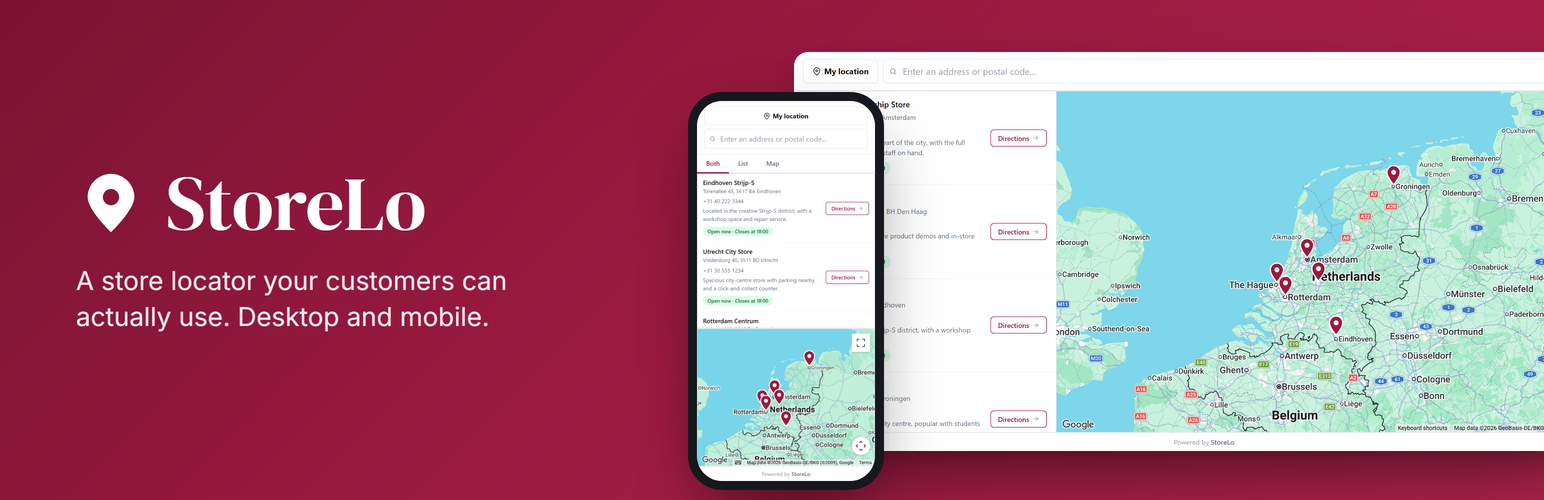
內容簡介
StoreLo 是一款簡單易用的商店定位小工具,透過 Google Maps 幫助訪客快速找到最近的商店、經銷商或取貨點,並提供開放時間及導航功能,讓用戶體驗更佳。
【主要功能】
• 快速設置:只需複製定位器 ID,輕鬆嵌入頁面
• 即時搜尋:支持地址或郵遞區號搜尋
• 自動地理編碼:自動獲取座標和國家
• CSV 匯入匯出:輕鬆管理多個位置
• 自訂主題:多種主題選擇,符合品牌需求
• 實時分析:了解訪客搜尋行為和需求
外掛標籤
開發者團隊
② 後台搜尋「StoreLo – Store Locator Widget with Google Maps」→ 直接安裝(推薦)
原文外掛簡介
Two minutes in WordPress. Copy one Locator ID from your StoreLo dashboard, paste it into the settings screen, and the locator is on your page. No plugin settings to learn, no database tables, nothing to maintain.
After that your visitors type a city or a postcode and see your nearest shops, dealers, branches or pickup points on a map, with opening hours and a directions button. You manage all of it from one dashboard instead of from inside WordPress, so your site stays light and nothing breaks on the next core update.
You build the locator at storelowidget.com, then place it on any page with the [storelo] shortcode or the StoreLo block.
Four things you do not have to worry about
Stuck at any point? We set it up for you, free. Create a free account and request it from your dashboard under Customize → Themes. Send your site and your list of locations and we build the locator with you, on any plan including the free one. That is the StoreLo Promise.
Your locations stay yours. Export everything to CSV whenever you want, on any plan. Cancel and nothing is left behind in your WordPress database, because nothing was ever put there.
Free means free. No credit card, no time limit, and it is not a trial that quietly expires. You get a working locator with real locations on it, and you only move up a plan when you outgrow it.
It will not slow your site down. No database tables, no PHP on your front end, and the widget script only loads on the pages that actually show a locator.
Rather see it than read about it? The live demo is the real widget. Search a city, click a pin, switch themes.
What your visitors get
Search by address or postcode. Type a city, a street or a postcode and the closest stores come up first.
Use my location. One tap, no typing.
Sorted by real distance, with the nearest store marked and the distance in km or miles.
A live open or closed pill on every store, so people see in one line whether it is worth the trip. The full week of opening hours is one checkbox away if you want it.
Directions in one click, from the list or from the map pin, straight into Google Maps.
Filters so visitors can narrow the list by store type, product line, or any category you define.
Marker clustering, which keeps hundreds of pins readable and splits them apart as people zoom in.
List, map, or both. On phones the locator switches between the three with a tab.
Store popups with phone number, description and directions. Pro plans add a store photo and your own call to action button.
What you manage in the dashboard
Every location in one place: address, opening hours, phone, website, description and photo.
CSV import and export. Add or update hundreds of locations at once, and take them back out whenever you want.
Automatic geocoding. Paste an address, StoreLo works out the coordinates and the country.
Store types with their own look. Dealer, stockist, webshop, showroom: each gets its own marker colour and its own button, so a webshop can say “Buy online” while a shop says “Get directions”.
Highlighted stores stay pinned to the top, which is what you want for a flagship or a premium dealer.
Multiple ready made themes, from a monochrome minimal look to a full dark mode and a warm retail palette. Or start from the default and change nothing.
Colour control over everything, plus a range of Google map styles next to the standard map, from grayscale and ultra light to a dark midnight look.
Custom CSS and editable labels. Rewrite every piece of text in the widget, which is also how you translate it.
One locator per country, so a multilingual site can show a different one on each language page.
Domain whitelisting to stop other websites from embedding your locator.
What the analytics tell you
What visitors actually search for in your locator.
Which searches return nothing. These are the places people look for where you have no store yet, and it is the clearest demand signal you are going to get.
A heatmap of where that demand sits on the map.
A conversion funnel from loads to searches to directions clicks, so you can see how many visitors turned into store visits.
GA4 and Meta Pixel. The locator pushes its events into your dataLayer, and Pro plans can fire a Meta Pixel.
What it does inside WordPress
The [storelo] shortcode works in Elementor, Divi, Beaver Builder, Bricks and WPBakery.
The StoreLo block. Search for “StoreLo” in the block inserter and drop it on a page.
Several locators on one site. Save each Locator ID with a label and get a short shortcode like [storelo id="1"], so raw IDs never end up in your page content.
No API key in WordPress. Your Google Maps key lives in the dashboard, not in your site.
Caching friendly. Locations load in the visitor’s browser, so cached pages still show live data.
A light footprint. The widget script only loads on pages that actually show a locator, and the plugin creates no database tables.
No “Powered by” link unless you tick the box yourself.
How it works
Create a free account at storelowidget.com.
Add your locations and set the look in the dashboard.
Add a Google Maps API key in the dashboard. Google gives every account generous free monthly usage, and the setup guide walks you through it. Stuck? Mail me and I will do it with you.
Copy your Locator ID from the Embed page.
Paste it into StoreLo in your WordPress admin and save.
Add the [storelo] shortcode or the StoreLo block to any page.
Hosted service
StoreLo is a hosted store locator service. Your locations and design live in your StoreLo account, and this plugin connects your WordPress site to it. There is a free plan; paid plans add more locators and locations. See pricing.
Use cases
One locator covers every “find us” job on a WordPress site:
Store locator or store finder for retail chains showing their own shops with hours and directions.
Dealer locator for brands routing buyers to dealers, resellers and distributors, filterable by product line.
Stockist map or where to buy page for products sitting on other shops’ shelves, with a webshop fallback when no stockist is nearby.
Branch finder for service businesses, restaurants and hospitality with several branches.
Pickup points and service points: collection lockers, repair partners, drop off addresses.
Specialty directories, from vegan to kid friendly.
The free plan is a real free plan: no time limit and no credit card. You can have a working locator on your site before you decide anything. Current limits per plan are on the pricing page, and how-tos live in the StoreLo guides.
Shortcode
The basic shortcode:
[storelo]
Show a different locator on a specific page, which overrides the default Locator ID:
[storelo id="your-other-locator-id"]
External services
This plugin connects to the following external services to display and configure your store locator.
StoreLo (storelowidget.com)
The hosted service that stores your locations and renders the locator. The widget script (https://storelowidget.com/widget.js) is loaded on pages where the locator is shown, and the locator’s data is served to the visitor’s browser by StoreLo. The plugin verifies your Locator ID from the admin screen by calling StoreLo at https://storelowidget.com/api/widget/validate.
Data sent: your Locator ID (to load and verify the locator and count its locations); for visitors, the standard request data their browser sends when loading the widget script and your public location data.
When: on every front-end page that renders the locator (widget script + location data), and when you enter, save or check a Locator ID on the StoreLo admin screen.
Provider: StoreLo. See the Privacy Policy, Terms and Data Processing Agreement.
Google Maps Platform
The interactive map is rendered by Google Maps, using the Google Maps API key you configure in your StoreLo dashboard (not in WordPress).
Data sent: the Google Maps API key and the map viewport coordinates; address strings only when a visitor searches.
When: on every front-end page that renders the locator map, and as a visitor uses the search box.
Provider: Google LLC. See Google Maps Platform Terms and Google Privacy Policy.