內容簡介
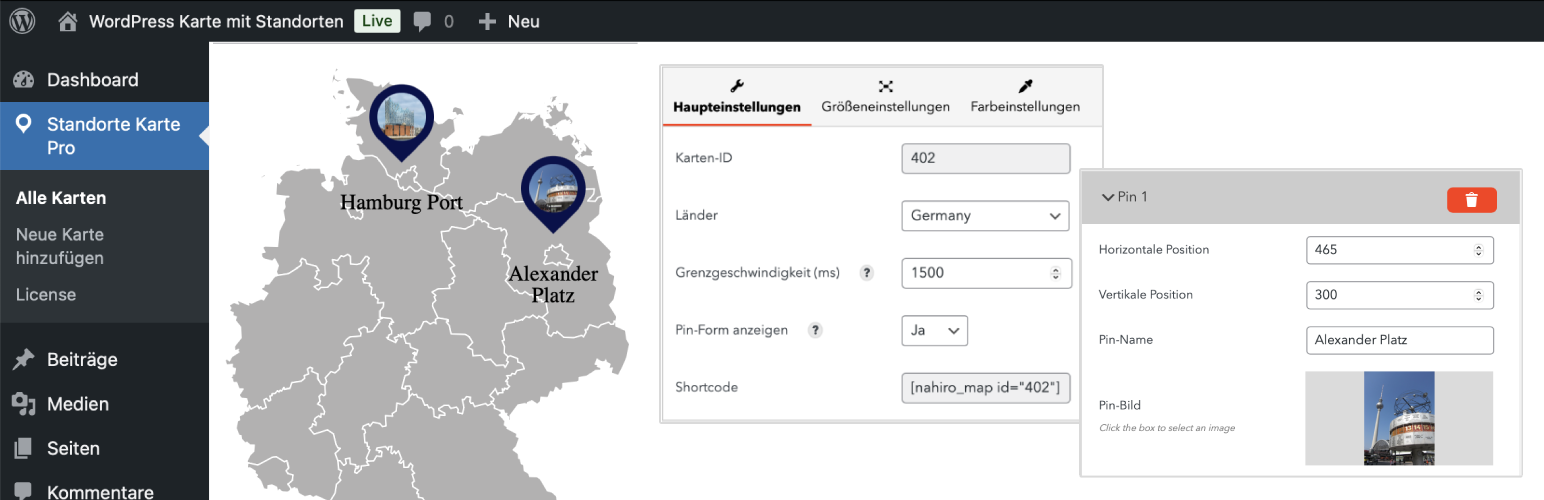
Store Locations Map 是一款輕量級的門市據點地圖外掛,透過短代碼將互動式向量地圖嵌入文章或頁面,適合零售業或多據點商家展示門市位置,支援自訂標記、響應式設計,且不依賴特定頁面編輯器。
【主要功能】
• 支援多國地圖顯示(美國、德國、法國等十餘國)
• 自訂地圖標記的標題、圖片與說明文字
• 響應式設計,完美適配桌機、平板與手機
• 輕量化架構,不影響網站載入速度
• 透過短代碼嵌入,相容任何佈景主題
• 多種地圖樣式可自訂顏色、版面與圖釘外觀
外掛標籤
開發者團隊
📦 歷史版本下載
原文外掛簡介
Transform your WordPress site with the Store Locations Map plugin, a powerful tool that brings customizable, interactive maps to your posts and pages. Whether you run a single storefront or a chain of locations, this plugin enables you to highlight your presence on a fully responsive, vector-based map. Store Locations Map uses shortcodes for seamless integration across any WordPress theme, making it the ideal solution for those who need a flexible, user-friendly map tool that’s independent of specific page builders.
The Store Locations Map plugin lets you add a map to your website with personalized markers, titles, images, and links, allowing visitors to view important location details at a glance. This highly adaptable plugin offers various styles and customization options, so you can design your map to match your brand’s look and feel perfectly. It’s an excellent solution for retailers, businesses with multiple locations, or anyone needing to provide geographic information in an engaging, easy-to-use format.
Key Features
Wide Range of Maps: Display maps for countries like Austria, Belgium, France, Germany, Ireland, Italy, Luxembourg, Poland, Portugal, Spain, the United States, and more.
Customizable Markers: Add markers with custom titles, images, and descriptions for each store or location.
Flexible and Responsive Design: This plugin is designed to ensure high-quality display on desktop, tablet, and mobile screens.
Fast and Lightweight: Optimized for performance, Store Locations Map keeps your site’s load times low.
Language Support: Available in English, German, and Spanish, reaching a broader audience.
Simple Integration: Uses shortcodes, allowing you to easily embed maps into any page or post without additional dependencies.
Multiple Map Styles: Customize the appearance of your map, from colors and layout to pin styles, to make it uniquely yours.
Why Choose Store Locations Map?
With its shortcode-based integration, Store Locations Map is compatible with any WordPress theme and page layout. Unlike plugins designed exclusively for specific page builders, Store Locations Map works seamlessly in classic editors, block editors, and beyond. This adaptability makes it an ideal choice for WordPress users who want professional, visually appealing maps without being limited by page builder requirements.
Use Cases for Store Locations Map:
Retail Chains: Showcase all your store locations on a single, interactive map that provides easy access to essential information.
Local Business Directories: Create a directory of business locations across a specific region or city.
Event Venues: Highlight multiple event venues or points of interest with custom markers and descriptions.
Real Estate Listings: Display properties on a map with detailed location markers to improve your visitors’ browsing experience.
Store Locations Map Pro
Unlock additional features and customization options with Store Locations Map Pro. The premium version includes:
⭐️ Unlimited Markers: Place an unlimited number of markers to represent multiple locations on a single map.
⭐️ Advanced Customization Options: Access more settings for pins, colors, and map elements to better align the map with your brand.
⭐️ Rich Content Fields: Enhanced marker fields allow you to include formatted text, images, and links, giving you complete control over the details displayed.
Ready to enhance your map capabilities? Check out Store Locations Map Pro for the full experience.
Installation
Extract the contents of the .zip file and upload store-locations-map to the /wp-content/plugins/ directory.
Activate the plugin through the ‘Plugins’ menu in WordPress.
Add a new map and use the shortcode [store-locations-map id=""] on any page or post to display your customized map. The specific shortcode ID is found on the map’s edit page.
Frequently Asked Questions
How do I customize the map markers?
Markers can be customized by selecting options in the plugin settings, where you can adjust titles, colors, descriptions, and links for each location.
Is Store Locations Map compatible with any WordPress theme?
Yes! Since it uses shortcodes, this plugin integrates seamlessly with any WordPress theme, making it easy to add to any site layout.
Does Store Locations Map support languages other than English?
Yes, Store Locations Map is fully compatible with English, German, and Spanish, enhancing accessibility for a broader audience.