內容簡介
需要已安裝並啟用Events Manager(免費外掛)。
不幸的是,有時您必須取消計劃中的活動。在 Events Manager 中,確保您完成了所有工作可能會很麻煩。這個外掛讓這些任務變得非常簡單!
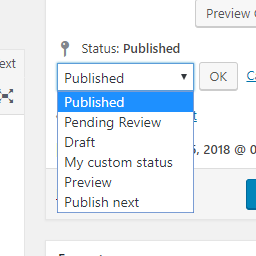
只需將文章狀態更改為“取消”,這個外掛就會自動執行以下任務:
通過調整取消時間戳記來關閉預訂表單;
將活動類別更改為新的“活動已取消”;
對於選定的預訂狀態,將預訂狀態更改為新的“活動已取消”;
匯出新的“活動已取消”電子郵件以通知您的客戶。
取消活動後,它仍然會在前端中可見,但預訂表單將被關閉。這可以防止訪問者和搜索引擎出現404錯誤。
退還在線付款需要手動操作。
這個外掛與Events Manager控制台完全集成。這些新選項的工作方式與內建選項完全相同。
支援EM的全球表格模式
如果您在啟用全局表格模式的 WordPress多站點上運行Events Manager,您可能已經注意到(默認情況下)一些功能在子站點上丟失。如果啟用全球表格模式,可以根據活動類別篩選管理事件列表,這一點有別於EM Dev所說的。
從2.0版本開始,這個插件幾乎完全兼容該插件。唯一還缺少的是在子部落格上選擇事件類別的快速編輯菜單。但這個外掛的所有其他功能都運行順暢。
與EM - Ongoing Events兼容性:
如果取消了主要活動,所有子活動也將被取消,但如果取消了子活動,則此Ongoing Series的其余部分將保持不變。
如何測試它?
只需像創建任何其他測試事件一樣創建一個測試事件。發布它並將自己添加為參與者。然後將測試事件設置為“取消”,看看魔法發生了什麼。
反饋意見
歡迎您提出建議和反饋!
還可以查看我為Events Manager編寫的其他外掛、教學和其他有用的片段。
外掛標籤
開發者團隊
② 後台搜尋「Events Manager – Event Cancellation」→ 直接安裝(推薦)
📦 歷史版本下載
原文外掛簡介
Requires Events Manager (free plugin) to be installed & activated.
Unfortunately, you sometimes have to cancel a planned event. In Events Manager it can be quite cumbersome to make sure you have done everything. This add-on makes that extremely easy!
Just change the Post Status to “Cancelled” and this add-on will automatically:
Close the Booking Form by adjusting the Event cut-off time to the timestamp of cancellation;
Change the Event Category to the new “Event Cancelled”;
Change the Booking Status to the new “Event Cancelled” for selected booking statuses;
Send the new “Event Cancelled” Email to notify your customers.
After cancelling an event, it will still be visible in the front end, but the booking form will be closed. This prevents 404-errors for visitors and search engines.
Refunding online payments remains a manual procedure.
This add-on is fully integrated with the Events Manager Dashboard. These new options will work exactly the same as the built-in ones.
Supports EM in Global Tables Mode
If you are running Events Manager on a WordPress MultiSite with Global Tables Mode enabled, you will probably have noticed that (by default) some features are missing on the sub-blogs. Unlike what the EM Dev told me, it is possible to filter the Admin Events List per Event Category if Global Tables Mode is enabled.
Since version 2.0 this add-on is (almost) fully compatible with that. The only thing still missing, is selecting Events Categories in the Quick Edit menu on sub blogs. But all other features of this add-on run smoothly.
Compatibility with EM – Ongoing Events:
If you cancel a main event, all sub events will be cancelled as well, but if you cancel a sub event, the rest of this Ongoing Series will remain unchanged.
How to test it?
Simply create a test event like any other. Publish it and add yourself as a participant. Then set the test event to “Cancelled” and watch the magic happen.
Feedback
I am open to your suggestions and feedback!
Please also check out my other plugins, tutorials and useful snippets for Events Manager.