內容簡介
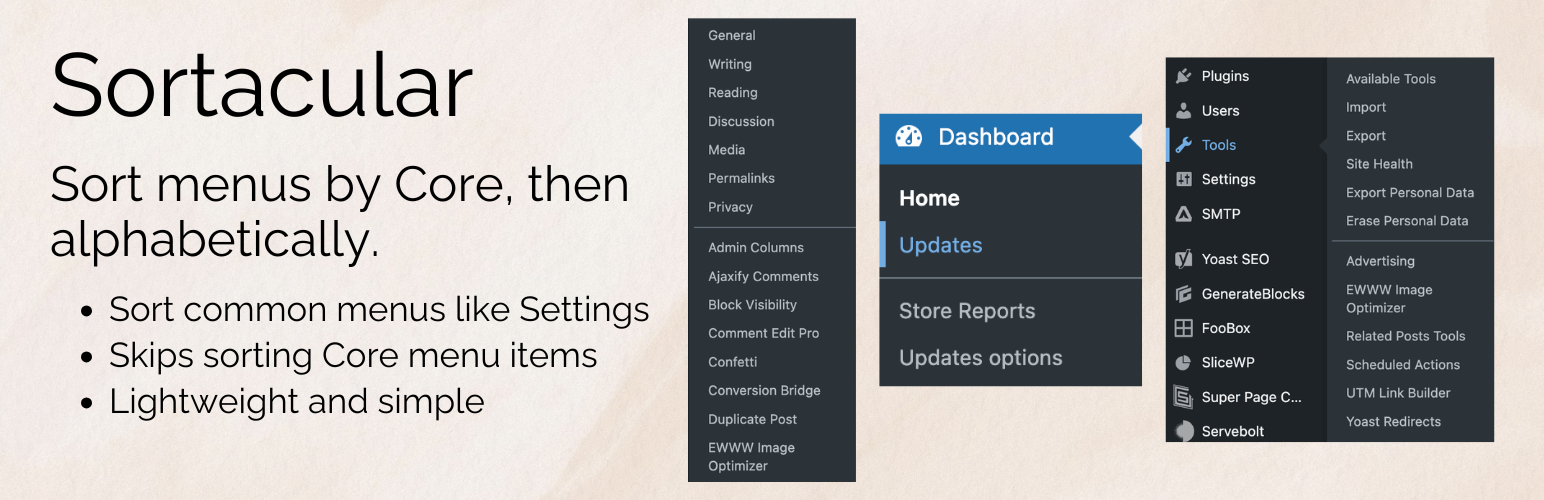
Sortacular 外掛能夠迅速整理和組織 WordPress 控制台的選單,將所有外掛和佈景主題新增的項目按字母順序排列,讓使用者更容易找到所需功能,提升工作效率。
【主要功能】
• 自動將外掛和佈景主題項目按字母排序
• 保持核心 WordPress 選單的原始順序
• 清晰的分隔線區分核心項目與其他項目
• 無需任何設定,啟用後即自動整理
• 適用於多站點環境的選單整理
外掛標籤
開發者團隊
② 後台搜尋「Sortacular – Instantly Sort and Organize WordPress Admin Menus Alphabetically」→ 直接安裝(推薦)
原文外掛簡介
Your WordPress admin menu gets messy fast. Plugins add their own items. Settings end up scattered. Finding what you need takes longer than it should.
Sortacular fixes this instantly.
It keeps the default WordPress menus exactly where you expect them, and neatly sorts everything added by plugins and themes alphabetically. This makes your admin menu easier to scan and much faster to use.
No setup. No settings.
Activate the plugin, and your menu is instantly organized.
A simple divider separates the default WordPress items from everything else, so you can clearly see what belongs to WordPress and what has been added by plugins or themes.
What gets organized
Sortacular keeps the main WordPress menus in their original order. Nothing moves or breaks.
Everything added by plugins and themes is grouped and sorted alphabetically.
This applies to:
Settings
Appearance
Tools
Dashboard
In multisite, it also works with:
Settings
Dashboard
Themes
What changes after you install it
Instead of scrolling through a long, cluttered menu, you get a clean and predictable layout.
You will see:
Core WordPress items at the top, unchanged
A clear divider
All plugin and theme items sorted from A to Z
This means you no longer have to guess where a plugin placed its settings and in what order. You can find things quickly, every time.
Who this is for
This plugin is especially useful if:
You install a lot of plugins, and your admin menu feels crowded
You manage client websites and need to move quickly
You waste time clicking around trying to find settings
You want a cleaner, more organized WordPress dashboard
You like a sorting plugin, but want your Core items left alone
It is also helpful for beginners who feel overwhelmed by how messy the admin menu can become over time.
Why this matters
A messy admin menu slows you down.
When plugins add items in random places, it becomes harder to navigate your site. You spend more time searching and less time actually working.
By organizing everything into a clear structure, Sortacular makes your workflow faster and less frustrating.
It is a small change that makes a big difference, especially on sites with many plugins.
No configuration needed
There are no settings to manage.
You do not need to learn anything new or configure options.
Just activate the plugin, and your menus are automatically reorganized.
For developers
If you need more control, you can customize which items are treated as core using filters. Please check out the Sortacular GitHub repo for filters, examples, and ways you can help extend and contribute to the plugin.
There is also optional support for sorting top-level menus, but it’s off by default.
This plugin has no admin options or settings, and it works automatically when activated.