內容簡介
「Simple System Status」的名稱言簡意賅,它可以讓你非常簡單地查看 WordPress 設置中系統的狀態。此外,它還在 WordPress 安裝的「工具」部分下增加了一個子菜單項目。
以下是其他人對這款外掛的評價:
「這是一款讓你取得系統所有相關資訊的絕佳外掛。讓他人安全地遠端存取你的系統狀態的內建遠端檢查選項,可協助你進行遠端除錯。做得好 🙂。」
〜 Hugh Lashbrooke,WooThemes 主要開發人員
如果你認為這個外掛非常有用,請在 WordPress 外掛目錄上為它評分。捐款:買點心,我會感激不盡。
如果你發現了錯誤,請在 GitHub 上開啟新的問題。如果你需要幫助使用該外掛,請使用 WordPress 外掛論壇。
如果你想要貢獻,請 Fork GitHub 存放庫。
以下是「Simple System Status」能為你顯示的內容:
WordPress 環境:
- WP 版本。
- 檢查 WP_DEBUG 是否啟用。
- WP 語言。
- 檢查 Multisite 是否啟用。
- WP 記憶體限制。
- WP 資料庫表名前綴資訊。
- 永久連結結構。
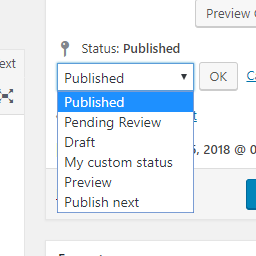
- 註冊文章狀態。
- 前台顯示資訊。
佈景主題資訊:
- 佈景主題名稱、版本、作者和作者 URI。
- 檢查當前啟用的主題是否為子主題。
- 如果當前的主題是子主題,它將顯示父主題的資訊。
外掛資訊:
- 如果有必要,顯示必要外掛。
- 顯示啟用的外掛。
- 顯示停用的外掛。
伺服器環境:
- 顯示 PHP 資訊。
- 顯示 PHP 擴展。
- 顯示伺服器類型。
- 顯示 MySQL 版本。
- 顯示主機名(如果可能的話)。
- 顯示 session 設定。
用戶端詳細資訊:
- 平台作業系統。
- 瀏覽器:名稱、版本、用戶代理字串。
你可以使用這個功能來進行自己的除錯,或使用兩種方法(動態連結或可下載的文字檔案)與技術支援進行共享。
外掛標籤
開發者團隊
原文外掛簡介
“Simple System Status” does exactly what it says on the box – shows you, very simply, your systems status for your WordPress Setup.
Simple System Status adds a submenu item under the ‘tools’ section of your WordPress installation.
What others are saying
This is a brilliant plugin for getting all the relevant info out of your system. The built-in remote viewing option for letting other people securely access your system status is incredibly helpful for remote debugging. Nice work 🙂
~ Hugh Lashbrooke, WooThemes Lead Developer
Like the Plugin?
If you found this plugin useful, please give it a rating
Donations are welcome: Buy me a snack.
Issues and Support
If you find a bug that you would like to report, please open a New Issue on Github.
If you want help using the plugin, please use the default WordPress Plugin Forum.
Contribute
Want to contribute? Fork the GitHub repository.
What Simple System Status Displays For You
WordPress Environment:
WP Version.
Checks if WP_DEBUG is turned on.
WP Language.
Checks if Multisite is active.
WP Memory Limit.
WP Table Prefix Information.
Permalink Structure.
Registered Post Stati
Show On Front Information
Theme Information:
Theme Name, Version, Author and Author URI
Checks if current active theme is a Child Theme
If current theme is a child theme, it offers Parent Theme information.
Plugin Information:
Must Use Plugins (if any)
Active Plugins
Inactive Plugins
Server Environment:
PHP Information
PHP Extensions
Server Type
MySQL Version
Host (if possible)
Session Configuration
Client Details:
Platform OS
Browser: Name, Version, User Agent String.
You can use this for your own debugging purposes or for sharing with Support via two methods: A Dynamic Link, or a text file you can download and send.