內容簡介
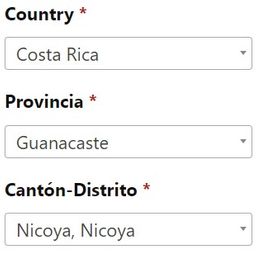
Shipping Manager For WooCommerce可以將城市欄位轉換為下拉式選單,允許添加具有費率的自訂城市,以及輕鬆添加自訂的WooCommerce運輸區域(城市-國家-州)[進階版],
同時還可以顯示/隱藏運輸結帳欄位和更改城市欄位標籤。
免費外掛功能:
添加無限自訂城市選項。
自訂城市欄位標籤。
將結帳城市文本欄位轉換為下拉式選單。
自訂下拉式菜單中的城市選項。
自訂下拉式菜單的城市運輸費率和成本。
關閉自訂帳單欄位。
關閉自訂運輸欄位。
選擇城市父國家
進階版外掛功能:
添加自訂WooCommerce運輸區域(城市-國家-州)。
選擇費率基礎部分(帳單欄位部分-運輸欄位部分)。
將下拉式結帳城市轉換為文本欄位預測。
有任何問題:
請通過外掛支援論壇聯繫。
進階版支援
升級到進階版
外掛標籤
開發者團隊
② 後台搜尋「Shipping Manager For WooCommerce」→ 直接安裝(推薦)
原文外掛簡介
Shipping Manager for WooCommerce is a powerful localization plugin that lets you take full control over your store’s shipping logic by converting the default city field into a customizable dropdown and letting you define your own cities and regions — no coding required. If you need to convert the city field into a dropdown, assign city-specific shipping rates, or define custom WooCommerce shipping zones (Pro), this plugin is your perfect solution.
By default, WooCommerce doesn’t support detailed city-level shipping control or non-standard regional zones. That’s where this plugin helps. Whether you deliver within major cities, rural towns, or localized areas not listed in WooCommerce, Shipping Manager lets you build a fully localized shipping system optimized for your business model.
🌍 Replace the default city input with a dropdown to avoid user input errors and enforce valid entries
🏷️ Rename the city field to suit your business — call it “District”, “Zone”, “Area”, or anything else
🚚 Set custom shipping rates for each city dropdown option
🗺️ Localize shipping for countries with region-specific delivery, especially useful for Egypt, UAE, KSA, and similar markets
💡 Use the Pro version to define custom WooCommerce shipping zones using combinations of Country + State + City
🔥 Free Plugin Features:
Convert WooCommerce city input to dropdown
Customize the city field label (e.g. change “City” to “District”)
Add unlimited custom cities to the dropdown
Assign shipping costs per city
Disable unused billing/shipping fields
Link each city to its parent country for zone logic
💎 Pro Features (Custom WooCommerce Shipping Zones + More):
Create custom shipping zones using Country, State, and City
Choose rate logic based on billing or shipping address
Enable predictive text input instead of dropdown (autocomplete)
🧠 Common Use Cases:
🛵 Local delivery services targeting districts like Maadi or Zamalek
🏢 Retailers needing separate rates for 6th of October City vs Nasr City
🍱 Food delivery or grocery stores serving select areas
🚛 Courier companies wanting to standardize delivery regions in checkout
Whether you operate in underserved geographic markets or simply want more control over the shipping experience, Shipping Manager for WooCommerce gives you the flexibility to define localized shipping zones the way your business demands.
🎯 Designed to work seamlessly with any WooCommerce-compatible theme, 100% translation ready (WPML/Polylang), and compatible with all standard checkout/payment flows.
== Upgrade to Pro ==
Create custom shipping zones, rate logic and city predictive text.
Upgrade to Pro
💡 Need Help?
👉 Get support on the WordPress.org Support Forum
👉 Access Premium Support
🎥 YouTube Channel
== More by WPSaad ==
🖼️ Image Alt Text Manager – Pro Version
🧩 Custom Product Type for WooCommerce – Pro Version
🧱 WPSaad Addons for Dokan and Elementor – Pro Version
💲 Bulk Wholesale Dynamic Pricing Buttons – Pro Version
⚙️ Product Add-Ons, Custom Fields, Booking & Extra Options – Pro Version
== Other Services ==
🔧 WordPress Design & Development Services
⚙️ WordPress Professional Support Services