內容簡介
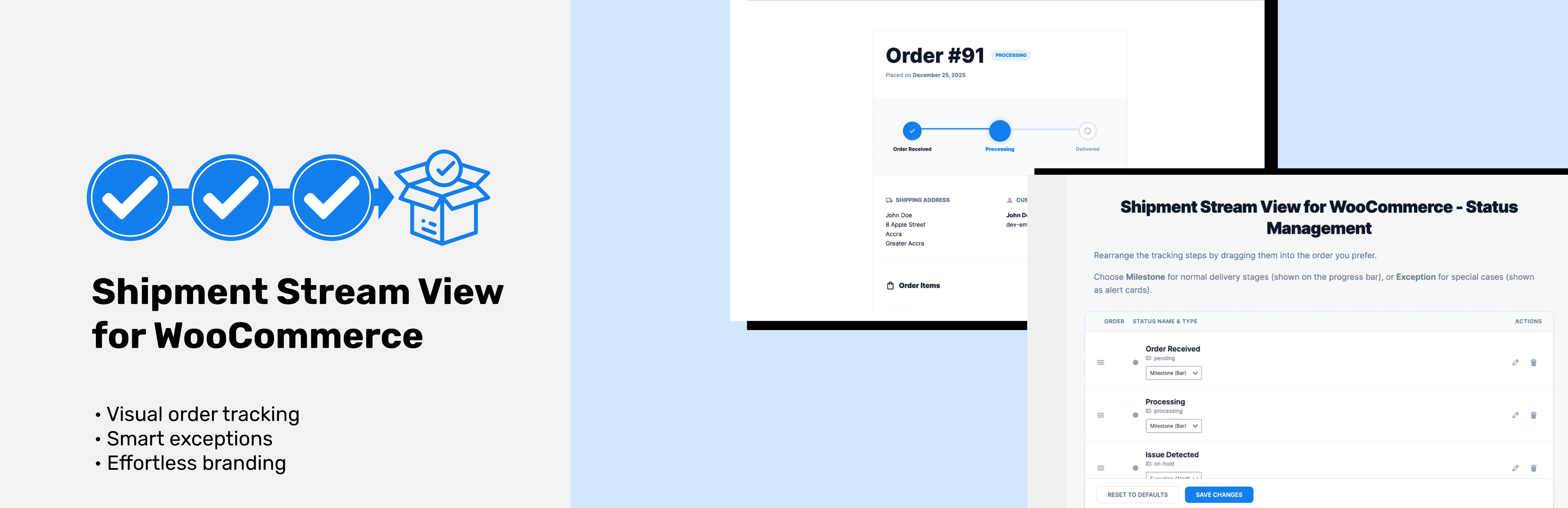
總結:Shipment Stream View for WooCommerce透過美麗且直觀的進度條,改變了客戶追蹤訂單的方式。不再混淆的狀態標籤 - 您的客戶將清楚地看到訂單在交貨過程中的位置。
問題與回答:
1. 這個外掛的特色有哪些?
- 可視化進度追蹤 - 顯示訂單旅程的美麗進度條
- 可自訂狀態步驟 - 拖放以重新排序您的追踪里程碑
- 異常處理 - 特別警示有訂單問題(保留中、取消等)
- 簡單整合 - 使用簡單的短代碼[ssvfww_order_tracker]添加到任何頁面
- 響應式設計 - 在桌面、平板和移動設備上完美
- WooCommerce兼容 - 與現有的WooCommerce設置無縫配合
- HPOS Ready - 完全支持高性能訂單存儲
- 設計自定義 - 選擇您的品牌顏色和字體
- 里程碑和異常類型 - 將狀態分類為正常進度或特別警示。
2. 安裝和使用這個外掛的步驟是什麼?
- 安裝並啟用外掛
- 進入WordPress管理員的Shipment Stream
- 自訂追蹤步驟(拖拽以重新排序、編輯標籤、設定類型)
- 將[ssvfww_order_tracker]短代碼添加到任何頁面
- 客戶輸入其訂單編號和電子郵件以跟蹤其訂單。
3. 這個外掛適合哪些用途?
- 想要減少“我的訂單在哪裡?”的線上商店支持票的商家
- 想要改善客戶體驗的企業
- 渴望現代、專業訂單追蹤的WooCommerce網站
- 需要靈活追踪里程碑管理的商店所有者。
外掛標籤
開發者團隊
② 後台搜尋「Shipment Stream View for WooCommerce」→ 直接安裝(推薦)
原文外掛簡介
Shipment Stream View for WooCommerce transforms the way your customers track their orders with a beautiful, intuitive visual progress bar. No more confusing status labels – your customers will see exactly where their order is in the delivery process.
Features
Visual Progress Tracking – Beautiful progress bar showing order journey
Customizable Status Steps – Drag and drop to reorder your tracking milestones
Exception Handling – Special alerts for order issues (on-hold, cancelled, etc.)
Easy Integration – Simple shortcode [ssvfww_order_tracker] to add to any page
Responsive Design – Perfect on desktop, tablet, and mobile devices
WooCommerce Compatible – Works seamlessly with your existing WooCommerce setup
HPOS Ready – Full support for High-Performance Order Storage
Design Customization – Choose your brand colors and fonts
Milestone & Exception Types – Categorize statuses as normal progress or special alerts
How It Works
Install and activate the plugin
Go to Shipment Stream in your WordPress admin
Customize your tracking steps (drag to reorder, edit labels, set types)
Add the [ssvfww_order_tracker] shortcode to any page
Customers enter their order ID and email to track their order
Perfect For
Online stores wanting to reduce “where is my order?” support tickets
Businesses looking to improve customer experience
WooCommerce sites that want modern, professional order tracking
Store owners who need flexible tracking milestone management
Why Choose Shipment Stream View?
Unlike other tracking plugins, Shipment Stream View gives you complete control over your tracking flow. Define custom milestones, handle exceptions gracefully, and present everything in a stunning visual interface that customers love.
Development
This plugin uses modern JavaScript tools (npm, webpack) for development.
The full source code is available in our public GitHub repository: Link
To build from source:
Clone the repository
Run npm install to install dependencies
Run npm run build to compile assets
Run npm run start for development mode
Additional Info
Support: Email: [email protected]
Documentation: Link
GitHub: Link
Built with ❤️ by Tieku Asare