內容簡介
總結:SeekMake 是一個用於 WordPress 的 3D 列印報價外掛,可以將您的網站轉變為自動化的 3D 列印商店,讓顧客上傳 3D 模型並立即獲得列印價格,節省等待郵件或手動報價時間。
### 問題與答案:
1. SeekMake 主要適用於哪些類型的業務?
- 答案:主要適用於 3D 列印服務、製造空間、列印農場、原型製造公司以及線上 3D 列印商店。
2. SeekMake 如何運作?
- 答案:顧客上傳 STL 檔案後,SeekMake 分析模型(體積、列印時間、材料),並自動計算價格,最後顧客下單並在線上支付。
3. 如何在 WordPress 中設置 SeekMake 外掛?
- 答案:安裝並啟用 WordPress 中的外掛後,到 WordPress 管理選單中的 SeekMake 選項,點擊「Connect Your Account」進行驗證,之後可以選擇使用短代碼或 Elementor 添加小工具。
4. SeekMake 提供哪些主要功能?
- 答案:包括智能定價、3D 模型查看器、訂單與付款、自動化、業務工具、自定義選項等。
外掛標籤
開發者團隊
② 後台搜尋「SeekMake – Instant 3D Printing Quote Plugin on your Website」→ 直接安裝(推薦)
原文外掛簡介
SeekMake – 3D Printing Quoting Plugin for WordPress
Turn your WordPress website into an automated 3D printing shop.
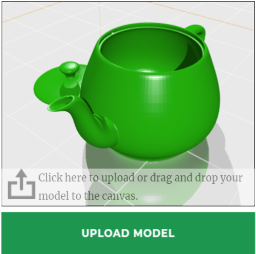
With SeekMake, your customers can upload their 3D models and instantly receive a price for printing — without waiting for emails or manual quotes.
SeekMake is a powerful plugin that can be easily implemented on any website to provide instant 3D printing prices, streamline payments, order management, and customer communication — powered by AI.
Perfect for:
* 3D printing services
* Makerspaces
* Print farms
* Prototyping companies
* Online 3D print shops
🚀 How It Works
Customer uploads an STL file.
SeekMake analyzes the model (volume, print time, material).
A price is calculated automatically.
Customer places the order and pays online.
More quotes. More orders. Less manual work.
⚙️ Easy Setup
Step 1 – Install Plugin
Install and activate the plugin in WordPress.
Step 2 – Connect to SeekMake
Go to SeekMake in your WordPress admin menu and click “Connect Your Account” to authenticate.
Step 3 – Add Widgets (Shortcode or Elementor)
You can use the Instant Quote or Client Dashboard widgets.
Option A: Using Shortcodes
Insert these on any page:
* Instant Quote: [seekmake_instant_quote]
* Client Dashboard: [seekmake_client_dashboard]
Option B: Using Elementor
Edit a page and search for “SeekMake” in the widgets panel.
Done ✅
✨ Main Features
🧠 Smart Pricing
Instant 3D printing quotes
Automatic volume & print time calculation
Material & color selection
Infill & support material calculation
Filament cost calculation
🖥️ 3D Model Viewer
Rotate and inspect STL files
Zoom in / zoom out
Scale models
Manual rotation
💳 Orders & Payments
Online payments (Stripe, manual invoice, bank transfer)
Automatic order creation
Customer dashboard
Order tracking
🤖 Automation
Automatic email notifications
AI sales assistant (optional)
Customer qualification
Low maintenance system
📊 Business Tools
Quote history
Customer management
Analytics & reports
🎨 Customization
Place anywhere with shortcode
Mobile responsive
Multi-language ready
Custom pricing rules
🛟 Support
📩 [email protected]
📄 License
Licensed under GPL v3 or later.
Privacy Policy
This plugin connects to external SeekMake services:
Services Used:
* Authentication: dev.seekmake.com/auth/login
* Dashboard: seekmake.com/dashboard/manufacturer/
* API: dev.seekmake.com
Data Transmitted:
* User authentication credentials (during login only)
* Manufacturer ID (stored in WordPress options)
* Customer quote requests (CAD files, specifications)
* Order and project information
Data Storage:
* WordPress stores: Manufacturer ID, authentication status
* SeekMake stores: User accounts, quotes, orders, customer data
User Consent:
By activating this plugin and connecting your SeekMake account, you consent to data transmission to SeekMake services. No tracking or analytics occur without explicit consent.
For complete privacy details, visit: https://seekmake.com/privacy-policy
Third-Party Services
This plugin relies on SeekMake’s external services:
SeekMake Platform
* Service: Manufacturing quoting and order management
* Website: https://seekmake.com
* Terms of Service: https://seekmake.com/terms-and-conditions
* Privacy Policy: https://seekmake.com/privacy-policy
By using this plugin, you agree to SeekMake’s Terms of Service and Privacy Policy.
Support
For support, please visit:
* Documentation: https://seekmake.com/developers-portal/api-docs
* Support: https://api.whatsapp.com/send?phone=37258190825
* Help Center: https://seekmake.com/contact-us