內容簡介
```html
<ul>
<li>WooCommerce Product Sync 外掛允許與您的代理供應商API進行集成,將商品導入您的 WooCommerce 商店。</li>
<li>透過引入這個外掛,可簡化從外部供應商API同步商品的過程:</li>
<ul>
<li>SKU、名稱、描述</li>
<li>庫存</li>
<li>商品價格</li>
<li>商品圖片</li>
<li>連接 JSON、XML、SOAP APIs</li>
</ul>
</ul>
```
### 問題與答案:
1. 外掛能夠從供應商API中自動導入哪些商品數據?
- 答:名稱、SKU、描述、價格、庫存水平和圖片。
2. 如何讓外掛在您的 WooCommerce 商店中添加或更新產品?
- 答:透過將供應商API中的產品數據(如名稱、SKU、描述、價格、庫存水平和圖片)提取到您的 WooCommerce 商店。
3. 外掛具備什麼功能讓您能夠自定義字段映射?
- 答:您可以將供應商API中的數據字段(如 SKU、價格、庫存)與 WooCommerce 的字段進行映射,確保數據正確導入和顯示在您的商店中。
4. 外掛會怎樣更新貨源和價格?
- 答:每當供應商的庫存或價格發生變化時,外掛將相應更新您的商店,確保您的產品信息始終是最新的。
5. 外掛支持哪些供應商?
- 答:WooCommerce Product Sync 外掛設計為與任何遵循 RESTful API 結構並提供必要產品數據(如 SKU、價格、描述、庫存水平和圖片)的外部供應商API一起工作。它不限於特定供應商,但已預先集成了一些供應商,如 WooCommerce、Shopify 等。
6. 外掛運行的最低要求是什麼?
- 答:WooCommerce 版本需 3.0 或更高,WordPress 版本需 6.0 或更高,還需要供應商產品API訪問權限。
7. 這個外掛如何幫助用戶從外部庫存供應商導入商品?
- 答:透過連接到這些供應商的公共API,這個外掛幫助用戶將商品從外部庫存供應商導入其基於 WooCommerce 的 WordPress 網站中。
8. 這個外掛與供應商直接互動嗎?
- 答:不,這個外掛僅提供連接到供應商的功能,用戶通過外掛設置選擇想要連接的供應商,並必須提供自己的API憑證。
9. 外掛有保障用戶隱私的功能嗎?
- 答:是的,外掛不存儲任何用戶數據,而且如果用戶選擇與 miniOrange 註冊,則可能會連接到 login.xecurify.com(這是完全可選的)。
```
外掛標籤
開發者團隊
② 後台搜尋「Product Sync for WooCommerce」→ 直接安裝(推薦)
原文外掛簡介
Product Sync for WooCommerce plugin integrates your WooCommerce store with external suppliers or inventory APIs, enabling seamless WooCommerce inventory sync and WooCommerce stock synchronization. It imports products, stock/inventory levels, pricing, and more by automating imports from your suppliers. This plugin is perfect to streamline WooCommerce stock sync and automate product updates such as names, prices, stock quantities, images, categories, and more.
This plugin automates product imports and ensures WooCommerce stock synchronization from your supplier’s API. The result is a hassle-free and up-to-date WooCommerce Inventory Sync for your WooCommerce store
With Product Sync for WooCommerce Plugin, you can easily sync products between WooCommerce sites or directly connect to suppliers’ APIs for WooCommerce Product and stock sync and pricing updates. This ensures that your store is always updated with the most current product information and stock levels.
Plugin Documentation & Setup
Features
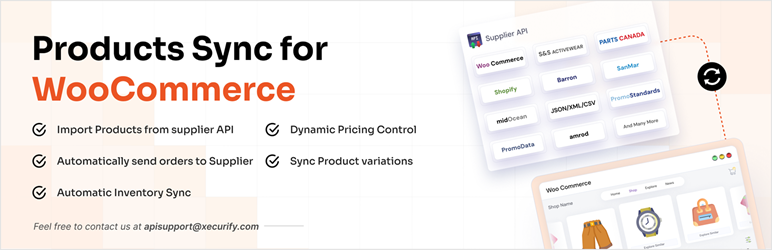
WooCommerce Product Sync: Effortlessly synchronize products from external APIs, including names, prices, descriptions, SKU, stock levels, categories, brands, and images, directly into your WooCommerce store..
Stock Sync for WooCommerce: Automatically update stock levels and prices based on real-time data from suppliers. This ensures your store’s WooCommerce inventory sync is always accurate, reflecting true stock availability..
Custom Field Mapping: Fully customizable field mappings to ensure accurate data syncing between the supplier’s API and your WooCommerce store.
WooCommerce Sync Products between sites: Easily sync products between WooCommerce sites, making WooCommerce stock synchronization effortless across multiple WooCommerce stores.
Supports Multiple API Formats: The plugin supports multiple API formats, including JSON, XML, and SOAP, providing flexibility when integrating with various suppliers for stock sync for WooCommerce.
Automatic Product Updates: The plugin automatically fetches updates from your supplier’s API, including product details, stock levels, and price adjustments. This ensures WooCommerce product sync happens instantly, keeping your store’s data up-to-date.
Automatic Price Margin: The plugin includes an automatic price margin feature, enabling you to apply custom markups or margins on the products imported from suppliers during WooCommerce stock sync..
What Can You Sync?
With the WooCommerce Product Sync Plugin, you can automate product imports and synchronize:
Product Data: Including Names, SKUs, descriptions, categories, brands, custom fields, and attributes, ensuring WooCommerce product sync is seamless
Inventory Stock: WooCommerce inventory sync is accurate and up-to-date, automatically adjusting stock levels..
Product Pricing: Update pricing from suppliers into your WooCommerce store.
Product Images: Sync product images from the supplier’s API to your WooCommerce store.
Free plan Features
Import Simple products from Supplier API
Connect to one supplier.
Click-based manual product sync in bulk.
Preview Products before importing.
External supplier API which supports JSON and XML formats.
Add token APIs separately.
Premium Plan features
Import simple and variable products.
Connect multiple supplier APIs including dependent APIs.
Automatically sync WC orders with the supplier.
Import all product fields (WC standard and custom/ACF).
Automatic scheduled product sync.
Apply custom price margin rules.
Preview Products before importing.
Apply custom filters for product import.
Supports JSON, XML, CSV, FTP, and more.
Which Suppliers are supported?
The WooCommerce Product Sync Plugin is designed to work with any external supplier API that follows a RESTful API structure and provides the necessary product data such as SKU, price, description, stock, and images.
Below are a few examples of supported suppliers:
WooCommerce: Import products from another WooCommerce store automatically for WooCommerce inventory Sync.
Shopify: Import Products from Shopify to WooCommerce store.
S&S Activewear: Import Products from S&S Activewear to WooCommerce store and send the orders back to S&S Activewear that are placed on your WooCommerce store.
Amrod: Import Products from Amrod to WooCommerce store.
Barron: Import Products from Barron to WooCommerce store.
Turn14: Import Products from Turn14 to WooCommerce store.
Promodata: Import Products from Promodata to WooCommerce store.
SanMar: Import Products from SanMar to WooCommerce store.
midOcean: Import Products from midOcean to WooCommerce store.
UTTeam: Import Products from UTTeam to WooCommerce store.
Suppliers with custom APIs (The plugin can be configured to sync product data from any API as long as the supplier provides the product data.)
TRENDS: Import Products from Trends to WooCommerce store.
TopTex:Import Products from TopTex to WooCommerce store.
Proactive Clothing: Import Products from Proactive Clothing to WooCommerce store.
PromoData: Import Products from Promodata to WooCommerce store.
Parts Canada: Import Products from Parts Canada to WooCommerce store.
Parts Unlimited: Import Products from Parts Unlimited to WooCommerce store.
midOcean: Import Products from midOcean to WooCommerce store.
Requirements
WooCommerce: Version 3.0 or higher.
WordPress: Version 6.0 or higher.
Supplier Product API access
External services
This plugin helps users import products from external inventory suppliers into their WooCommerce-based WordPress site by connecting to those suppliers’ public APIs.
The following third-party services are supported –
S&S Activewear – https://api.ssactivewear.com
S&S Activewear Terms Of Use
S&S Activewear Privacy Policy
Amrod – https://vendorapi.amrod.co.za
Amrod Terms Of Use
Amrod Privacy Policy
Shopify – https://shopify.dev/docs/api
Shopify Terms Of Use
Shopify Privacy Policy
Barron – https://wslive.kevro.co.za
Barron Policy & Terms
Turn14 –
Turn14 Terms
Turn14 Privacy Policy
SanMar-
SanMar Policy &Terms
midOcean-
midOceanPolicy &Terms
UTTeam-
UTTeam Policy &Terms
Important Notes:
This plugin does not directly interact with these suppliers and does not reply on them directly to function. It simply provides the feature to connect to them.
Users choose which supplier(s) they want to connect to through the plugin settings and must provide their own API credentials.
The plugin only fetches product data from these suppliers — it does not send any data from user’s site to them.
Access to each supplier’s API requires a valid API token or credentials, which must be obtained by the plugin user from the supplier and used according to that supplier’s terms of service.
Additionally, the plugin may connect to login.xecurify.com if a user opts to register with miniOrange (our service). This is entirely optional.
Privacy
This plugin does not store any user data. However, it offers users the option to share basic WordPress site details (such as WordPress environment information, WooCommerce environment information, and plugin configuration details) if they require support from our team when facing any issues while using the plugin. Please note that sharing this information is entirely optional, and users can choose not to share it.