內容簡介
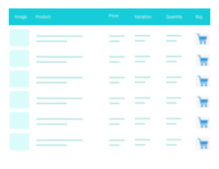
ProductBay 是一款專為 WooCommerce 設計的高效能產品表格外掛,能夠將產品以清晰、快速的表格形式展示,適合批發商、大型產品目錄及餐廳菜單等多種需求,讓顧客能夠輕鬆比較產品並快速下單。
【主要功能】
• 使用引導式精靈輕鬆建立產品表格
• 實時預覽,變更即時顯示
• 高度自訂的欄位編輯器
• 無縫整合 WooCommerce 功能
• 支援多種產品來源及過濾條件
• AJAX 加入購物車,無需重新載入頁面
外掛標籤
開發者團隊
② 後台搜尋「ProductBay – High-Performance Product Table for WooCommerce」→ 直接安裝(推薦)
原文外掛簡介
WooCommerce’s default grid layout is great for browsing, but it isn’t always the right fit for every store. Wholesale shops, large catalogs, B2B order forms, price lists, quick-order tables, and restaurant menus all need something different, a clean, fast, scannable table where customers can compare products, select options, and add to cart in seconds.
ProductBay transforms how your WooCommerce products are displayed. Build beautiful, responsive product tables using a guided wizard, no coding required, and embed them anywhere on your site with a simple shortcode.
Home | Documentation
ProductBay requires WooCommerce to be installed and active.
Perfect For
Wholesale & B2B stores
Large product catalogs
Quick-order & bulk-order forms
Price lists & product directories
Restaurant & food menus
Digital product libraries
Any WooCommerce store who wants easy and efficient product listing
Why ProductBay?
Unlike traditional table plugins, ProductBay is built on a modern hybrid architecture:
Admin Panel: A fully responsive Single Page Application (SPA) built with React 18, TypeScript, and Tailwind CSS, so the table builder feels fast, fluid, and intuitive.
Frontend Display: A lightweight, SEO-friendly rendering engine optimized for Core Web Vitals, so your customers get speed without bloat.
No external CDN. No remote scripts. No data ever leaves your server. All assets are bundled locally inside the plugin.
Guided Table Creation Wizard
Creating a product table has never been easier. ProductBay walks you through a focused 5-step wizard:
Setup: Name your table and choose a product source
Columns: Pick and arrange which data columns to display
Display: Customize colors, typography, borders, and spacing
Options: Configure filters, pagination, and sorting defaults
Finish: Copy your shortcode and publish
Live Preview
A real-time live preview updates as you make changes. What you see in the wizard is exactly what your customers will see on the front end.
Smart Product Sources
Control exactly which products appear in each table:
By Category: Show all products from one or more categories
By Sale Status : Display currently on-sale products
By Specific IDs: Handpick individual products
All Products: Pull your entire catalog into the table
Query Modifiers: Exclude product IDs, filter by stock status, set a minimum/maximum price range, and choose a default sort order (name, price, date, or popularity).
Advanced Column Editor
Full control over what data appears in your table and how it’s arranged:
Drag-and-Drop Reordering: Change column order visually with an intuitive interface
Column Types: Product Image, Name, Price, SKU, Description, Add to Cart, Bulk Selection and more
Responsive Visibility: Set custom width for each column in pixel (px), percentage (%) or auto. Configure per-column show/hide rules for desktop/laptop, tablet, and mobile independently
Tablet & Phone Columns are optional: if left empty, the plugin falls back to your desktop column configuration automatically
Seamless WooCommerce Integration
ProductBay is built for WooCommerce from the ground up:
Simple Products: Standard add-to-cart button
Variable Products: Inline attribute selectors (for each variable) right inside the table row. Visual indicators showing which variations were added, natively synced with the WooCommerce Cart
Grouped Products: Link to product page or display child items
External / Affiliate Products: Displays the external buy button correctly
AJAX Add-to-Cart: Products are added without any page reload
Bulk Add-to-Cart: Customers can select multiple products and add them all at once with a single click
Selected Items Panel: A floating popup showing selected products with individual quantities, pricing, and remove controls
Clear All Selections: A global “Clear all” button to reset bulk selections instantly
Search & Filter
Help customers find instantly what they’re looking for, without page reloads:
Instant AJAX Search: Live search that filters the product list as users type
Category Filter: Native dropdown to filter by product category
Product Type Filter: Dropdown to filter by Simple, Variable, Grouped, or External product type
AJAX Pagination: Page through results without full page reloads
Image Lightbox
Product images open in a popup/modal with fullscreen toggling and close controls, built using native resources for maximum performance, with no bloated third-party library required.
Deep Design Customization
Every table is independently styled. Multiple tables on the same page will never conflict with each other:
Colors: Background, text, borders, alternate rows (zebra striping) and hover states
Typography: Font size and font weight per element
Borders: Border style, width, and radius
Spacing: Cell padding per table
Table Management Dashboard
A centralized admin dashboard to manage all your tables at a glance:
Search Tables: Find any table quickly by name
Filter by Status: Published or Private
Filter by Product Source: Category, Sale, IDs, or All
Bulk Status Update: Update status of tables at once to private or published
Bulk Delete: Clean up multiple tables at once
Shortcode Display: Every table shows its shortcode instantly
Date: See created, modified and published date for each table
Developer-Friendly
ProductBay exposes 30+ action hooks and filters across all plugin layers, Core, Data, API, Frontend, and Admin, so developers can extend or modify behavior without ever touching plugin files:
Hook into query arguments, cell output, table styles, and more
A dedicated Hooks & Filters reference page is included directly in the plugin’s admin area
All frontend assets are only loaded on pages where a table shortcode is present
Translation Ready
100% of all user-facing strings are wrapped in WordPress localization functions. ProductBay is fully ready to be translated into any language.
Coming Soon: ProductBay Pro
We’re actively building a Pro add-on that will extend ProductBay with advanced capabilities:
Variation Popup & Nested Rows: Richer variable/grouped product interactions
Pro Columns: Ratings, reviews, dimensions, discount badges, B2B quantity column
Lazy Loading: Improved performance with lazy loading including infinite scroll or “Load More” button instead of pagination
Quick View Modal: AJAX-loaded product detail popup
Custom CSS Editor: Per-table scoped CSS editor in the admin
Advanced Filters: Sidebar/drawer/top menu layout, attribute filters, active filter chips
Import / Export: Backup and share table configurations as JSON
Premium Templates: One-click style presets
Analytics: Table impressions, click tracking, and a dashboard widget