內容簡介
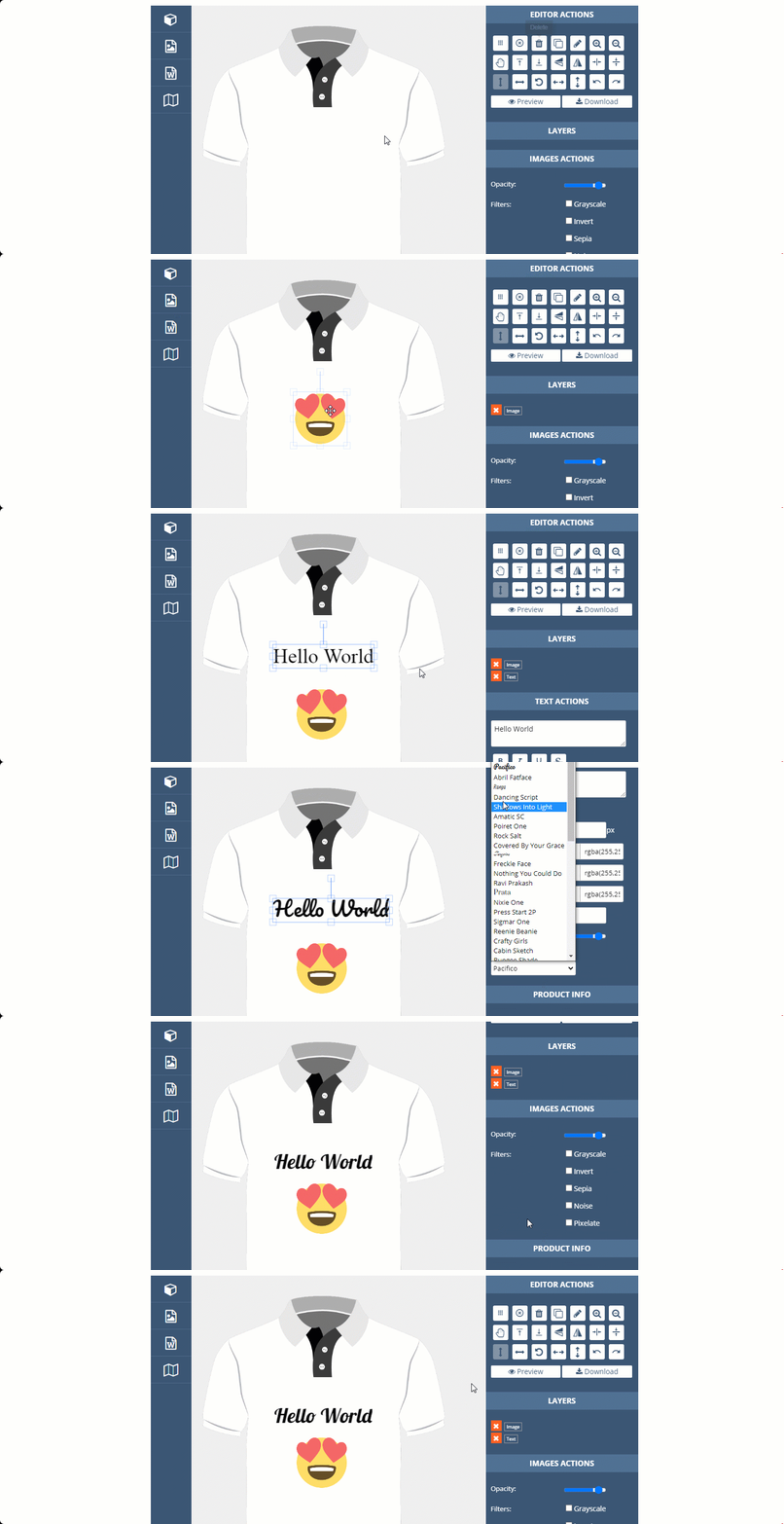
產品設計外掛是在您的電子商務商店上添加 WooCommerce 產品自定義或產品設計的一種準備好且簡單的方法。讓您的客戶在提交訂單之前自行設計或自定義。您的客戶可以添加自定義剪貼畫、文本、形狀等等。您可以爲不同類型的產品添加無限產品面。我們的產品設計是基於模板的,因此您可以將同一模板用於許多產品。用戶可以在提交訂單之前下載或預覽其設計。有大量的選項來自定義文本藝術、剪貼畫和形狀。
Product Designer by http://pickplugins.com
查看高級版面»
現場演示»
說明文件»
支持»
外掛功能
準備好 WooCommerce
產品設計器已準備好 WooCommerce,您的客戶將能夠通過自定義產品提交訂單,您能夠通過訂單數據查看設計文件。
剪貼圖形
您可以添加無限的剪貼畫、圖片、圖片作爲設計素材,因此您的用戶可以將它們添加到設計器中。有基於類別的篩選器和 Ajax 分頁來訪問剪貼畫。
文本藝術
您的客戶可以在產品設計器上添加文本,有多種自定義文本、字體大小、顏色、字體系列的選項,我們添加了 50+ 精選谷歌字體,您可以添加自己的字體。
SVG 或形狀
您可以上傳或添加無限數量的形狀或 SVG 文件,您的客戶可以使用這些文件設計其產品。
無限產品面
基於不同的產品,您可以添加任意數量的產品面,因此用戶可以在設計器中自定義每個面。
預覽設計
用戶可以在提交訂單之前預覽其設計。
下載設計
您的客戶可以在提交訂單之前下載設計。
高級功能
預保存的模板
您可以為每個模板保存無限數量的預保存的模板,因此用戶可以從預保存的模板中選擇快速獲取所需的設計或從現有模板開始工作。
上傳自定義剪貼畫
允許用戶上傳自己的剪貼畫,以便用戶可以按照自己的意願設計其產品。
剪貼畫價格
您可以爲每個剪貼畫和不同類型的資產(如文本、QR 碼、條形碼和文本)設置自定義價格。
曲線文字
在產品上顯示曲線文字是很花哨的,我們的產品設計器允許用戶編輯曲線文本。
引言文字
您可以添加自己的引言文字,因此用戶可以在其產品上使用這些引言。
QR 碼
允許用戶在設計中添加其 QR 碼。
條形碼
用戶可以在設計中生成自己的條形碼。
下載預覽
允許用戶編輯其設計時下載預覽。
谷歌字體
我們已經添加了 50+ 精選的谷歌字體,您可以通過設置添加自己的谷歌字體。
自定義字體
您可以在設計器中添加自己的自定義字體。
視頻教程
如何安裝?
如何配置?
外掛標籤
開發者團隊
② 後台搜尋「PickPlugins Product Designer for WooCommerce」→ 直接安裝(推薦)
📦 歷史版本下載
原文外掛簡介
Product Designer plugin is a ready and simple way to add WooCommerce product customize or product designer on your eCommerce shop. Allow your customer to design or customize themselves before submitting order. you customer can add custom clipart, text, shapes and etc. You can add unlimited product sides for different kinds of products. our product designer is based on templates so you can use same template for many products. Users can download or preview their designs before submitting orders. there is a ton of options for customizing text art, clipart and shapes.
Product Designer by http://pickplugins.com
See Premium »
Live Demo »
Documentation »
Support »
Plugin Features
WooCommerce ready
Product Designer is WooCommerce ready and your customer will able to submit order by customizing products, you will able to see design files via order data.
Clipt Arts
You can add unlimited clipart, image, picture for design assest, so your user can add them to designer. there is category based filter and ajax pagination for accessing cliparts.
Text Arts
Your customer can add text on the product designer, there is many option to customize text, font size, color, font families, we added 50+ hand picked Google fonts, you can add your own.
SVG or Shapes
You can upload or add unlimited shapes or svg file and your customer can use these to design their products.
Unlimited product sides
Based on different product you can add any number of product sides, so user can customize each side on the designer.
Design preview
User can preview their design before submit order.
Design download
Your customer can download design before submit order.
Premium Features
Pre saved templates
You can save unlimited pre saved templates for each templates, so use can choose from pre saved template to get quickly order their expected design or start work from existing templates.
Upload custom cliparts
Allow users to upload their own clipart so that users can design their products as they want.
Cliparts price
You can set custom price for each cliparts and different types of assets like text, qr code, barcode and text also.
Curve text
Displaying curve text on the product is fancy and our product designer allow users to editing curve text.
Quotes text
You can add your own quotes text, so user can use these quotes on their products.
QR code
Allow user to add their QR code on the design.
Barcode
User can generate their own Barcode on the design.
Download preview
Allow user to download preview on editing their design.
Google fonts
We have already added 50+ handpicked Google fonts, you can add your own Google font via settings.
Custom fonts
You can add your own custom fonts on the designer.
Video tutorials
How to Install?
How to Configure?
Tour Guide
How to add Cliparts, QR code, Barcode on design?
How to add Text & Curve Text on Design?