內容簡介
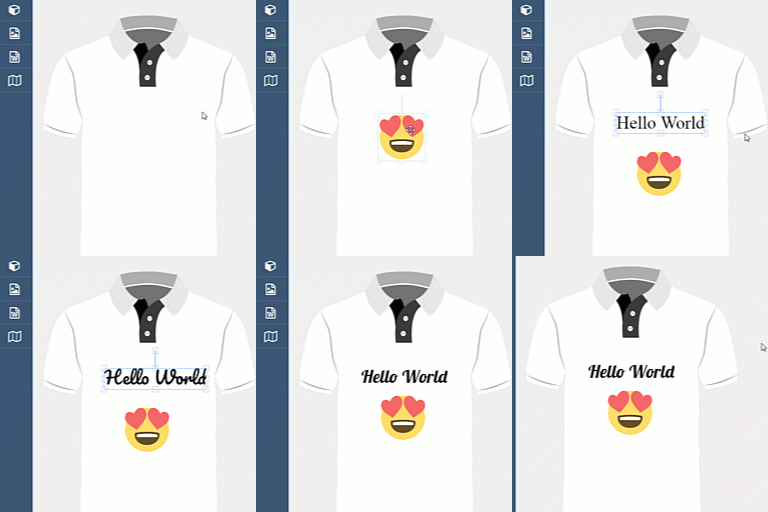
Custom Product Builder for WooCommerce 是一款讓 WooCommerce 商店能夠提供產品個性化的外掛,顧客可以在下單前自訂支持的產品。透過視覺編輯器,顧客可以自由安排設計元素並即時預覽他們的設計,適合銷售客製化服飾、個人化禮品等商品。
【主要功能】
• 互動式產品設計工具
• 拖放編輯功能
• 即時產品預覽
• 插圖庫提供設計元素
• 文字自訂功能
• WooCommerce 整合
外掛標籤
開發者團隊
② 後台搜尋「Custom Product Builder for WooCommerce – Product Designer & Personalizer」→ 直接安裝(推薦)
原文外掛簡介
👑Get Pro | 💻Live Demo | 📃Documentation | 🎧Support
Custom Product Builder for WooCommerce lets you add product personalization to your WooCommerce store, so customers can customize supported products before placing an order.
Give shoppers a visual editor where they can arrange design elements and preview their designs as they customize a product. It is suitable for stores selling custom apparel, personalized gifts, accessories, promotional merchandise, and other products that customers want to make their own.
Start with the free product designer and its core customization tools. Upgrade to Pro when you need additional capabilities such as customer image uploads, advanced text editing, drawing tools, downloadable design files, and advanced order management.
Explore the live demo to see the product designer in action.
Features
Visual product designer: Give customers an interactive way to personalize supported products.
Drag-and-drop editing: Let customers arrange supported design elements on the product canvas.
Live product preview: Allow shoppers to review their designs while customizing a product.
Clipart library: Provide ready-to-use graphic elements for product designs.
Text customization: Let customers add text using the available editor features.
WooCommerce integration: Add product customization to your existing WooCommerce store.
Design and order management: Access design-related order information through the plugin’s administration tools.
Pro customization tools: Add capabilities such as customer image uploads, advanced text controls, drawing tools, and downloadable design files.
Feature availability depends on the installed plugin version and plan. See the Free and Pro sections below for details.
What Can You Create?
Use the product designer for customizable products such as:
T-shirts, hoodies, and other apparel
Mugs, cups, and drinkware
Phone cases and accessories
Jewelry and personalized gifts
Caps, hats, and merchandise
Print-on-demand products
Corporate gifts and promotional merchandise
Wedding, event, and celebration products
Choose a setup that fits your products, design area, and production workflow.
Free Version Features
Get started with product customization using the core features included in the free plugin.
Drag-and-drop product designer
Product canvas system
Image placement and resizing for supported design elements
Real-time product preview
WooCommerce integration
Product configuration tools
Product setup without coding
Customer image uploads and other advanced customization capabilities require Pro.
Pro Version Features
Upgrade to Pro when your store needs additional product design and order management functionality.
Unlimited customizable products
Customer image uploads
Advanced text editor with additional font, color, and sizing controls
Freehand drawing tools
Downloadable design files
Advanced order management
Priority support
14-day money-back guarantee
Visit the Pro product page for current pricing, licensing details, and feature availability.
How to Get Started
Install and activate Custom Product Builder for WooCommerce.
Open the plugin’s product builder and configure a customizable product.
Set up the product canvas and available design elements.
Add the customizable product to your WooCommerce catalog.
Visit the product page and test the customer-facing design experience.
Review the resulting order and design information in your WordPress dashboard.
For detailed setup instructions, visit the official documentation.
Why Choose Custom Product Builder?
Start without building a custom solution: Configure product personalization within your WooCommerce store.
Offer interactive shopping: Let customers visualize their designs before ordering.
Grow at your own pace: Begin with the free features and upgrade when you need more tools.
Keep your workflow in WordPress: Manage your store and product customization in your WordPress environment.
Access design-related order information: Use the plugin’s administration interface to review design details.
Get ongoing improvements: Access product updates, documentation, and support from CoderPress.
Choose a suitable license: Explore available Pro plans, including lifetime licensing where offered.
Who Is It For?
Custom Product Builder for WooCommerce can help:
Print-on-demand businesses
Custom apparel stores
Personalized gift shops
Promotional product companies
Jewelry and engraving businesses
Wedding and event merchandise stores
WooCommerce merchants offering customizable products