內容簡介
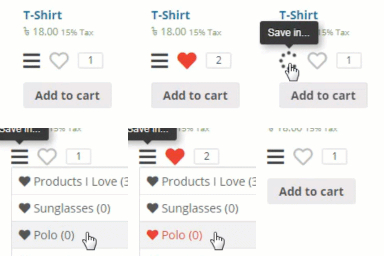
願望清單是一個工具,讓您的顧客可以選擇未來的產品購買,並與親密的人分享他們的願望。使用願望清單,您可以查看顧客的願望,並根據收集的信息提供優惠和促銷活動。
完整的說明文件在這裡:Premmerce Wishlist for WooCommerce
「Premmerce Wishlist for WooCommerce」的主要功能
建立自己的願望清單
使用 URL 分享願望清單的可能性
在控制台中審核顧客的願望清單的可能性
顯示帶有願望清單的小部件
演示
您可以在此處查看 Storefront 主題的操作方式:https://storefront.premmerce.com/messenger-bag-eshow/。
您可以在此處查看 SalesZone 主題的操作方式:https://saleszone.premmerce.com/apple-iphone-64gb-x/。
此外,您可以創建自己個人的演示商店,並在我們團隊開發的 Premmerce Premium 和所有其他 Premmerce 插件和主題一起測試此插件。您可以在此處查看:Premmerce WooCommerce Demo。
與其他外掛的相容性
WooCommerce
WooCommerce Multilingual
WPML
安裝
解壓縮已下載的 zip 檔案。
上傳插件文件夾到 WordPress 網站的 wp-content/plugins/ 目錄中。
在外掛頁面啟用 Premmerce Wishlist for WooCommerce。
外掛標籤
開發者團隊
② 後台搜尋「Premmerce Wishlist for WooCommerce」→ 直接安裝(推薦)
原文外掛簡介
A wishlist is a tool that will allow your customers to choose products for future purchases and to share their wishes with close people. Using wishlists you can review customers’ wishes and make favorable offers and promotions based on collected information.
Full documentation is available here: Premmerce Wishlist for WooCommerce
Major features in “Premmerce Wishlist for WooCommerce”
Creating your own wishlists
The possibility to share a wishlist using the URL
The possibility to review customers’ wishlists in the dashboard
Displaying a widget with wishlists
Demo
You can see how it works on the Storefront theme here: https://storefront.premmerce.com/messenger-bag-eshow/ .
You can see how it works on the SalesZone theme here: https://saleszone.premmerce.com/apple-iphone-64gb-x/ .
Plus, you can create your personal demo store and test this plugin together with Premmerce Premium and all other Premmerce plugins and themes developed by our team here: Premmerce WooCommerce Demo.
Compatibility with other Plugins
WooCommerce
WooCommerce Multilingual
WPML
Installation
Unzip the downloaded zip file.
Upload the plugin folder into the wp-content/plugins/ directory of your WordPress site.
Activate Premmerce Wishlist for WooCommerce from the Plugins page