
內容簡介
PlugVersions 讓使用者在更新外掛時保留最多三個版本,無論是付費或自訂外掛,若新版本無法正常運作,可以輕鬆一鍵回滾至先前版本,提升使用者的操作便利性與安全性。
【主要功能】
• 支援最多三個版本的保留
• 一鍵回滾至先前版本
• 兼容所有外掛,包括非官方庫外掛
外掛標籤
開發者團隊
② 後台搜尋「PlugVersions – Easily roll back to previous versions of your plugins.」→ 直接安裝(推薦)
原文外掛簡介
PlugVersions lets you retain up to three versions each time you update a plugin, including premium and custom plugins.
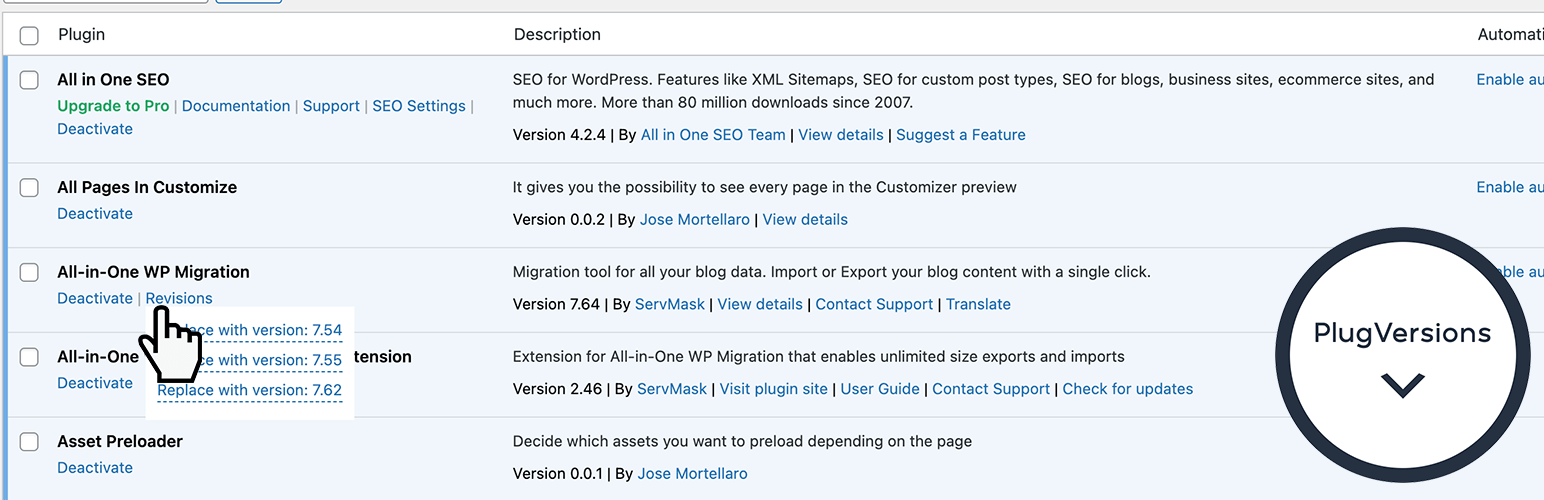
If a new version doesn’t work as expected, you can easily roll back by selecting a previous version with a single click. It works similarly to post revisions, but for plugins.
While WP Rollback is a great solution for plugins hosted on the WordPress repository, PlugVersions supports all plugins, including those not available on the repo.
This broader compatibility is currently the key difference between PlugVersions and other rollback plugins.
Additional features, such as version previews, are on the roadmap.
How to roll back to a previous version of a plugin
Install and activate PlugVersions.
Go to the Plugins page in your WordPress dashboard.
For any plugin that has been updated, you’ll see a “Revisions” action link. Hover over it to view the list of previously stored versions.
Click on the version you want to restore.
That’s it. Your plugin is rolled back!
There are no settings to configure.
This free version allows you to retain up to three previous plugin versions.
You’ll find them listed under the “Revisions” link on the Plugins page.
How to Safely Update a WordPress Plugin
To learn how to safely update a WordPress plugin, please read the detailed guide here:
How to Safely Update a WordPress Plugin
Help in case of issues after a plugin update
Want peace of mind when updating your plugins? Check out our Plugin Update Rescue – Annual Protection Plan
If something breaks after an update, we’ll step in and fix it.














