內容簡介
總結: Pixobe Product Designer 是一款強大的外掛,讓 WooCommerce 商店擁有豐富的互動式產品自定製體驗。顧客可以透過文字、圖像和由 Google Gemini、OpenAI GPT 和 DALL·E 驅動的 AI 生成設計來個性化產品。
問題與答案:
1. Pixobe Product Designer 的關鍵功能有哪些?
- AI-Powered Design
- Laser Etching Preview
- Multi-Image Variants
- User-Friendly Interface
- WooCommerce Ready
2. Pixobe Product Designer 提供哪些進階功能?
- Edit in Cart
- Order History View
- Admin Design View
- Customizable Grid Area
- Laser Etching Color Control
- Per-Product Effect Toggle
3. 這個外掛連接到哪些外部服務?
- Pixobe Product Designer Assets
- Optional AI Image Generation Services (Google Gemini API 和 OpenAI API)
4. 如何開啟或關閉 Pixobe Product Designer 的 AI 圖像生成服務?
- 在外掛設置中,可以啟用或停用 AI 圖像生成服務,透過 Google Gemini API 和 OpenAI API。
5. Pixobe Product Designer 存儲 API 金鑰於哪裡?
- API 金鑰存儲在 WordPress 選項中,並且不會向訪客揭露。
6. 如何查看 Pixobe Product Designer 的使用條款和隱私政策?
- 使用條款: https://app.pixobe.com/terms-of-service/
- 隱私政策: https://app.pixobe.com/privacy-policy/
外掛標籤
開發者團隊
② 後台搜尋「Pixobe Product Designer – WooCommerce Product Customizer」→ 直接安裝(推薦)
📦 歷史版本下載
原文外掛簡介
Pixobe Product Designer empowers WooCommerce store owners to offer a rich, interactive product customization experience. Customers can personalize products with text, images, and AI-generated designs powered by Google Gemini, OpenAI GPT, and DALL·E.
Key Features:
– AI-Powered Design – Generate unique product visuals from text prompts using integrated AI models.
– Laser Etching Preview – Provide realistic laser-etched mockups so customers can see an accurate final look.
– Multi-Image Variants – Assign multiple images to each product variant for enhanced customization.
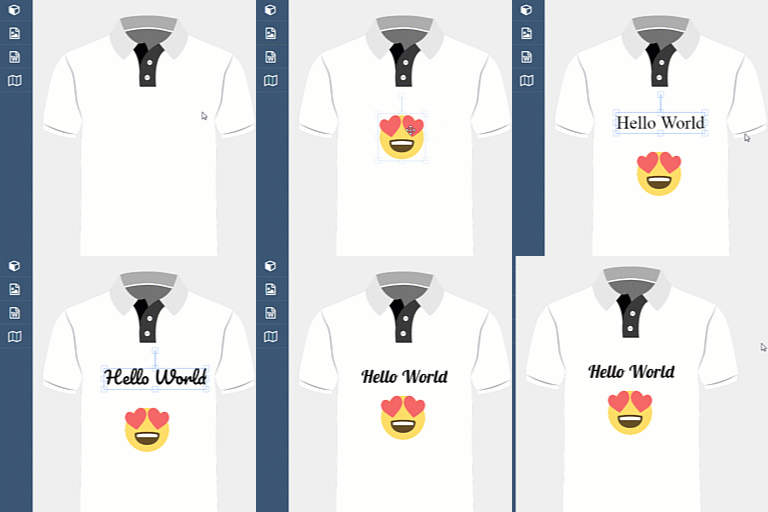
– User-Friendly Interface – Customers can add, edit, and preview designs directly on the product page.
– WooCommerce Ready – Fully compatible with WooCommerce and WordPress block editor.
Advanced Capabilities:
1. Edit in Cart – Customers can view and modify their customizations directly on the cart page before checkout.
2. Order History View – After placing an order, customers can see their custom designs in the “My Orders” page.
3. Admin Design View – Store admins can view customer designs directly in the order details page.
4. Customizable Grid Area – Admins can define a specific grid area on each product where customization is allowed.
5. Laser Etching Color Control – Admins can configure laser etching colors/effects per product for accurate previews.
6. Per-Product Effect Toggle – Enable or disable the laser etching effect for specific products or variations.
With Pixobe Product Designer, you can turn your WooCommerce store into a fully interactive, AI-driven product personalization hub while giving both customers and admins complete control over the customization process.
External services
This plugin connects to external services in order to provide its functionality:
Pixobe Product Designer Assets
The plugin loads JavaScript assets required for the product designer interface from Pixobe’s CDN:
https://product-dev.pixobe.com/product-designer.js
These assets are needed to render the design editor inside the storefront. No personal data is transmitted to this domain.
Optional AI Image Generation Services
If enabled by the site administrator, the plugin can use third-party AI providers to generate product images:
Google Gemini API
Endpoint: https://generativelanguage.googleapis.com/
Service: Google’s Gemini image generation models.
Data Sent: The prompt entered by the user and the administrator’s API key.
OpenAI API
Endpoint: https://api.openai.com/v1/images/generations
Service: OpenAI’s DALL·E models for image generation.
Data Sent: The prompt entered by the user and the administrator’s API key.
These integrations are optional and can be turned off in the plugin settings. When disabled, no requests are sent to OpenAI or Google Gemini.
API keys are stored in WordPress options and never exposed to site visitors.
Legal
Terms of Use: https://pixobe.com/terms-of-service/
Privacy Policy: https://app.pixobe.com/privacy-policy/