
內容簡介
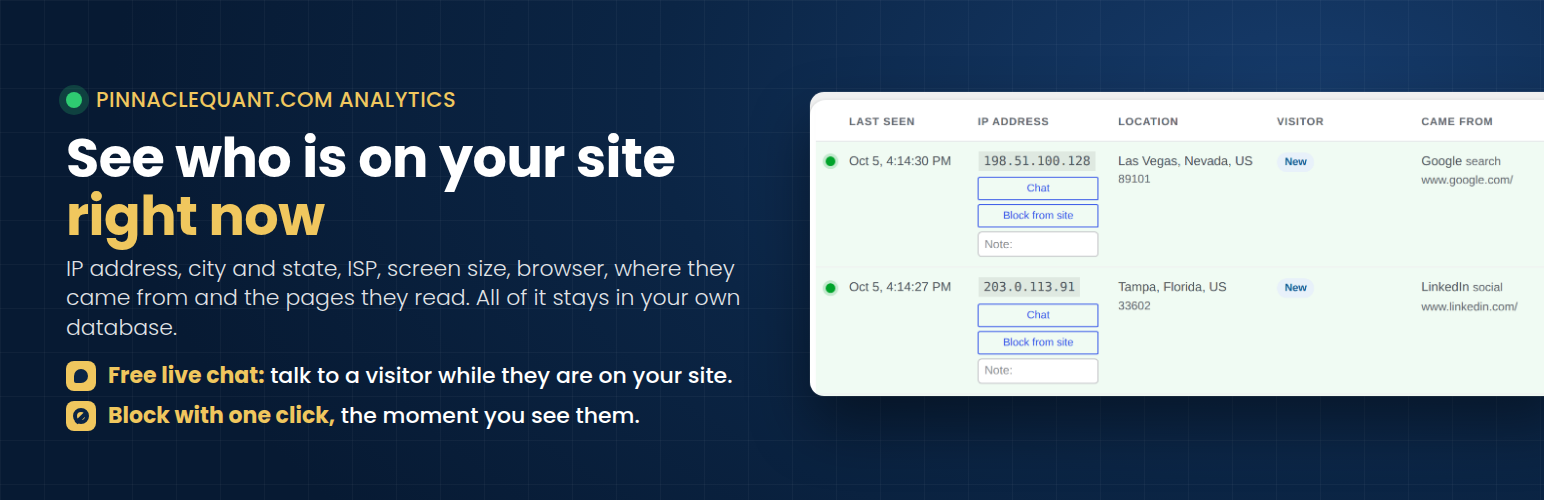
PinnacleQuant.com Analytics 是一款即時訪客追蹤外掛,能夠在您的網站上實時顯示訪客資訊,包括流量來源和瀏覽行為,所有數據均保留在您的 WordPress 資料庫中,無需外部服務。
【主要功能】
• 實時顯示訪客資訊,包括 IP 和地理位置
• 自主託管,數據保留在本地資料庫
• 提供每日或每週的電子郵件報告
• 追蹤流量流向,分析訪客行為
• 支援即時聊天功能,與訪客互動
• 自動移除舊訪問記錄,保持資料庫整潔
外掛標籤
開發者團隊
② 後台搜尋「PinnacleQuant.com Analytics – Live Visitors, Visitor Tracking & Real-Time Stats」→ 直接安裝(推薦)
原文外掛簡介
PinnacleQuant.com Analytics shows you, in real time, the people on your site, one row per visitor, as they arrive, with the traffic source of every visit. It is self-hosted visitor tracking: everything stays in your own WordPress database, with no account and no outside service. Open source, GPL.
For each visitor you see:
Whether they are on the site right now
IP address
City, state and country
ISP or organization
New or returning, with the visit number and first-seen date
Where they came from: Google, Bing, social networks, AI assistants, ads (click IDs), UTM campaigns, or another site
The page they are reading now and every page they read, with time on each
Screen type and resolution, browser and operating system
One-click Block from site for any address
Plus totals for today, yesterday, 7 days and 30 days, the bounce rate, a by-hour table for today, a 30-day table, a screen size breakdown, a dashboard widget, a search box and a CSV export.
Email report
Have a short report emailed to you every day or every week, at the time you pick: visitors, page views, returning visitors, bounce rate, average visit, bots, where visitors came from, the most read pages, locations and screens, each next to the day or week before. Turn it on under Settings, where a button sends you a sample right away.
Traffic flow
The Traffic flow page shows, for today, yesterday, or the last 7, 30 or 90 days: entry pages, exit pages, what visitors opened right after any page you pick (and right before it), the most common paths through the site, and every page with views, visits, time on page, entries and exits. The Visitors page lists the pages of each visit in the row, with a green mark on the page the visitor is reading right now, refreshed every 15 seconds. The CSV export includes the page path of every visit.
Everything stays on your site
No account, no key, no analytics service.
Visitor details are written to tables in your own WordPress database and nowhere else.
City, state and ISP are looked up on your own server from two free database files (from db-ip.com) that you download into your uploads folder with one click on the Visitors or Settings page; after that click, the plugin fetches a fresh copy once a month.
Nothing in your visitors’ browsers contacts any other server. The small script on your pages talks only to your site.
Old visits are removed automatically after the number of days you choose (90 by default).
Free live chat
The Live Chat page in the plugin menu explains how to add the free chat add-on so you can talk with the people on your site in real time. When you are not available to chat, the widget takes their name, email, phone and a brief message and emails it to you. The add-on is downloaded from https://pinnaclequant.com/analytics-systems and needs a free key, requested by email.
Bots
Crawlers that reach PHP are counted separately and never mixed into your visitor totals. Pages served from a cache or CDN are not seen, so bot counts are indicative only.
Location data from DB-IP
The city, state, country and ISP of a visitor are looked up on your own server, using two free database files published by DB-IP (https://db-ip.com): IP to City Lite and IP to ASN Lite. Nothing is downloaded until you click Download the location files on the Visitors page, or Download on the Settings page. From that click on, the plugin fetches the files from https://download.db-ip.com/free/ into your uploads folder and downloads a fresh copy once a month. Only the download request reaches DB-IP; it carries no information about your visitors, and no visitor data is ever sent to DB-IP or anyone else. Without the files, the plugin works the same, with city, state and ISP left blank. The files are provided under the Creative Commons Attribution 4.0 license, which is why the plugin pages show the line “IP geolocation by DB-IP”. DB-IP terms of use: https://db-ip.com/tos.php. DB-IP privacy policy: https://db-ip.com/privacy.php.
Included library
The plugin includes the MaxMind DB Reader for PHP (https://github.com/maxmind/MaxMind-DB-Reader-php), Apache License 2.0, to read the database files. It is used as is.
Privacy
This plugin keeps the IP address, approximate location, browser details, referring page and the pages viewed for each visit, in your own database, for the retention period you set. It sets one first-party cookie (pqanalytics_vid) with a random ID so it can tell a returning visitor from a new one. No data is sent to the plugin author or to any third party. The only outside connection the plugin makes is the download of the two location database files from DB-IP, described above, and only after you start it. Suggested wording for your privacy policy is under Settings, Privacy, Policy Guide.
IP geolocation by DB-IP (https://db-ip.com), used under the Creative Commons Attribution 4.0 license.














