外掛標籤
開發者團隊
原文外掛簡介
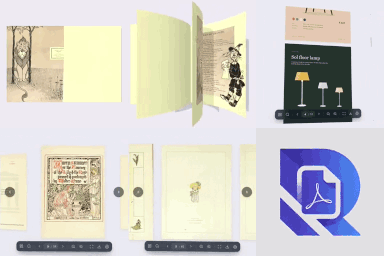
O7 FlipBook turns any PDF into a beautiful interactive magazine with a realistic 3D page-flip effect. Upload your PDF, publish the post, and embed it anywhere on your site with a simple shortcode.
Key Features
3 View Modes – Flipbook (3D page turn), Carousel (Swiper), Grid
8 Interface Languages – English, Türkçe, Deutsch, Français, 中文, 日本語, العربية, Русский
Light Template – Frameless, transparent viewer that blends into any page design
Zoom Controls – In/out/reset with per-post toggle
Auto-Play – Automatic page turning with configurable interval
Download Button – Optional PDF download button in toolbar
Thumbnail Strip – Clickable page thumbnail navigation
Sound Effects – Paper rustle on page turn (custom or built-in)
Custom Themes – 6 preset color themes + full custom color picker
Shortcode Parameters – Override any setting per instance
Stealth Mode – Hover-reveal toolbar overlay
Shortcode Usage
Basic:
[o7_flipbook id=”123″]
All parameters:
[o7_flipbook id=”123″ mode=”flipbook” width=”100%” height=”600″ orientation=”auto” light=”yes” zoom=”yes” download=”yes” autoplay=”no” thumbs=”yes” sound=”yes” stealth=”no” accent=”#e53935″ bg=”#1a1a2e” toolbar=”#ffffff” text=”#222222″ radius=”8″]
Large books with search:
[o7_flipbook src=”https://example.com/book.pdf” search=”yes” search_url=”https://example.com/search.json” page_param=”page” lazy=”yes”]
Languages
The admin interface language can be changed from Settings → O7 FlipBook → Interface Language. This changes all menu labels, meta box titles, viewer controls, and settings text.
For WordPress .po/.mo file translations (e.g. via Loco Translate), a .pot template is included at languages/o7-flipbook.pot.