內容簡介
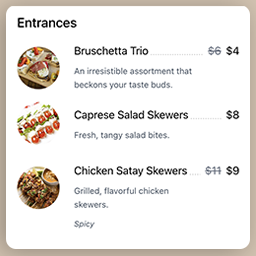
我的餐廳菜單外掛可讓您為您的餐廳、比薩店等創建線上菜單。此外,您還可以取得可列印的 PDF 版本,上傳至 Facebook(如果您有活動的 Facebook 專頁)或交給您的客人。
功能:
無限制的菜單:午餐菜單、晚餐菜單、夏季菜單、特價菜單、酒單等
無限制的菜單項目:菜餚、飲料等
管理員區域內的項目按不同類別組織:前菜、主菜等
菜單內的項目按不同部分組織,可以與類別相同或完全不同:當天的特色菜、當天的特價菜、素食者專區、兒童專區等
使用視覺化編輯器進行菜單設置,並從您建立的項目列表中進行項目選擇
在不同菜單部分中重複使用的項目:例如今日菜餚也在主菜中出現
項目的特色圖片
菜單的特色圖片
每個菜單的專屬頁眉和頁腳
類別圖標
外掛標籤
開發者團隊
原文外掛簡介
My Restaurant Menu plugin allows you to create online menu(s) for your restaurant, pizzeria, and so on. And you also get a printable PDF version, to upload to Facebook (if you have a Facebook page for your activity) or to hand to your guests.
Features:
unlimited menu: lunch menu, dinner menu, summer menu, specials, wine list, etc.
unlimited menus items: dishes, drink, etc.
inside the admin area items are organized into different categories: starters, main course, etc.
inside the menu items are organized into different sections, that can be the same as the
categories or completely different: catch of the day, special of the day, vegetarians, kids specials, etc.
visual editor to create the menu, selecting items from the list of items you created
items can be repeated in different sections of the menu: dish of the day also present in main courses, etc.
featured image for items
featured image for menus
dedicated header and footer per menu
icons for categories