內容簡介
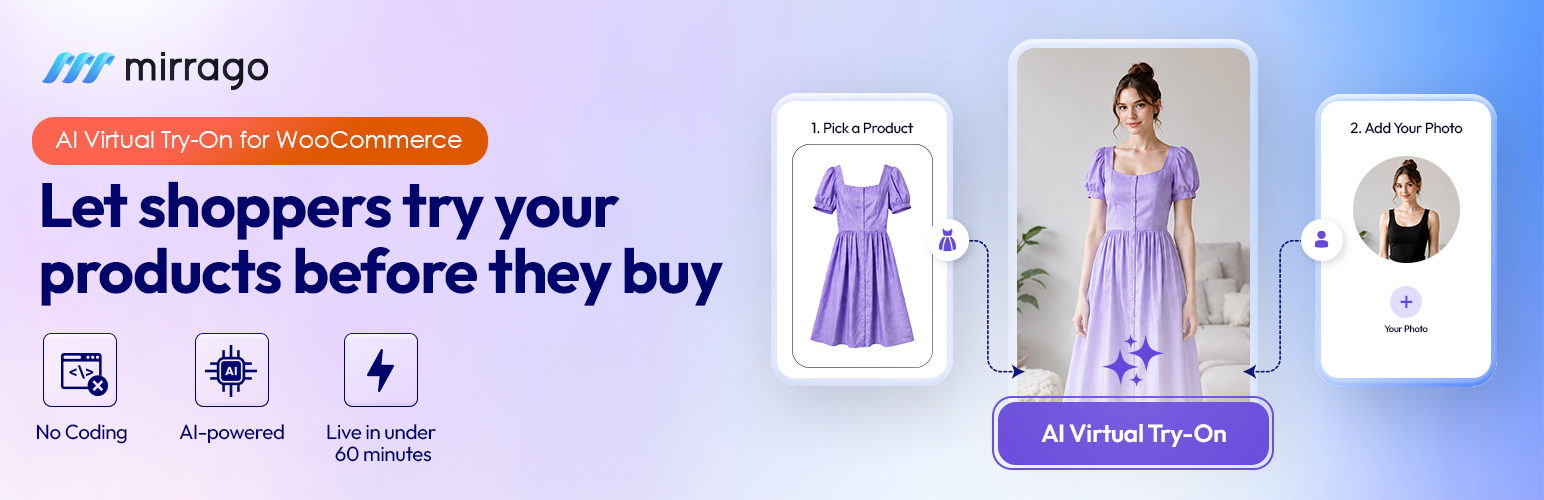
Mirrago 是一款專為 WooCommerce 設計的 AI 虛擬試穿外掛,讓顧客能在產品頁面上上傳照片,快速試穿商品,提升購物體驗並降低退貨率。
【主要功能】
• 顧客可上傳照片進行虛擬試穿
• 短短 20 秒內即能看到試穿效果
• 高度真實的服裝渲染技術
• 提升購物轉換率達 47%
• 安裝後 30 分鐘內即可上線
• 減少高達 35% 的退貨率
外掛標籤
開發者團隊
原文外掛簡介
Mirrago – AI Virtual Try-On for WooCommerce
Let Your Customers Try Before They Buy — Right on Your Product Page.
Mirrago is the AI-powered virtual try-on plugin built natively for WooCommerce. Your shoppers upload a photo, select a product, and see exactly how it looks on their body in under 20 seconds. No guesswork. Fewer return rates. No developers needed.
Install from your WordPress dashboard. Go live in under 30 minutes. Start converting browsers into buyers from day one.
Mirrago | Business | WordPress Try-on | Pricing | Book a Free Demo
The New Way to Sell Fashion on WordPress
eCommerce on WordPress has evolved — and so have shopper expectations. Customers don’t just want product photos anymore. They want to see themselves in what they’re buying.
Mirrago brings enterprise-grade AI try-on for fashion to any WooCommerce store, regardless of size or tech stack. Whether you sell everyday apparel, luxury fashion, eyewear, or accessories. Mirrago renders your products onto real bodies with photorealistic accuracy at the exact moment a purchase decision is being made.
The result? Fewer abandoned carts. Fewer returns. Conversion lift.
What Makes Mirrago Different?
Most virtual try-on tools overlay a flat product image on a generic model. Mirrago doesn’t.
Mirrago’s AI virtual try-on technology renders clothing onto the shopper’s actual uploaded photo—preserving their real proportions, posture, and skin tone. Fabric texture, natural drape, and sheen are all simulated at high fidelity. The result looks like the shopper physically tried the item on because, to the AI, they did.
This isn’t a gimmick. It’s a measurable conversion tool.
Up to 35% fewer returns: Shoppers buy with real visual confidence
Up to 47% higher conversion rate: Try-on customers commit faster
65% more product page engagement: Interactive experience keeps shoppers on-site longer
30-minute setup: From install to live try-on, no developer required
Plugin Features
Real-Body AI Rendering
Your shoppers aren’t mannequins — and now your product pages don’t treat them like one. Mirrago renders outfits directly onto the shopper’s uploaded photo, matching their body shape, posture, and proportions with precision.
Photorealistic Fabric Simulation
Fabric doesn’t just sit flat. Mirrago simulates how cloth actually drapes, folds, and falls—capturing texture, weave, and sheen the way it would look in a fitting room mirror.
Full Outfit Composition
Let shoppers build complete looks — top, bottom, outerwear, and accessories — all on one photo. A powerful built-in cross-sell engine that increases average order value without a single extra plugin.
Cross-Category Support
Apparel. Eyewear. Footwear. Jewelry. Watches. Accessories. If it goes on the body, Mirrago’s AI can render it under one store setup.
Results in Under 20 Seconds
Each try-on render completes in under 20 seconds. Fast enough for real-time shopping decisions. Built for scale, not queues.
Privacy-First, GDPR-Compliant
Shopper photos are processed securely and auto-deleted after every session. Never stored. Never used for AI training. Fully GDPR compliant — zero data risk for your store.
Built-In Conversion Analytics
See exactly how virtual try-on is affecting your sales. Track try-on events, conversion lifts, and engagement — all from your WordPress dashboard. No third-party analytics setup is required.
Who Is Mirrago For?
Fashion & Apparel Stores — Sell shirts, dresses, pants, and outerwear with confidence. Let shoppers see the natural drape and how it looks on their own body.
Eyewear & Accessories Brands — Precision face and head alignment lets shoppers virtually try glasses, bags, watches, and jewelry in real time.
Sportswear & Activewear — Silhouette-matching renders compression and stretch fabric accurately. Seamless layering previews for full kit looks.
Luxury & Designer Labels — Ultra-high-definition texture rendering with AI shadow and lighting adjustments for maximum realism.
Workwear & Uniform Suppliers — B2B portal-ready with dynamic brand logo and name placement previews for corporate procurement.
Setup in 4 Simple Steps
01 — Install the Plugin
Download and activate Mirrago directly from your WordPress plugin directory. One click. No files to upload manually.
02 — Configure Your Settings
Enter your API key and customize the try-on widget appearance to match your store. Takes under 5 minutes.
03 — Assign Products
Choose which products get virtual try-on enabled. Works at the individual product or category level.
04 — Go Live
The try-on button appears on your product page automatically. That’s it — start converting.
Platform Compatibility
WordPress: 6.2+
WooCommerce: 6.0+
Elementor: Compatible
Divi: Compatible
WPBakery: Compatible
All Mobile Devices: Fully Responsive
Simple, Transparent Pricing
No forced upgrades. No hidden fees. Scale when you’re ready. See Pricing and choose according to your business need.
Start for free now
Yearly plans available: pay for 10 months, get 12 months of access. Every plan includes onboarding support, integration guidance, and the ability to upgrade at any time.
1 image generation = 1 try-on result. Credits renew monthly. Unused credits reset at the end of the cycle.
Trusted by 100+ brands worldwide. Featured in the NVIDIA Inception Program.
Install Mirrago → Book a Free Demo → Talk to a Specialist →
External Services
This plugin connects to the Mirrago cloud API (api.mirrago.com) to generate virtual try-on images. The shopper’s uploaded photo and the selected product image are sent to Mirrago’s servers for processing and are automatically deleted within 24 hours. See the Mirrago Privacy Policy and Terms of Service for details.
Connecting the plugin to your Mirrago account uses the Mirrago dashboard (app.mirrago.com). Clicking “Create free account & connect” opens app.mirrago.com/wp-connect, where you sign in or register and confirm the connection. Mirrago then returns a one-time code to this site’s settings page, and the plugin exchanges it for your API credentials by calling app.mirrago.com/wp-connect/exchange with that code and this site’s hostname. No shopper data is sent during this step.