內容簡介
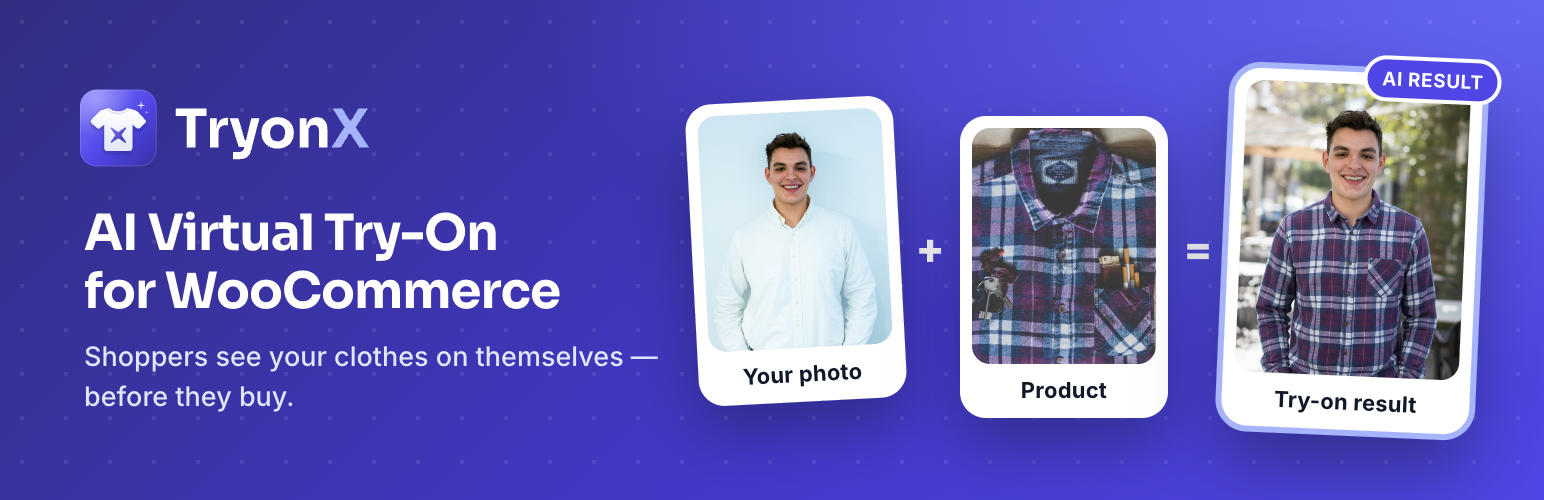
TryonX 是一款專為 WooCommerce 設計的 AI 虛擬試穿外掛,讓顧客能夠上傳照片,立即看到服裝在自己身上的效果。此外掛簡單易用,無需重建佈景主題,幫助商家提升轉換率、減少退貨率,並提供更佳的購物體驗。
【主要功能】
• AI 虛擬試穿:使用 Google Gemini 2.5 Flash Image 提供真實感的服裝視覺化
• 一次上傳,多件商品:可在一次上傳後試穿整個目錄類別
• 批量試穿:建議相似商品,顧客可立即測試
• 前後比較:滑動條和並排視圖驚艷顧客
• 一鍵加入購物車:從試穿結果直接購買
• 支援變數產品:正確顯示不同尺寸和顏色的服裝圖像
外掛標籤
開發者團隊
② 後台搜尋「TryonX – AI Virtual Try-On for WooCommerce」→ 直接安裝(推薦)
原文外掛簡介
Turn your WooCommerce store into an AI fitting room.
TryonX adds a “Try On” button to product pages so customers upload a photo and instantly see how your apparel looks on them — powered by Google Gemini 2.5 Flash Image AI. No app. No custom theme rebuild. Install, connect your API key, and start offering virtual try-on for WooCommerce in minutes.
Shoppers buy with confidence. You sell more. Returns drop. That is the promise of AI try-on for online fashion — and TryonX brings it to WordPress stores of every size.
Why WooCommerce stores install TryonX
Higher conversion — Customers who visualize a fit are more likely to add to cart.
Fewer “will it fit?” doubts — Answer the #1 question in fashion e-commerce before checkout.
Lower return rates — Better expectations mean fewer size and style surprises.
Shareable moments — Results can be shared on social media; your products get organic reach.
Works on mobile — Most fashion traffic is mobile; TryonX is built mobile-first.
Analytics built in — See which products get the most try-ons and measure engagement.
Who is this plugin for?
Fashion & apparel WooCommerce stores (tees, hoodies, dresses, jackets, activewear)
Boutiques & DTC brands that want a premium, interactive product experience
Agencies building modern WooCommerce sites with Elementor, Divi, or block themes
Merchants ready to differentiate with AI-powered virtual fitting without enterprise pricing
Features: AI virtual try-on for WooCommerce product pages
AI virtual try-on — Photorealistic garment visualization with Google Gemini 2.5 Flash Image
One photo, many products — Session memory: upload once, then try other products for 24 hours
Try more products — A grid of similar items from the same category that shoppers can test without re-uploading
Before / after compare — Slider and side-by-side views of the shopper’s photo and the try-on result
Garment image picker — Shoppers choose which product photo (featured, gallery, or your custom garment image) is sent to the AI
Variable products — One selector per attribute (Size, Color, …) so the result screen adds the right variation to the cart
Add to cart from results — Close the loop from try-on to purchase in one click
Download and share — Shoppers can save the result or share it to Facebook, X, or Pinterest
Per-product controls — Enable or disable try-on per product and set a dedicated flat-lay garment image
Shortcode — [tryonx] or [tryonx product_id="123"] for landing pages and page builders
Privacy controls — Consent checkbox, shopper “Remove my photo” button, automatic deletion of generated images, optional login-only mode, IP anonymization, and WordPress privacy-tool support
Cost controls — Per-shopper hourly limit plus a store-wide daily cap on generated images
Analytics dashboard — Try-on counts, success rate, add-to-carts, orders and revenue from tried-on products, failure reasons, top products, daily chart, and a WordPress dashboard widget
Shop & category pages — Optional Try On button under each product in product grids
Easy setup — Guided checklist, one-click API connection test, “all products” switch, bulk enable/disable from the Products list
Cache-friendly — No cookie until a shopper uses try-on, and nothing visitor-specific in the page HTML
Theme-friendly — Works with Hello Elementor, Divi, and block themes
Developer hooks — Filters and actions for custom integrations
Accessibility
The try-on window is announced to screen readers as a modal dialog with a title, and closes with the Escape key.
Upload, Generate, Compare, Download, Share, and Add to cart are native buttons and links that can be reached with the Tab key. Focus moves into the window when it opens, stays inside it, and returns to the Try On button when it closes.
Product, saved-photo, and before/after images carry text alternatives.
Errors and status are shown as text messages, not by color alone.
Every label, button, and message is translatable (text domain tryonx).
How virtual try-on works (3 steps)
Shopper uploads a photo on your WooCommerce product page (JPEG, PNG, or WebP — large phone photos are resized in the browser automatically).
TryonX sends the photo + product image to Gemini AI and generates a realistic try-on result.
Customer compares, downloads, shares, or adds to cart — then tries more products without re-uploading.
Setup in under 5 minutes
Install TryonX and activate WooCommerce.
Go to WooCommerce → Virtual Try-On.
Paste your Google AI Studio API key.
Click Test connection, then turn on All products or select clothing categories (or enable per product).
Publish — the Try On button appears on eligible products.
Requirements
WordPress 5.6+ (tested up to 7.1) and WooCommerce 5.0+ (tested up to 10.8, required)
PHP 7.2+
Google Gemini API key with access to a Gemini image model — gemini-2.5-flash-image by default, changeable under AI model in the settings (paid plan required for image generation — see Google AI Pricing)
Outbound HTTPS from your server to Google’s API
Product featured image (or custom garment image per product)
Best for: Clothing and apparel. Other product types may be supported in future updates.
Note: Image generation uses Google’s Gemini API. You control your API key and usage costs. Photos are processed only when a customer clicks Generate.
External services
This plugin connects to Google’s Gemini AI API to generate virtual try-on images when a shopper uses the feature.
What data is sent:
The customer’s uploaded photo and the WooCommerce product (garment) image
Data is sent only when the customer clicks Generate
Your API key and the model name are sent when you click Test connection in the settings
Images are transmitted over HTTPS (Base64 in the API request)
API endpoint: https://generativelanguage.googleapis.com/v1beta/models/{model}:generateContent (default model: gemini-2.5-flash-image)
Data handling:
Temporary processing files are deleted after use
Generated try-on images are saved in your WordPress uploads folder and deleted after 30 days by default (configurable)
Session photos expire after 24 hours, and shoppers can remove theirs at any time
Photos are re-encoded on your server before use, which strips EXIF data such as GPS location
Google’s retention policies apply to API requests — see their terms below
Service provider: Google LLC
Google AI Terms of Service
Google Privacy Policy
Usage
Show the Try On button on WooCommerce product pages
Go to WooCommerce → Virtual Try-On and tick the product categories that should offer try-on.
The Try On button appears automatically on every eligible single product page. Change its label, position, and colour under Display, and optionally show it on shop and category pages too.
Enable or disable try-on for one product
Edit the product, open Product data → Virtual Try-On, and choose Enabled or Disabled to override the category setting. Add a garment image here if your featured image is a lifestyle shot — a clean flat-lay or front-facing product photo gives the best AI results.
Add try-on to any page with the shortcode
[tryonx] — on a product page, shows the button for the current product
[tryonx product_id="42"] — shows the button for product 42 on any page, post, or page-builder layout
[tryonx product_id="42" label="See it on you"] — sets a custom button label
What shoppers do
Click Try On and upload a photo (JPEG, PNG, or WebP; big photos are resized automatically).
Pick a product image if the product has more than one, then click Generate.
Compare before and after, download or share the result, add the product to the cart, or try another product without uploading again.
Tips for better try-on results
Ask shoppers for a well-lit, front-facing photo that shows the upper body.
Use garment images with a plain background and the whole item visible. Flat-lay or on-hanger photos work best; a photo of a model wearing the item can confuse the AI, so add a dedicated garment image for those products.
Review WooCommerce → Virtual Try-On → Analytics to see which products are tried most and how often generation succeeds.