內容簡介
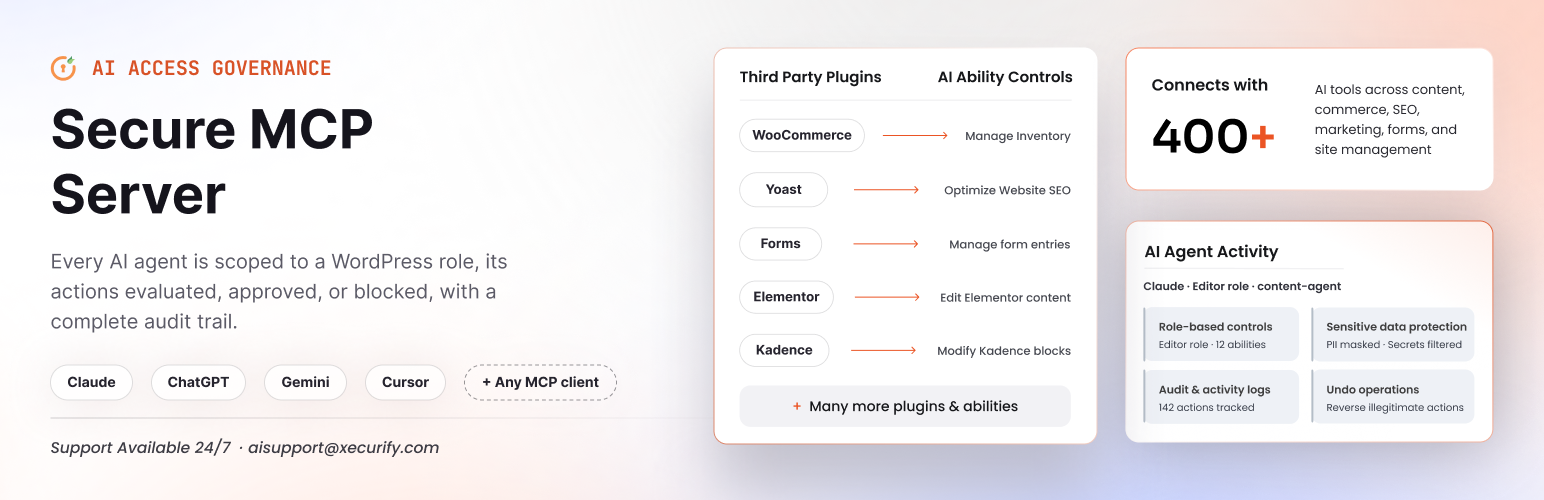
miniOrange Secure MCP Server 是一款完整的 WordPress MCP 伺服器外掛,能將您的 WordPress 網站轉換為一個功能完善的模型上下文協議 (MCP) 伺服器。安裝後,您可以在短短 2 分鐘內將 Claude、ChatGPT 或任何兼容的 AI 連接至 WordPress。
【主要功能】
• 426 種 MCP 工具,涵蓋多個類別
• 角色基礎的 AI 權限管理
• 自主託管的 OAuth 2.1 登入
• 完整的活動日誌記錄
• 安全的主題與代碼編輯功能
外掛標籤
開發者團隊
② 後台搜尋「Secure MCP Server for Claude, ChatGPT, Gemini and other AI Agents」→ 直接安裝(推薦)
📦 歷史版本下載
原文外掛簡介
miniOrange Secure MCP Server is a complete WordPress MCP server plugin that turns your WordPress site into a fully working Model Context Protocol (MCP) server. Once installed, you can connect Claude to WordPress, connect ChatGPT to WordPress, or link any MCP-compatible AI in just 2 minutes.
Ask AI to write blog posts, edit Elementor and Kadence page layouts, manage custom post types and their custom fields, upload media, update WooCommerce products, manage Yoast SEO, moderate comments, handle contact form submissions, and much more, all through simple chat. With Governed REST API Access, AI can even use REST endpoints from your other plugins, under the same permissions.
Unlike other WordPress MCP server plugins that give AI full admin access, we put you in complete control. Role-based AI permissions, Turn each tool on or off, self-hosted OAuth 2.1 login, and full activity logs are all included, with no restrictions.
Quick Links
Official Website | ChatGpt Setup Guide | Claude Setup Guide | Documentation | Book a Demo
Key Features of the Secure WordPress MCP Server
Built security-first, so you can let AI work on a live site with confidence:
Every user connects their own AI – each person uses their own ChatGPT or Claude, limited to the tools you allow their role.
479 MCP tools in 33 categories – WordPress core, the block editor, menus and widgets, WooCommerce, Yoast SEO, Rank Math, Advanced Custom Fields, Elementor, Kadence, Contact Form 7, WPForms, Gravity Forms, Fluent Forms and more.
Block-by-block page editing – AI changes one heading, paragraph or button and leaves the rest of the page exactly as it was.
Changes show straight away – page caches are cleared automatically after every AI change, and drafts can be shared with an expiring preview link.
Governed REST API access – AI can use any WordPress REST endpoint, including those from your other plugins, with route-by-route, role-based permissions.
Agent Registry – decide, per WordPress role, exactly which tools an AI agent can use.
Self-hosted OAuth 2.1 with PKCE – the AI never sees your WordPress password.
Every call checked against WordPress capabilities – an AI can never do more than its user can do in wp-admin.
Full audit log – every call, allowed or refused, is recorded.
Safe theme and code editing – changes go to a draft, are syntax-checked and previewed, and publish with automatic backup and rollback.
Built-in troubleshooting – a Troubleshooting page finds out why an AI client can’t connect and tells you what to fix.
Everything runs on your own server. No third-party relay sits between your AI client and your site. When you connect through the miniOrange Gateway, your AI client’s requests pass through the gateway on their way to your site; the tools still run, and every permission is still checked, on your own WordPress site.
How to Install the WordPress MCP Server (2 Minutes)
Log in to your WordPress admin dashboard.
Go to Plugins → Add New.
Search for Secure MCP Server.
Click Install Now, then Activate.
Create Your First AI Agent
Open Secure MCP Server from the WordPress admin sidebar.
Click Register your first agent.
Enter an agent name and click Next.
Choose which abilities each user role can use, then click Create & Continue.
Click Continue. You’ll see Connect your AI client.
How to Connect ChatGPT to WordPress
Under Connect your AI client, select ChatGPT. A setup panel opens.
Copy Your Site URL from the panel.
Click the MCP Server for WordPress link in the panel. It opens the app in ChatGPT.
Click Install Plugin.
Enter your WordPress Site URL and click Continue.
Click Allow Access. Now start chatting with your site through ChatGPT.
Full guide: Set up ChatGPT with WordPress using MCP
Each team member can connect their own ChatGPT the same way.
How to Connect Claude to WordPress
Under Connect your AI client, select Claude. A setup panel opens.
Open the connector page miniOrange MCP for WordPress and click Connect.
Enter your site’s address. You’ll land on the sign-in gateway — paste your site’s URL there.
Log in with your WordPress account and click Allow access. Your approved tools now appear in Claude – start chatting with your site.
Full guide: Connect WordPress with Claude using MCP
Video: Connect Claude to WordPress Using Secure MCP Server
Connect Gemini, Cursor, Windsurf & Any MCP Client
The plugin follows the open Model Context Protocol standard, so it works with Gemini, Cursor, Windsurf, and any MCP-compatible client. Connect several AI clients at once, each with its own permissions and audit trail.
Your MCP server endpoint:
https://gateway.miniorange.ai/v2/mcp
What Your AI Agent Can Do
479 tools in 33 categories. Integration tools appear only when the related plugin is active.
WordPress Content
Posts & Pages (56 tools) – Create, publish, schedule, duplicate, set templates and featured images, trash and restore.
Categories, Tags & Media (45 tools) – Manage taxonomies, upload media from a URL or file, update alt text and captions, crop and resize images.
Revisions (9 tools) – List, compare and restore revisions and autosaves.
Comments (21 tools) – Moderate, reply, search, mark spam and view counts.
Custom Post Types & Fields (19 tools) – Discover any custom post type and edit its items, terms and fields.
Content Find & Replace (6 tools) – Change part of a post, custom field or setting without rewriting it.
Block Editor (12 tools) – Edit one block at a time: change its text or settings, insert, move, duplicate and delete blocks and patterns, and detach synced patterns.
Preview Links (2 tools) – Expiring links to share a draft without signing in.
Users & Site Management
Users & Roles (38 tools) – Create users, assign roles, update profiles, send password reset links.
Settings, Plugins, Themes & Updates (34 tools) – Site title, tagline, homepage, timezone, plugin activation and updates, auto-updates, site health.
Maintenance (8 tools) – Clear caches, refresh permalinks, run cron events, read the error log.
Theme Editing (41 tools) – Block templates, global styles, patterns and theme files, logo, site icon, Additional CSS and Customizer settings, with draft, preview, publish and restore.
Menus & Navigation (16 tools) – Build and reorder menus, assign locations, and edit block-theme Navigation menus.
Widgets & Sidebars (8 tools) – Add, update, move and delete widgets, including block widgets.
Site Overview (1 tool) – Tells the AI how your site is built and which tools it may use.
Plugin Integrations
WooCommerce (41 tools) – Products, orders, refunds, customers, coupons and sales reports.
Advanced Custom Fields (25 tools) – Field groups, repeaters, flexible content, relationships, options pages.
Yoast SEO & Rank Math (15 tools) – SEO titles, meta descriptions, focus keywords, canonicals, schema, Open Graph.
Forms & Leads (54 tools) – Contact Form 7 (Flamingo), WPForms, Gravity Forms and Fluent Forms entries, with CSV export.
Elementor (10 tools) – Read, edit, style, move and duplicate Elementor elements
Divi 4 & Divi 5 – Read and edit Divi Builder layouts, modules, text, images and styling. Divi support is part of the Pro plan.
Kadence Blocks (18 tools) – Build Kadence pages, insert rows, columns, headings, buttons and images.
Governed REST API Access: Go Beyond Built-in Tools
AI can use any WordPress REST API endpoint – core, WooCommerce, Yoast or any other plugin – with no plugin update needed.
Read-only by default – a new AI agent can read posts, pages and media; any write needs your approval.
Granular control – allow each route and method (read or write) per user role, all logged.
Site-wide write switches – turn all create, update or delete REST calls off for the whole site in one click.
Dangerous routes stay blocked – plugin and theme installs, activations, batch and blueprint-import routes can never be granted.
WooCommerce MCP Server
Run your store through chat. Create and update products, attributes, categories and tags. Look up, create and update orders, change order status, add order notes and issue refunds. Manage customers, view purchase history and customer segments, and create or update coupons. Get sales, orders, products, customers, coupon usage and top-seller reports.
SEO MCP: Yoast SEO & Rank Math
Bulk-update SEO titles and meta descriptions, set focus keywords, mark cornerstone content, and control robots meta, advanced robots directives, canonical URLs, breadcrumb titles and sitemap inclusion. Manage Open Graph, Twitter/X cards and schema types. Rank Math SEO metadata is supported too.
Advanced Custom Fields (ACF) MCP
Read and update any ACF field value, in bulk or one at a time. Work with repeater rows, flexible content layouts, relationship fields and options pages. Create field groups, add fields, update location rules, check conditional logic, and validate a value before it is saved. You can also search posts by ACF field value.
Page Builder MCP: Elementor, Divi & Kadence
Elementor: read a page layout, change element text, images, links and styling without breaking the design, move, duplicate or delete elements, look up widget schemas and preview the rendered result.
Divi 4 & Divi 5: read Divi Builder layouts and update modules, text, images, links and styling through chat, without opening the visual builder. (Pro plan.)
Kadence Blocks: build new Kadence layout pages, insert rows, columns, headings, buttons, icons and images, update block text and styling, and set page layout options.
Forms & Leads MCP
Work with Contact Form 7 (via Flamingo), WPForms, Gravity Forms and Fluent Forms. List forms and fields, read and count entries, mark them read or unread, trash, restore or delete them, and export entries as CSV. Inspect form settings and notifications, and for Fluent Forms you can create, update and test notifications and confirmations.
Safe Theme & Code Editing
AI can now edit your theme safely:
Edit block templates, template parts, global styles, style variations and patterns.
Read, search and edit theme files – PHP, CSS, JavaScript and theme.json.
Nothing touches the live site directly. Every change goes into one private draft.
PHP is checked for syntax errors, JSON for validity, and templates for broken blocks before a change is accepted.
Preview the draft, and test that the site still loads before it goes live.
Publishing takes an automatic backup. If the site fails, everything rolls back automatically.
Undo any publish later with one restore.
Site Management & Maintenance
Update site title, tagline, homepage, posts page, timezone and privacy page. List, activate, deactivate and update plugins and set auto-updates. Check WordPress core, plugin and theme updates, site health and server information. Clear caches, refresh permalinks, inspect and run scheduled (cron) events, and read the site error log to troubleshoot problems.
Smart Content Editing
Find & replace inside posts, custom fields and settings – change one sentence without rewriting the whole page.
Page lock – edits are refused if the page changed after the AI read it.
Revision restore – roll back any post to an earlier version.
Agent Registry: Role-Based Access for Every AI Agent
The Agent Registry controls what each AI agent may do.
Create named agent policies that map WordPress roles to allowed tools.
Tools outside a role’s grant are hidden from the AI client and cannot be called.
Turn an agent on or off without losing its configuration.
Revoke an AI client’s access instantly.
Use the role/ability matrix editor to manage everything in one place.
So an editor’s AI can write content but cannot install plugins, and a shop manager’s AI can update orders but cannot touch site settings.
Troubleshooting: Find Out Why an AI Client Can’t Connect
If an AI client can’t reach your site or sees no tools, open the Troubleshooting tab. The plugin checks your site and the connection from outside, and shows only the problems that are likely to be real.
Each problem is explained in plain language, with who can fix it and the exact change to make.
Detects firewall, CDN, caching and reverse-proxy issues, and servers that strip the Authorization header.
Copy-paste Apache and Nginx fixes for the most common causes.
Copy for support gives you a redacted report to send to our team.
Three Layers of Security on Every Call
The connection is a real WordPress user. OAuth 2.1 (PKCE) tokens are bound to the user who approved the connection and to your site. Expired, revoked or wrong-site tokens are refused.
Role-scoped AI grants. Only the tools allowed for that role through the agent Registry are visible and callable.
WordPress capability checks. Each call is checked exactly like wp-admin, down to the individual post, page, comment
Plus:
Per-tool on/off toggles for every tool. Tools are switched on or off per agent and per WordPress role in the Agent Registry.
Prompt-injection detection and behavioral anomaly detection.
Rate limits and quotas per AI client, enforced by the miniOrange Gateway.
Data rules & DLP that mask emails, phone numbers and secrets (Business plan; you define the rules).
Human-in-the-loop approval for sensitive actions (Business plan).
Clear answers when a tool is off – the AI is told the tool is switched off for the role, not that it does not exist.
Destructive actions need confirmation, and every tool tells the AI client whether it is read-only or destructive.
Activity audit log that records the user, AI identity, client, tool, outcome and time, filterable by agent, status, tool, user and date.
Dashboard & Monitoring
See active agents, executions, success rate and latency at a glance. Members can open “Your AI Access” to see which tools their role allows and how to connect.
Example Prompts
“Write a blog post about our summer sale, add it to the News category and schedule it for Monday 9 AM.”
“Find all products under ₹500 and put them on a 20% sale until Sunday.”
“Write meta descriptions for every post that doesn’t have one.”
“Export this month’s Gravity Forms entries as CSV.”
“Change the footer text in my theme, preview it, then publish.”
“Why aren’t my scheduled posts publishing? Check cron and the error log.”
“Use the REST API to list this week’s bookings from my booking plugin.”
“Change the heading in my homepage hero to ‘Spring Collection’.”
“Add our new Pricing page to the main menu, right after About.”
Need Help?
Ask in the support forum – our team responds quickly. For private or enterprise questions, email [email protected] or use the Contact Support button inside the plugin.