
內容簡介
總結:Magic Text Block是一個WordPress外掛程式,可為您的Gutenberg編輯器增添強大的文本格式選項,超越標準功能。這個外掛程式將創意排版和樣式直接帶入您的內容創建流程中。
問題與答案:
1. Magic Text Block主要提供了哪些功能?
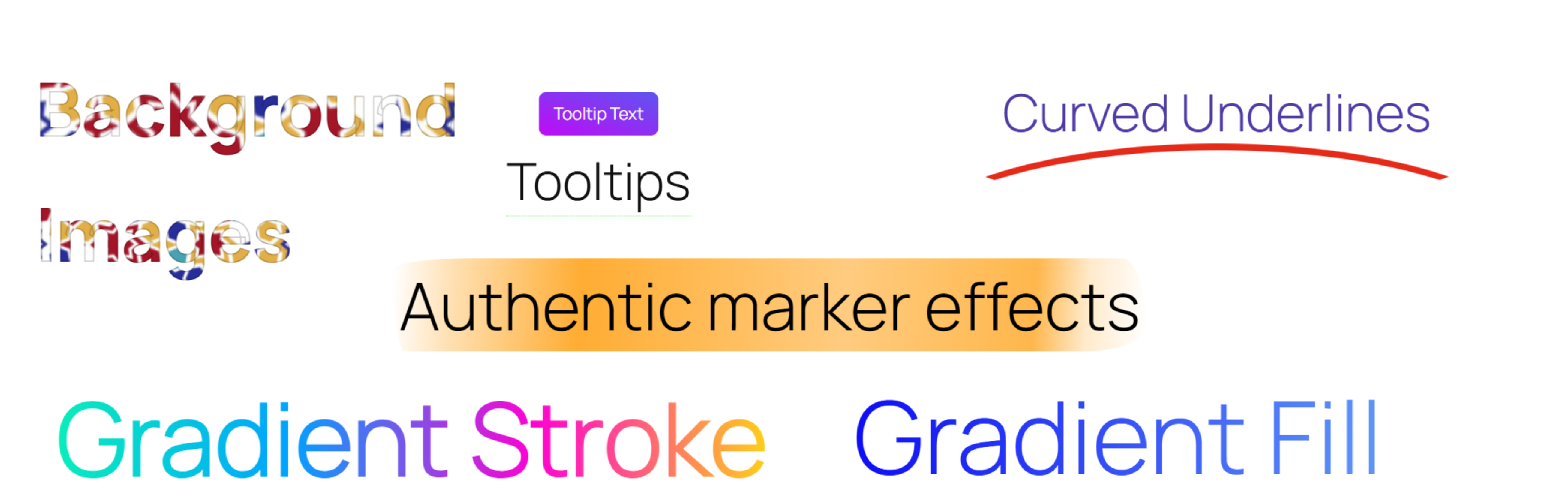
- Gradient Stroke Text:將美麗的漸變邊框應用到您的文本上,引人注目,使標題更加突出。
- Gradient Text Color:將普通文本轉換為色彩流暢從一種顏色流向另一種的充滿活力的漸變色填充。
- Post Theme Selector:將自定義主題(Dark、Light、Milkshake、Popsicle)應用於個別文章或頁面,為不同內容創建獨特的視覺體驗。
- Text Background Image:從媒體庫中選擇圖像,應用為文本背後的特定部分背景,創建引人注目的視覺效果。
- Underline Effects:應用具有可自定義顏色的裝飾性彎曲下劃線效果,以突出重要文本。
2. Magic Text Block適用於哪些人?
- 對於希望使其內容脫穎而出而不需任何編碼知識的部落客、設計師和內容創作者來說是完美的選擇。
3. Magic Text Block是否與所有WordPress主題兼容?
- 是的,Magic Text Block與所有WordPress主題兼容,並且與Gutenberg區塊編輯器無縫合作。
外掛標籤
開發者團隊
② 後台搜尋「Magic Text Block — Styles & Effects: Gradients and Tooltips」→ 直接安裝(推薦)
原文外掛簡介
Magic Text Block enhances your WordPress Gutenberg editor with powerful text formatting options that go beyond the standard capabilities. This plugin brings creative typography and styling directly to your content creation workflow.
Key Features:
Gradient Stroke Text: Apply beautiful gradient borders to your text that catch the eye and make headlines pop.
Gradient Text Color: Transform ordinary text with vibrant gradient color fills that flow smoothly from one color to another.
Post Theme Selector: Apply custom themes (Dark, Light, Milkshake, Popsicle) to individual posts or pages, creating unique visual experiences for different content.
Text Background Image: Select images from your media library to apply as backgrounds behind specific portions of text, creating striking visual effects.
Underline Effects: Apply decorative curved underline effects with customizable colors to highlight important text.
Tooltip Text: Add customizable tooltip bubbles to text with your own message, background color, and text color—great for inline explanations or quick hints.
Unstyle Text: Remove all formatting from selected text instantly.
Realistic Text Marker: Highlight text with authentic marker effects using 8 handcrafted styles (uneven, thick, messy, double, faded, wavy, textured) that simulate real highlighter strokes.
Perfect for bloggers, designers, and content creators looking to make their content stand out without requiring any coding knowledge. Simply select your text and apply the formatting options from the text toolbar.
Compatible with all WordPress themes and works seamlessly with the Gutenberg block editor.
This plugin’s code is available on GitHub. Please feel free to fork the repository and send a pull request. If you find a bug in the plugin, open an issue.
Video Tutorial
Watch our step-by-step guide on how to apply Magic Text Block formatting in WordPress! Learn how to enhance your text with gradient effects, background images, and stylish underlines.
📺 Watch the tutorial here:
Demo














