內容簡介
使用 Linkrex 來為您的 WordPress 網站賺錢吧。官方外掛可以讓用戶賺取更多收益。
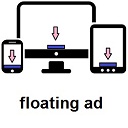
連結收益(當訪客點擊您網站上的鏈接時,顯示橫幅廣告頁面)。
設置
設置該外掛非常簡單,只需花費幾分鐘的時間即可在您的網站上提供連結收益服務:
在 Linkrex (https://linkrex.net/auth/signup) 上註冊。
在您的 WordPress 網站上安裝該外掛。
現在前往“設置”,選擇 Linkrex 設置。
現在您將會在外掛設置中看到有三個選項。
Token Key:(重要)
Domain:(重要)
Patterns:(可選)
您可以在這裡獲取您的 Token Key (https://linkrex.net/member/tools/quick)。
現在在第二個框中輸入您的預設網站地址,或僅輸入那些您不想縮短的網域。
跳過第三個框(僅限高級用戶)。
保存配置。
完成!! 該外掛已經啟動運行。
登錄 Linkrex 儀表板即可實時追蹤您的收益。
外掛標籤
開發者團隊
原文外掛簡介
Monetize your WordPress site with Linkrex. The official plugin allow users to earn more money.
Links monetization (displays an banner ad page when visitors click through links on your website).
Configuration
Setting up the plugin is super simple and it takes just a couple of minutes to start serving monetized links on your website:
Sign up for Linkrex (https://linkrex.net/auth/signup).
Install the plugin on your WordPress website.
Now goto the ‘Settings’ and select Linkrex Settings.
Now you will see there are 3 options in the Plugin settings.
Token Key: (Important)
Domain: (Important)
Patterns: (Optional)
You can get your token key here (https://linkrex.net/member/tools/quick).
Now in second box enter your default website address or just put those domains which you do not want to short.
Skip the third box (only for advance users).
Save configuration.
Done !! The plugin is up and running.
Track your earnings in real-time by logging into the Linkrex dashboard.