內容簡介
總結文案:
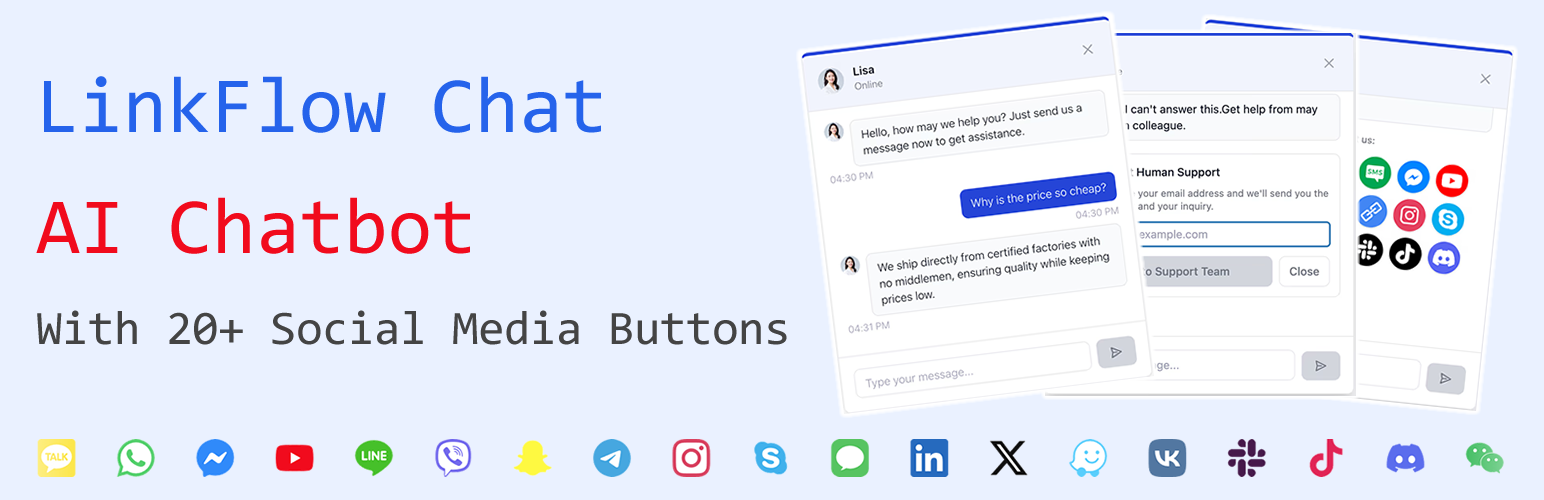
LinkFlow 將像 ChatGPT 這樣的先進人工智慧整合到 WordPress 中,進行智能對話。必要時,它可以順暢地轉接到 WhatsApp 和社交平台,不僅提高滿意度,還有助於增加您的追隨者數量和社區。
問題與答案:
1. LinkFlow是使用什麼樣的AI來進行智能對話的?
- 答:LinkFlow使用像ChatGPT和領先的LLMs這樣的先進AI Chatbot技術。
2. LinkFlow可以連接到多少個社交平台?
- 答:LinkFlow可以連接到20多個社交平台,包括WhatsApp、Messenger、Telegram等。
3. LinkFlow提供哪些功能以維護對話的自然流?
- 答:LinkFlow提供上下文感知對話、預設的Q&A管理以應對常見問題,以及智能轉接選項,可以在AI和人力支援之間智能切換。
4. LinkFlow適用於哪些使用情境?
- 答:LinkFlow適用於電子商務(幫助產品信息、指導購買和提供24/7支援)、企業網站(回答服務問題和收集客戶信息)、博客(推薦相關內容並回答讀者常見問題)以及專業服務(協助預訂、提供服務信息和回答客戶問題)等情境。
5. LinkFlow為什麼特別?
- 答:與傳統的支援外掛不同,LinkFlow Chat提供了AI + 社交媒體 + 人力協作,一站式解決方案。無需編碼,您可以免費開始使用。
外掛標籤
開發者團隊
② 後台搜尋「LinkFlow Chat – AI Chatbot With Social Media Buttons」→ 直接安裝(推薦)
原文外掛簡介
LinkFlow integrates advanced AI like ChatGPT into WordPress for smart conversations. It seamlessly hands off to WhatsApp and social platforms when needed, not only boosting satisfaction but also helping you grow your follower count and community.
Key Features:
🤖 AI Chatbot Powered by ChatGPT and Leading LLMs
🌐 Connect to 20+ Social Platforms like WhatsApp, Messenger, Telegram, and more
🧠 Context-Aware Conversations to maintain natural flow
📋 Preset Q&A Management for FAQs and common questions
🔗 Shareable Chat History Links for seamless agent handoff
🔁 Smart Handoff Options between AI and human support
🎨 Custom Appearance Settings for colors, position and icon
⚙️ Flexible Deployment: floating button or embedded anywhere
🌍 Multilingual Support with auto language detection
Use Cases:
🛍️ E-commerce: Help with product info, guide purchases, and 24/7 support
🏢 Corporate Sites: Answer service questions and collect leads
✍️ Blogs: Recommend related content and answer reader FAQs
👩⚖️ Professional Services: Assist with bookings, service info, and client questions
Why LinkFlow Chat?
Unlike traditional support plugins, LinkFlow Chat offers AI + Social Media + Human Collaboration in one package. No coding required, and you can start for free!
License
This plugin is licensed under the GPLv2 or later. See https://www.gnu.org/licenses/gpl-2.0.html.
Support
Visit https://linkflow.chat or contact us at [email protected] for help.
External services
This plugin connects to third-party AI and supporting services to provide its functionality. We disclose what is used, what is sent, and when, so you can make informed decisions.
OpenAI API (api.openai.com)
What it is used for: Generates AI chat replies when OpenAI is selected as the provider.
What data is sent: Conversation messages (roles and content, including the current user question, prior context you configure, and a system prompt containing your knowledge base), model parameters (model, max_tokens, temperature). Your API key is sent in the Authorization header.
When data is sent: When a chat reply is requested or when you run the “Test connection” in settings.
Terms of use: https://openai.com/policies/terms-of-use
Privacy policy: https://openai.com/policies/privacy-policy
Anthropic Claude API (api.anthropic.com)
What it is used for: Generates AI chat replies when Claude is selected as the provider.
What data is sent: Conversation messages (system, user, assistant), model parameters (model, max_tokens, temperature). Your API key is sent via the x-api-key header; anthropic-version header identifies the API version.
When data is sent: When a chat reply is requested or when you run the “Test connection” in settings.
Terms of use: https://www.anthropic.com/legal/terms
Privacy policy: https://www.anthropic.com/legal/privacy
DeepSeek API (api.deepseek.com)
What it is used for: Generates AI chat replies when DeepSeek is selected as the provider.
What data is sent: Conversation messages (roles and content), model parameters (model, max_tokens, temperature). Your API key is sent in the Authorization header.
When data is sent: When a chat reply is requested or when you run the “Test connection” in settings.
Terms of use: https://www.deepseek.com/terms
Privacy policy: https://www.deepseek.com/privacy
Freemius SDK (freemius.com)
What it is used for: Licensing, upgrades, and WordPress.org compliance flows for the plugin. The SDK is bundled and may communicate with Freemius if you opt into relevant functionality.
What data is sent: As part of licensing/updates/opt-in flows, standard site and plugin metadata may be transmitted in accordance with their policies. This plugin sets the SDK to WordPress.org compliant mode.
When data is sent: During activation/upgrade/licensing flows or when you choose Freemius-powered features.
Terms of use: https://freemius.com/terms/
Privacy policy: https://freemius.com/privacy/
Notes:
– You can choose which AI provider to use in settings and supply your own API key. Requests are sent directly from your WordPress site to the selected provider’s API endpoint that you configure (default endpoints listed above).
– Conversation content you submit may be processed by the selected AI provider per their terms. Do not include sensitive personal data unless you have consent and a lawful basis.
– If you disable QR code features or ensure a local QRCode script is present, CDN requests are not made.
Source code and build
This plugin includes human-readable source code for any compiled/minified frontend assets to comply with the WordPress.org guideline.
Frontend chat widget (compiled to assets/dist/):
Source: frontend/src/ (TypeScript/React)
Build config files included: frontend/package.json, frontend/vite.config.ts, frontend/tsconfig.json, frontend/tsconfig.node.json, frontend/postcss.config.js, frontend/tailwind.config.js, frontend/pnpm-lock.yaml, and related styles like frontend/index.css (when present)
Build output: assets/dist/
Admin UI scripts and styles:
Human-readable JavaScript: assets/admin/js/*.js
Human-readable CSS: assets/admin/css/*.css
Build instructions (optional – only needed if you want to rebuild the frontend bundle):
Ensure Node.js 18+ and npm are installed.
From the plugin directory, run:
cd frontend
npm install
npm run build
The production assets will be generated into assets/dist/ per vite.config.ts.
Notes:
– We do not ship node_modules/ in the plugin package. The included frontend/ directory contains only the source and configuration files needed to reproduce the build.
– Third-party libraries used by the frontend include React and qrcode. Their source and licenses are available in their respective repositories.