內容簡介
InkPanda 是一款專為 WooCommerce 設計的產品設計與 POD 自訂外掛,讓顧客能輕鬆個性化產品,並生成可供生產的藝術作品。它簡化了訂單處理流程,適合各類型的個性化商品。
【主要功能】
• 讓顧客個性化產品
• 生成可供生產的藝術作品
• 支援多種履行提供商
• 可對自訂產品收取額外費用
• 提供上傳圖像的品質指導
• 適用於變數產品
外掛標籤
開發者團隊
② 後台搜尋「InkPanda – Product Designer & POD Customizer for WooCommerce」→ 直接安裝(推薦)
原文外掛簡介
InkPanda helps WooCommerce stores sell personalized products without making the setup feel complicated.
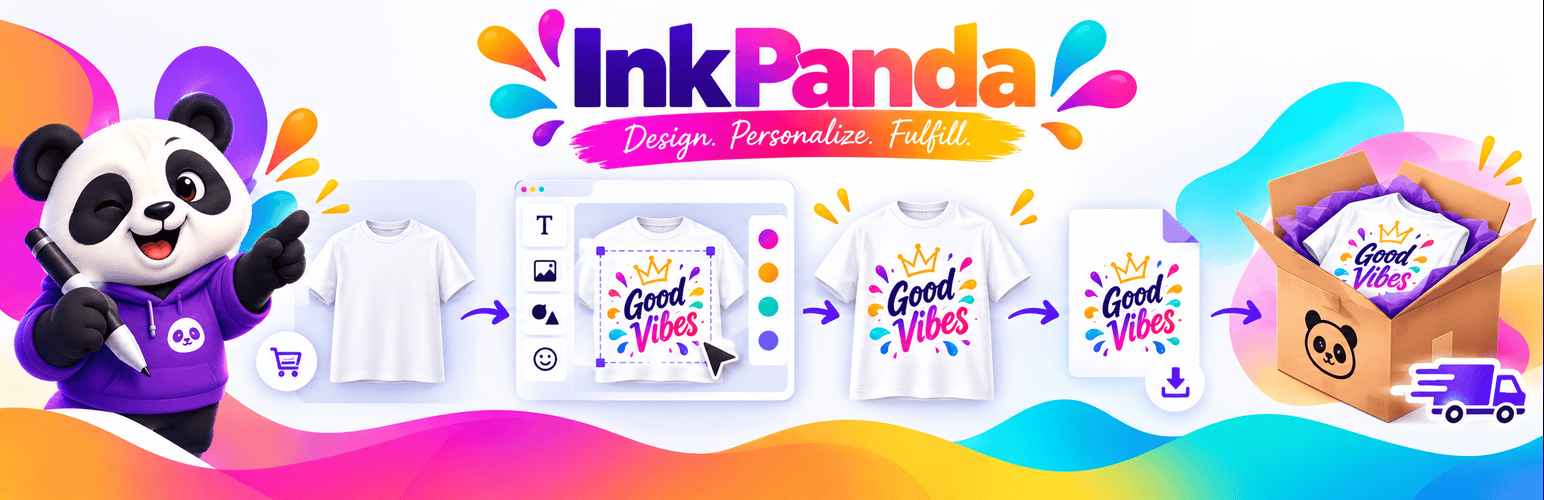
Customers can add their own text, images and simple design elements directly on the product’s customizer, see how their customization looks, and add the finished product to the cart.
On the merchant side, InkPanda keeps the important production information together, creates print-ready artwork, and helps you move the order toward fulfillment with Printful, Printify, Gelato, a local print shop, or another print-on-demand provider.
It is designed to be useful from day one.
What you can do with InkPanda
Let customers personalize products
Give customers an easy visual editor directly from your WooCommerce product page.
They can:
Upload their own images
Add and edit text
Use different fonts and colors
Add basic shapes
Move, resize and rotate design elements
Change layer order
Duplicate elements
Undo and redo changes
Customize as many named product surfaces as you need
Preview their design before ordering
InkPanda is fully responsive, so customers can personalize products from everywhere!
Prepare artwork for production
Once an order is placed, InkPanda keeps the design linked to the WooCommerce order and generates print-ready artwork for production.
You can easily access:
Customer preview
Print-ready artwork
Original uploaded files
Product and variation information
Surface dimensions
Design information
Quality guidance
This makes it much easier to take a customized WooCommerce order and move it into your fulfillment workflow.
Built for print-on-demand workflows
InkPanda can be used with different fulfillment providers.
You can choose one between:
Printful
Printify
Gelato
Another provider or local print shop
Choose one active fulfillment provider and change it later without changing historical orders. Printful can create a draft order when you explicitly choose that action. Printify, Gelato, and other providers use guided manual fulfillment with InkPanda’s print-ready artwork. InkPanda does not claim endorsement or partnership with any provider.
Charge for personalization
Want to charge extra for customized products?
InkPanda lets you add a simple customization surcharge to a WooCommerce product!
Supports variable products
InkPanda works with WooCommerce variable products.
Different variations can use different product images and configuration, making it suitable for products with different:
Colors
Sizes
Styles
Mockups
Quality guidance for uploaded artwork
Customers do not always know whether an image is suitable for printing.
InkPanda provides clear quality guidance based on the configured print size, helping reduce low-resolution artwork before it reaches production.
Designed with performance in mind
WooCommerce stores often already use many plugins, so InkPanda is designed to avoid adding unnecessary weight to the rest of your website.
The editor is loaded only when and where it’s needed.
Translation ready
InkPanda follows the standard WordPress translation system and is ready to be translated through WordPress.org. It is also designed to work correctly in multilingual WooCommerce environments.
Great for
InkPanda can be useful for stores selling:
Custom t-shirts
Hoodies
Mugs
Tote bags
Posters
Personalized gifts
Team products
Workwear
Event merchandise
Print-on-demand products
Branded products
Custom promotional items
Privacy and control
InkPanda doesn’t automatically send customer orders to production.
Provider actions remain under merchant control.
If you choose to suggest a new fulfillment provider, that name is saved on your site only with your explicit permission. InkPanda does not send it automatically.
Need a provider that is not listed?
Choose Another provider during setup.
You can still use InkPanda’s print-ready artwork with your existing fulfillment workflow.
If you want, you can also tell us which provider you use so we can consider it for a future InkPanda integration.
Getting started
Install and activate InkPanda
Optional: complete the setup wizard, or keep the defaults (inches, Printful drafts, 20 MB uploads)
Enable InkPanda on a WooCommerce product
Configure the product surfaces and print areas
Publish the product
Review the design and production files in WooCommerce
That’s it. Your store is ready to start accepting personalized products.
Created by Frantic Ape. Project site: https://franticape.com/.
External services
InkPanda does not include analytics or telemetry. Editor preview fonts are bundled with the plugin under the SIL Open Font License (see assets/editor/fonts/) and are loaded only while the editor is open. InkPanda can contact this service:
Printful: Only when a merchant saves/tests a Printful token, loads Printful catalog mapping data, explicitly creates a draft, or refreshes its status does the server contact api.printful.com. Authentication requests send the merchant’s token. Catalog requests send catalog identifiers and pagination. Draft creation sends product/variant mapping, quantity, recipient/shipping details required by Printful, and public production-artwork URLs. Status refresh sends the Printful order identifier. See Printful Privacy Policy and Printful Terms of Service.
Customer artwork and generated files are stored in the WordPress uploads directory. In this release their URLs are public to anyone who knows the unguessable URL. Review your privacy notice and retention practices before accepting sensitive artwork.
Accessibility
InkPanda is built so customers and merchants can customize products with a keyboard, a screen reader, and reduced-motion preferences.
The Customize button opens a modal dialog. Focus moves into the dialog, stays there while it is open, and returns to Customize when it closes. Escape and Close editor dismiss it. Buttons, fields, tabs, and notices have visible names, a clear focus ring, and a usable target size. Save errors and object selection changes are announced with live regions. The editor honors prefers-reduced-motion.
The product mockup is a drawing canvas. Screen reader and keyboard users add artwork with Upload and Add text, select items from the design-objects list, and edit them in the inspector. When the canvas is focused, arrow keys move the selected object and Delete removes it. Drag, pinch, and rotate on the canvas remain pointer and touch gestures.
Merchant settings use labeled fields, tabs that expose the current page, and a Printful catalog dialog that can be closed with Escape.
This is an accessibility implementation, not a third-party WCAG certification. Report issues to Frantic Ape at https://franticape.com/.
Development
Source code: https://github.com/alejandrosan3/inkpandaWCPublic
assets/editor/editor.js and `assets/editor/editor.css` are generated files. Their human-readable React + TypeScript + Konva source and build tooling live in [`editor-source/`](https://github.com/alejandrosan3/inkpandaWCPublic/tree/main/editor-source) in that repository. To rebuild them (Node.js 24 and npm):
cd editor-source && npm ci && npm run build -- ../assets/editor
Dependencies are pinned by editor-source/package-lock.json. The editor bundle includes React 19, React DOM, Konva, and react-konva because WordPress’s bundled React is a different major version and cannot drive this isolated canvas editor. Preview fonts are bundled locally under the SIL Open Font License. See CREDITS.