內容簡介
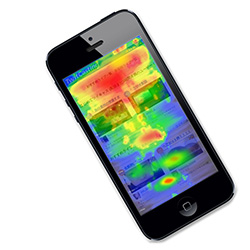
Incode Heatmap 是一款能夠顯示訪客如何使用網頁的外掛,透過點擊熱圖、滑動深度圖等功能,幫助網站管理者了解用戶行為,所有數據均保存在自己的 WordPress 數據庫中,無需外部服務。
【主要功能】
• 點擊熱圖與滑鼠移動熱圖
• 滑動深度圖,顯示讀者流失位置
• “彩帶”視圖,顯示每次點擊的時間
• 設備分割,針對桌面、平板和手機
• 同意感知,支援多種同意管理工具
• 前端檢視,實時顯示熱圖於網頁上
外掛標籤
開發者團隊
原文外掛簡介
Incode Heatmap shows you how visitors really use your pages — where they click, where they
hesitate and how far down they read — and keeps every measurement in your own WordPress
database. No account, no external service, no data leaving your server.
The heavy work happens in the administrator’s browser, on demand: aggregating points and
painting the map. On the front-end there is only a small, deferred, consent-aware tracker,
so real visitors pay virtually nothing for it.
What you get
Click heat map and mouse-movement heat map.
Scroll-depth map: see the line where readers drop off.
“Confetti” view: every click coloured by the moment it happened.
Device segmentation (desktop / tablet / mobile) — separate maps, because they rarely agree.
Configurable sampling, so the database does not balloon on a busy site.
Consent aware: Complianz, Cookiebot and Google Consent Mode v2 are detected automatically,
plus Do-Not-Track.
Input masking: nothing typed into a form is stored.
Front-end viewer: the heat is painted over your live page, in its real context — not on
a screenshot inside the dashboard.
Automatic retention with a daily cleanup job.
A setup wizard and an in-plugin quick guide, so the first map takes a couple of minutes.
No limits
Everything above is in this plugin, free and without limits: no caps on pages, on
events, or on how long you keep them. Nothing is locked, metered or timed out.
How it works
The tracker batches events and sends them with navigator.sendBeacon to a REST endpoint on
your own site. Coordinates are stored resolution-independently, so a map recorded on a 4K
monitor lines up with one recorded on a laptop. Nothing is computed on the visitor’s page
beyond collecting the events; rendering happens only when an administrator opens a map.
Privacy
Incode Heatmap stores behavioural data (clicks, mouse movement and scroll depth) on your own
server only. It does not collect names, email addresses or IP addresses, and text typed
into form fields is masked. Capture runs only after consent when a consent banner is
present, and honours the browser Do Not Track signal. Data is deleted automatically after
the retention period you configure. The plugin registers suggested privacy-policy text and
integrates with WordPress’ personal-data export and erase tools.