內容簡介
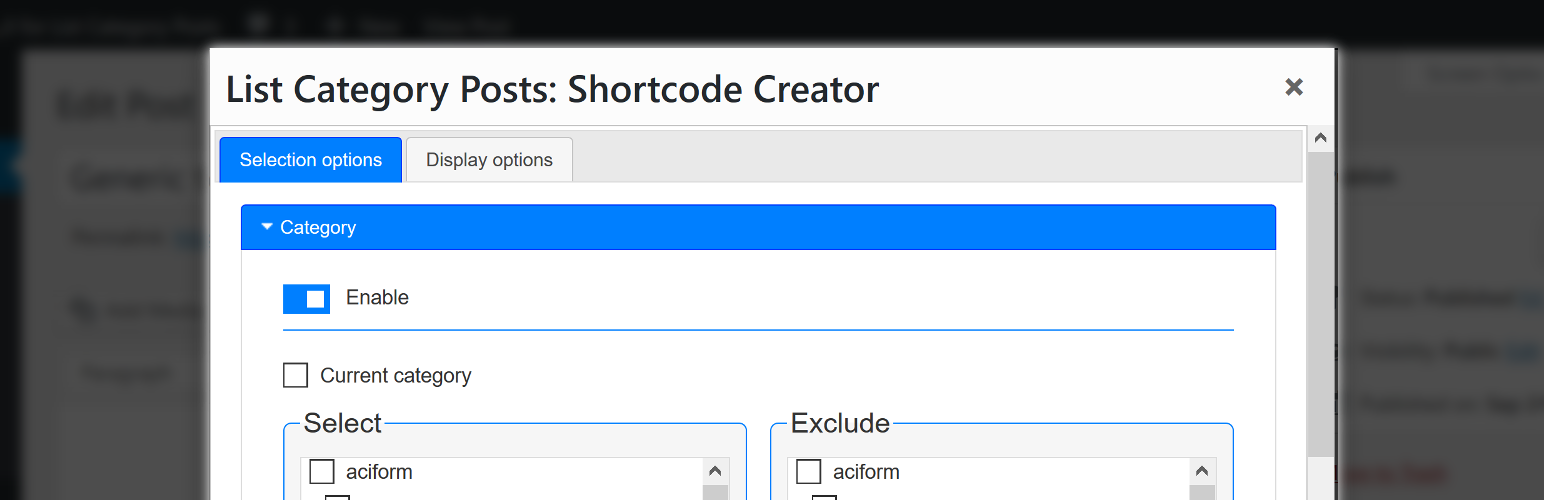
這個外掛為 Fernando Briano 的 List Category Posts 外掛增加了一個圖形化的短碼創建器。在 WordPress 編輯器中,你可以透過點擊編輯器工具列中的『LCP』按鈕來啟用此創建器。
也就是說,你可以在以下位置使用短碼創建器:
文章編輯畫面
文字小工具(text widget)
Gutenberg 的『Classic』區塊
以及在外掛和佈景主題中使用所見即所得編輯器的任何地方
請務必閱讀LCP 外掛的詳細說明文件以及它的自述文件,以瞭解其功能和可能性。這很重要,因為即使此處提供的 GUI 能夠在前端使事情易於理解,但它並未詳細說明基礎插件的所有功能。
如何使用插件
點擊『LCP』按鈕即可開啟一個模態視窗,內含一個表單。
短碼創建器分為兩個部分,並分隔在兩個標籤中:
選擇選項(Selection options)
顯示選項(Display options)
『選擇選項』讓你選擇哪些文章會被包含,而『顯示選項』則管理所選文章的顯示信息和何種HTML 和 CSS 客製化可應用於他們。
當你滿意所選的選項後,只需點擊模態視窗底部的『插入到編輯器』按鈕即可。它會自動將符合格式的 List Category Posts 短碼插入 WordPress 編輯器。你可以移動編輯器中的游標,來更改短碼插入位置。
List Category Posts 參數參考
以下是短碼創建器的各選項節點以及相對應的短碼參數列表。這將幫助你找到 List Category Post 的文件。
選擇選項
分類: id, categorypage, child_categories
標籤: tags, exclude_tags, current_tags
自定分類: taxonomy, terms, taxonomies_and, taxonomies_or
文章類型和狀態: post_type, post_status
自定欄位: customfield_name, customfield_value
排除文章: exclude_posts
作者: author_posts
日期: monthnum, year, after, before
搜尋: search
文章標題首字母: starting_with
偏移量: offset
父文章: post_parent
顯示選項
分頁、文章數和排序: pagination, numberposts, order, orderby
列表特定選項: conditional_title, catlink, catname, category_description, morelink, class
文章特定選項: author, comments, content, customfield_display, customfield_display_separately, customfield_display_glue, customfield_display_name, customfield_display_name_glue, date, date_modified, excerpt, excer
外掛標籤
開發者團隊
原文外掛簡介
This plugin adds a graphical shortcode creator for the List Category Posts plugin by Fernando Briano. The creator is available in WordPress editor by clicking the ‘LCP’ button of the editor’s toolbar.
This means you can use the shortcode creator in:
Post Editing Screen
Text Widgets
Gutenberg’s ‘Classic’ block
and wherever the WYSIWYG editor is used in plugins and themes
Make sure you have read the LCP plugin’s detailed documentation as well as its readme to understand its features and potential. This is important because even though the GUI provided here tries to make things easily understandable on the front-end, it does not explain all features of the base plugin in detail.
How to use the plugin
Clicking the ‘LCP’ button opens a modal window with a form.
The shortcode creator has two sections, divided in two tabs:
Selection options
Display options
‘Selection options’ allow you to choose which posts to include while ‘Display options’ manage what information about selected posts is displayed and what HTML & CSS customizations are applied.
Once you are happy with your selected options, just click the ‘Insert into editor’ button located at the bottom of the modal window. It will automatically insert a properly formated List Category Posts shortcode into WordPress editor. You can change the position at which the shortcode is inserted by moving the cursor in the editor.
List Category Posts parameters reference
Below is a list of shortcode creator’s sections together with corresponding shortcode parameters. This is intended to help you navigate List Category Post’s documentation.
Selection options
Categories: id, categorypage, child_categories
Tags: tags, exclude_tags, current_tags
Custom taxonomies: taxonomy, terms, taxonomies_and, taxonomies_or
Post type & status: post_type, post_status
Custom fields: customfield_name, customfield_value
Exclude posts: exclude_posts
Author: author_posts
Date: monthnum, year, after, before
Search: search
Post title firts character: starting_with
Offset: offset
Parent post: post_parent
Display options
Pagination, Number of posts & Order: pagination, numberposts, order, orderby
List-specific options: conditional_title, catlink, catname, category_description, morelink, class
Post-specific options: author, comments, content, customfield_display, customfield_display_separately, customfield_display_glue, customfield_display_name, customfield_display_name_glue, date, date_modified, excerpt, excerpt_overwrite, excerpt_strip, excerpt_size, display_id, post_suffix, posts_morelink, tags_as_class, title_limit, link_titles, no_post_titles, thumbnail, force_thumbnail, thumbnail_size
Template: template
Development
GUI for List Category Posts is open source software. You can find the
development version of the plugin on Github.
All suggestions and contributions are welcome 🙂 Fork it, read the respository’s
readme and start helping with the development!
This is a very early version of GUI for List Category Posts so users’ feedback is more than welcome 🙂
Support the plugin
If you have found this plugin useful and would like to support its further development please consider
sponsoring it on GitHub or donating on PayPal 🙂
User Support
Please use the support forum for questions about using the plugin. Use Github issues for discussing code changes and bugs.