內容簡介
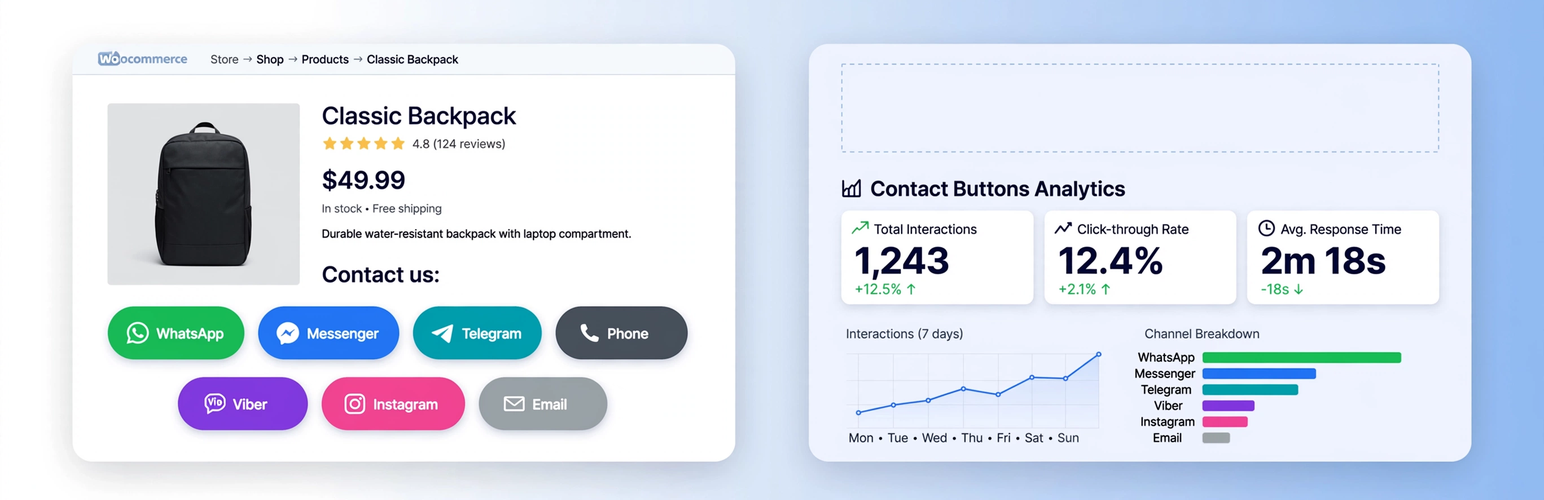
GRC Contact Buttons + Universal Tracker 是一款針對 WooCommerce 商店的全方位解決方案,提供美觀的聯絡按鈕和完整的分析功能,幫助商家提升客戶互動與數據追蹤。
【主要功能】
• WooCommerce 產品頁面聯絡按鈕
• 全站通用點擊與表單追蹤
• 自動偵測流量來源
• 可獨立啟用按鈕或追蹤功能
• 現代化的圓角按鈕設計
• 每月統計數據儀表板
外掛標籤
開發者團隊
② 後台搜尋「GRC Contact Buttons + Universal Tracker」→ 直接安裝(推薦)
原文外掛簡介
GRC Contact Buttons + Universal Tracker is the all-in-one solution for WooCommerce stores that want both beautiful contact buttons AND complete analytics.
2 plugins in 1:
Contact Buttons on WooCommerce product pages (Facebook Messenger, WhatsApp, TikTok, Phone, Email, Viber, Telegram, Instagram)
Universal Click & Form Tracker for the ENTIRE site – tracks every contact link regardless of where it is (header, footer, widgets, product page)
What’s new in 2.4.x:
✅ Source column – Automatically detects traffic source: fbclid = Facebook, gclid/gad_source = Google Ads, utm_source/utm_medium/utm_campaign, referrer domain
✅ Beautiful new icons – Official brand logos, pill-shaped buttons (999px radius), hover effects, shadows – looks premium
✅ Modular – You can enable ONLY tracking without buttons, or ONLY buttons without tracking (Contact Tracker > Settings)
✅ Universal tracking – Tracks ALL tel:, mailto:, wa.me, m.me/, t.me/, viber://, ig.me/m/, tiktok.com links from anywhere on site, not just product buttons
✅ All forms tracking – CF7, WPForms, Gravity Forms, Fluent Forms, Elementor Forms, Ninja Forms, Formidable, WS Form, generic HTML forms, WooCommerce checkout – only successful submissions
Features:
Independent enable/disable toggle for each contact channel
For each channel you can set recipient (phone number, username, or email address)
Default message configurable per channel with placeholders {product} and {link} – automatically replaced with product name and URL
Built-in premium SVG icons for each channel, no external dependencies
Modern pill-shaped buttons with shadows and hover animations
Dashboard with monthly stats: Contact Tracker > Dashboard
Daily evolution chart, Top numbers/emails/forms, Last 150 events with Source column
Top Traffic Sources report (Facebook / Google Ads / UTM)
All settings managed from Contact Tracker > Settings and Settings > Social Buttons
Tracking works even if button is disabled – universal site-wide detection
Use cases:
Only tracking: Disable buttons display and keep tracking enabled – perfect for stats only
Only buttons: Enable buttons, disable tracking – no DB storage
Everything: Keep all 3 modules enabled (recommended)
This plugin requires WooCommerce only if you enable product page buttons. Tracking works without WooCommerce.