內容簡介
描述:顯示帶有文章和自訂大小縮略圖(針對第一個附加或特色圖像),並與每篇文章永久鏈接鏈接的列表。您可以將其配置為多個小部件或簡碼。
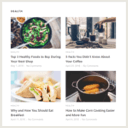
您可以選擇(參數不是必需的,請參見截圖 2)列表方向、僅顯示圖像、顯示文章日期、日期格式、顯示文章標題、類別、文章數量、每行註冊數(對於水平方向)、表寬度、縮略圖尺寸、表格單元的填充和間隔以及列布局。在 http://www.wpworking.com/posts-list/ 上查看它的工作方式。
購買 GPLWT PRO 並選擇顏色和格式!
http://www.wpworking.com/shop/
有關插件的更多信息:http://www.wpworking.com/
有關支持的請求,請發送電子郵件至 [email protected]。
任意部分
購買 GPLWT PRO 並選擇顏色和格式!
http://www.wpworking.com/shop/
結果的 div 在 div id gplwt_container,表格 id div_postlist,因此您可以使用 CSS 进行调整。
配置為小部件或簡碼
非常重要:分頁功能是一項測試功能,仍在開發中
[gplt nocats =”” ptype=”post” ttpos=”b” orient=”h” imgo=”false” ttgo=”true” dtgo=”true” dtfrm=”1″ categ=”” postnr=”100″ linn=”3″ divwid=”300″ tbwid=”90″ tbhig=”90″ cp=”4″ cs=”4″ lwt=”2″ tte=”” sptb=”false” tgtb=”false” ordm=”DESC” ordf=”ID” metk=”” mett=”” pgin=”” ptype=”post” dexcp=”false” gptb=”false”]
參數
NoPsts:要排除的文章的逗號分隔 ID,默認=
NoCats:要排除的類別的逗號分隔 ID,默認=
文章類型:所有文章類型,單數名稱,默認=文章
小部件標題位置:b 為前面,a 為後面。默認=b
方向:orient=”v” //v = 垂直,h = 水平,默認 ‘v’
僅顯示圖像:imgo=”false” // true,false,默認 ‘false’
顯示文章標題:ttgo=”false” // true,false,默認 ‘false’
顯示文章日期:dtgo=”false” // true,false,默認 ‘false’
日期格式:dtfrm=”1″ // 1 – d/m/y,2 – m/d/y,默認 ‘1’
類別 Slug:categ=” // 為所有類別排除或空白,默認=”
文章數量:postnr=”20″ //默認=20
每行註冊數:linn=”3″ // 僅對水平方向默認=3
結果表寬:divwid=300 // 默认值=300
縮略圖寬度:tbwid=”40″ //默認= 40
縮略圖高度:tbhig=”40″ //默認= 40
結果表的單元格填充:cp=”4″ //默认值= 4
結果表的單元格間隔:cs=”4″ //默认值= 4
列布局:lwt = 1 // 默认值= 1
小部件(或列表)標題:tte= “” //默认值=””
抑制縮略圖:sptb=”false” // true, false,默认值 ‘false’
目標鏈接到新頁面/標籤:tgtb=”false” // true,false,默認 ‘false’
秩序:ordm = “DESC” // DESC,ASC,默认值 ‘DESC’
排序依據:ordf = “ID” // ID,Date,Title,Random,默认值 ‘ID’
自定義字段鍵:metk = “” //默认值 ”
自定義字段值類型:mett =
外掛標籤
開發者團隊
② 後台搜尋「Get Post List With Thumbnails」→ 直接安裝(推薦)
📦 歷史版本下載
原文外掛簡介
Description:Displays a list with posts and custom size thumbnails(for the first attached or featured image), linked to each post permalink. You can configure it as multiple widgets or short code.
You can choose(parameters are not required, see screen shot 2) list orientation, display only images, display the post date, date format, display the post title, category, the number of posts, number of registers per line(for horizontal orientation), the table width, the thumbnails dimensions, the table cellpadding and cellspacing and the columns layout. See it working on http://www.wpworking.com/posts-list/
Get GPLWT PRO and choose colors and formating!
http://www.wpworking.com/shop/
More info about the plugin: http://www.wpworking.com/
Ask for support on [email protected]
Arbitrary section
Get GPLWT PRO and choose colors and formating!
http://www.wpworking.com/shop/
The result div is on div id gplwt_container, table id div_postlist so you can play with css
Configure as widget or shortcode
Very important: the pagination feature is a beta feature, under development
[gplt nocats =”” ptype=”post” ttpos=”b” orient=”h” imgo=”false” ttgo=”true” dtgo=”true” dtfrm=”1″ categ=”” postnr=”100″ linn=”3″ divwid=”300″ tbwid=”90″ tbhig=”90″ cp=”4″ cs=”4″ lwt=”2″ tte=”” sptb=”false” tgtb=”false” ordm=”DESC” ordf=”ID” metk=”” mett=”” pgin=”” ptype=”post” dexcp=”false” gptb=”false”]
Parameters
NoPsts: comma-separated ids from the posts you want to exclude, default=”
NoCats: comma-separated ids from the categories you want to exclude, default=”
Post Type: all posts types, singular name, default=posts
Widget Title Position: b for before, a for after. default =b
Orientation: orient=”v” // v = Vertical , h = Horizontal default ‘v’
Display only images: imgo=”false” // true, false default ‘false’
Display post title: ttgo=”false” // true, false default ‘false’
Display post date: dtgo=”false” // true, false default ‘false’
Date Format: dtfrm=”1″ // 1 – d/m/y , 2 – m/d/y default ‘1’
Category Slug: categ=” // leave out or blank for all categories default=”
Number of Posts: postnr=”20″ //default=20
Number of registers per line: linn=”3″ //default=3 only for horizontal orientation
Table result width: divwid=300 // default=300
Thumbnails Width: tbwid=”40″ //default = 40
Thumbnails Height: tbhig=”40″ //default = 40
Result Table Cellpadding: cp=”4″ // default= 4
Result Table Cellspacing: cs=”4″ // default= 4
Column layout: lwt = 1 // default= 1
Widget(or list) title: tte= “” // default=””
Suppress Thumbnails: sptb=”false” // true, false default ‘false’
Target links to a blank page/tab: tgtb=”false” // true, false default ‘false’
Order: ordm = “DESC” // DESC, ASC default ‘DESC’
Order By: ordf = “ID” // ID, Date, Title, Random default ‘ID’
Custom Field Key: metk = “” // default ”
Custom Field Values Type: mett = “” // n(numeric),t(text) default ‘n’ numeric
Registers per Page(beta feature): pgin = “” // default= ”
Post Type: ptype=”post” // default=’post’ ‘post’ or ‘page’
Display Excerpt: dexcp=”false” // true, false default ‘false’
Get featured image(instead of first image): gptb=”false” // true, false default ‘false’
If you have any questions, please let me know [email protected]
This readme file were validated at https://wordpress.org/extend/plugins/about/validator/