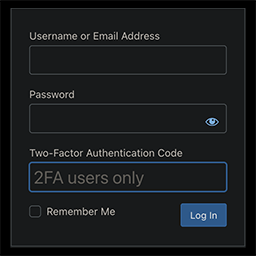
內容簡介
Gatey 外掛提供與 Amazon Cognito 的無縫整合,實現安全且可擴展的 WordPress 認證功能,適用於動態及靜態網站,提升使用者登入體驗。
【主要功能】
• 支援 Amazon Cognito 用戶池登入與註冊
• 完全可翻譯的認證畫面,支援 22 種語言
• 單一登入 (SSO) 整合社交登入、SAML 與 OIDC 提供者
• 支援 Gutenberg 區塊、Elementor 小工具及短碼
• 多重身份驗證 (MFA)
• 用戶資料編輯與密碼重設功能
外掛標籤
開發者團隊
② 後台搜尋「Gatey – Login & SSO with Amazon Cognito」→ 直接安裝(推薦)
📦 歷史版本下載
原文外掛簡介
Gatey provides a seamless integration with Amazon Cognito for secure, scalable authentication in WordPress. This plugin supports both dynamic WordPress sites and statically generated WordPress frontends.
Key features include:
– Amazon Cognito user pool login and registration
– Fully translatable Authenticator screens — 22 built-in languages plus a custom-JSON option for overriding any string or adding new languages
– Single Sign-On (SSO) integration with Social login, SAML, and OIDC providers
– Gutenberg block, Elementor widget, and shortcode support
– Multi-factor authentication (MFA)
– Profile editing and password reset features
– Secure API access with JWT or AWS IAM Signature authorization
– Role-based access control
You can find the plugin’s continuously expanding, detailed documentation at:
WP Suite – Docs
What’s on the site?
– Get Started guide — quick start, installation, first‑time setup.
– CSS/JS references — components, API, usage examples.
– Creating User Pools — step‑by‑step instructions with AWS CloudFormation / CDK scripts.
– Protecting static sites — full tutorial with point‑by‑point walkthroughs and AWS scripts.
This plugin is not affiliated with or endorsed by Amazon Web Services or the WordPress Foundation. All trademarks are property of their respective owners.
Free and Premium Usage Notice
Gatey works entirely offline and provides full login and registration functionality via your WordPress installation without requiring any registration or subscription.
Optional premium features (like advanced customization or frontend integrations) are only available after connecting your WordPress instance via a secure frontend-only JavaScript authenticator to our Gatey service. Registration and subscription are not required to use the core plugin functionality. All premium interactions happen client-side using standard AWS Amplify and Stripe components – no external PHP code is loaded or executed.
Machine-readable resources
AI plugin manifest: https://wpsuite.io/.well-known/ai-plugin.json
OpenAPI spec: https://wpsuite.io/.well-known/openapi.yaml
External Services
This plugin integrates with the following third-party services:
Amazon Cognito
What it is & what it’s used for:
A managed user-identity and authentication service from Amazon Web Services (AWS). We use Cognito User Pools to handle user registration, login, multi-factor authentication (MFA), password resets, and JWT issuance.
What data is sent & when:
Registration / Sign-up: username, email, and any required attributes are sent to Cognito for account creation.
Sign-in / Authentication: username and password (and MFA code if enabled) are sent to Cognito for verification.
Token exchange: on successful login, Cognito returns ID, access, and refresh tokens which are stored client-side for session management.
Password reset & profile updates: relevant identifiers and new credentials or attributes are sent when users trigger those flows.
Endpoints called:
https://cognito-idp.{region}.amazonaws.com/{userPoolId}
Other AWS API endpoints under the amazonaws.com domain.
Links:
Terms of Service: https://aws.amazon.com/service-terms/
Privacy Policy: https://aws.amazon.com/privacy/
Google reCAPTCHA v3
What it is & what it’s used for:
A client-side bot-detection widget from Google that provides a score for interactions. We integrate reCAPTCHA v3 into the Authenticator block’s sign-up form by fetching a token in the browser.
What data is sent & when:
Client-side only: the plugin’s JS calls grecaptcha.execute() to retrieve a reCAPTCHA token and then includes that token in the sign-up request sent to Amazon Cognito.
Server-side verification: only happens if you configure a Pre-SignUp Lambda in your Cognito user pool that calls Google’s siteverify API with your secret key. That Lambda is wholly under your control—Gatey does not handle or store your secret.
Configuration in WordPress:
Enter your reCAPTCHA v3 Site Key in Settings → General → reCAPTCHA v3 Public Key.
No Secret Key is required by the plugin.
Links:
About reCAPTCHA v3: https://www.google.com/recaptcha/about/
Google Terms of Service: https://policies.google.com/terms
Google Privacy Policy: https://policies.google.com/privacy
WPSuite platform connection (optional; site/workspace linking & shared features)
When it applies:
When you use WP Admin → SmartCloud → Connect your Site to WPSuite to link this WordPress site to a WPSuite workspace, or to switch/disconnect later.
What it’s used for:
Storing and retrieving Pro feature configuration (e.g., API/chatbot/feature settings) and enabling an admin-side preview experience so you can try Pro features in WP Admin before enabling them on the live site.
What data may be sent:
Minimal account/session data required for authentication, and minimal site/workspace linking data required to associate a WordPress site with a workspace (e.g., site/workspace identifiers and the site’s URL/domain).
Where it goes / how it’s called:
Secure HTTPS requests from the browser to WPSuite.io services (e.g. wpsuite.io and api.wpsuite.io).
Links:
WPSuite.io Privacy Policy: https://wpsuite.io/privacy-policy
WPSuite.io Terms of Use: https://wpsuite.io/terms-of-use
Client-Side Libraries
AWS Amplify Authenticator
What it is & why we use it:
A React UI component library from the Amplify Framework. We embed its
What it does:
Renders sign-in, sign-up, MFA, and password-reset forms.
Under the hood it calls the Amazon Cognito APIs (see External Services entry), but does not itself authenticate or store secrets.
Docs & source:
GitHub repo: https://github.com/aws-amplify/amplify-ui
Docs: https://ui.docs.amplify.aws/react/connected-components/authenticator
Trademark Notice
Amazon Web Services, AWS, and Amazon Cognito are trademarks of Amazon.com, Inc. or its affiliates.
Gatey is an independent open-source project and is not affiliated with, sponsored by, or endorsed by Amazon Web Services.
All references to “Amazon Cognito” are made purely to describe this plugin’s interoperability.
Source & Build
Public (free) source code:
All of the code that ships in this public ZIP (the “free” version) is published here: https://github.com/smartcloudsol/gatey
WPSuite Admin source code:
The wpsuite-admin/ directory contains modules originating from the Hub for WPSuite.io project: https://github.com/smartcloudsol/hub-for-wpsuiteio
This shared component handles WPSuite workspace linking, licence validation, and subscription management, and will be included in all upcoming WPSuite plugins.
Premium-only features:
We maintain a fork of the AWS Amplify Authenticator (with Edit Account, Setup TOTP, etc.) and any additional paid-only screens and services in a private repository. Those files are not part of this public source.