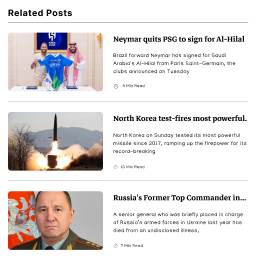
內容簡介
fraew Category Posts List 是一款輕量且靈活的小工具,可以顯示與當前文章相同類別的文章,幫助訪客發現相關內容,特別適合部落格和新聞網站。
【主要功能】
• 顯示當前文章類別的文章
• 三種顯示格式:列表、逗號分隔或內聯
• 自訂文章間距(緊湊、正常、舒適、寬敞)
• 切換文章分隔符的顯示
• 當前文章以粗體顯示
• 文章類別導航小工具
外掛標籤
開發者團隊
原文外掛簡介
fraew Category Posts List is a lightweight, flexible widget that displays posts from the same category as the currently viewed post. Perfect for blogs, news sites, and any WordPress site that wants to help visitors discover related content.
Features:
Display posts from the current post’s category in a widget
Three display formats: List, Comma-separated, or Inline
Customize spacing between posts (Compact, Normal, Comfortable, Spacious)
Toggle post separators (borders) on or off
Current post is highlighted in bold
Post Category Navigation widget – Display previous/next posts with filtering support
Configure global settings that apply to all widget instances
Works with any theme
Lightweight and performant (minimal overhead when not using advanced features)
Zero bloat – only loads CSS on pages where the widget appears
Advanced Features (Disabled by Default):
All three advanced features are disabled by default to keep the plugin lightweight. Enable them in Settings → Category Posts List to activate.
Advanced Filtering – Filter by date range (last 7/30/90 days, custom), author inclusion/exclusion, and per-author limits
Post Metadata Display – Show publication date, author, comment count, and reading time estimates (inline or block format)
Featured Images – Display post thumbnails with configurable sizes, positions (left/top/right), and layout modes (list/2-column/3-column grid)
Display Formats:
List – Traditional vertical list, one post per line
Comma-Separated – Posts displayed inline: Post 1, Post 2, Post 3
Inline – Posts displayed inline with spaces: Post 1 Post 2 Post 3
Spacing Options:
Compact – 3px padding (tight list)
Normal – 8px padding (default)
Comfortable – 12px padding
Spacious – 15px padding (generous spacing)
Post Separators:
Toggle borders between posts on or off to match your site’s design.
Usage
Widget Setup
Go to Appearance → Widgets
Find and add “Category Posts List” widget to a widget area (sidebar, footer, etc.)
Settings:
Posts Per Page – How many posts to display (default: 100)
Sort Posts – Choose sort order:
Title (A-Z)
Title (Z-A)
Date (Newest First)
Date (Oldest First)
Note: The widget will automatically display the category name as its heading.
Global Settings
Go to Settings → Category Posts List to configure:
Post Separators – Show or hide borders between posts
Display Format – Choose how posts are presented (List, Comma-separated, or Inline)
Spacing Between Posts – Adjust vertical spacing in list format
These settings apply to all widget instances on your site.
How It Works
When a visitor views a post, this plugin:
Detects the post’s category
Retrieves all posts in that category
Displays them according to your configured settings
Highlights the currently viewed post in bold
The widget only appears on single post pages and does not display on category archives, search results, or homepage.
Configuration Examples
Example 1: Clean, Minimal List
– Display Format: List
– Separators: OFF
– Spacing: Compact
Example 2: Prominent Related Posts
– Display Format: List
– Separators: ON
– Spacing: Spacious
Example 3: Compact Inline
– Display Format: Comma-separated
– Spacing: Compact (irrelevant for inline format)
Example 4: Bold Discovery
– Display Format: Inline
– Spacing: Normal (irrelevant for inline format)
Support
Need help? Visit the plugin documentation or report issues:
WordPress.org Plugin Page: https://wordpress.org/plugins/fraew-category-posts-list/
Support Forum: https://wordpress.org/support/plugin/fraew-category-posts-list/
Donate
Love this plugin? Support future development:
https://buymeacoffee.com/fraew
License
This plugin is licensed under the GPLv2 or later. For more information, visit:
https://www.gnu.org/licenses/gpl-2.0.html