內容簡介
HTML bulleted list:
<ul>
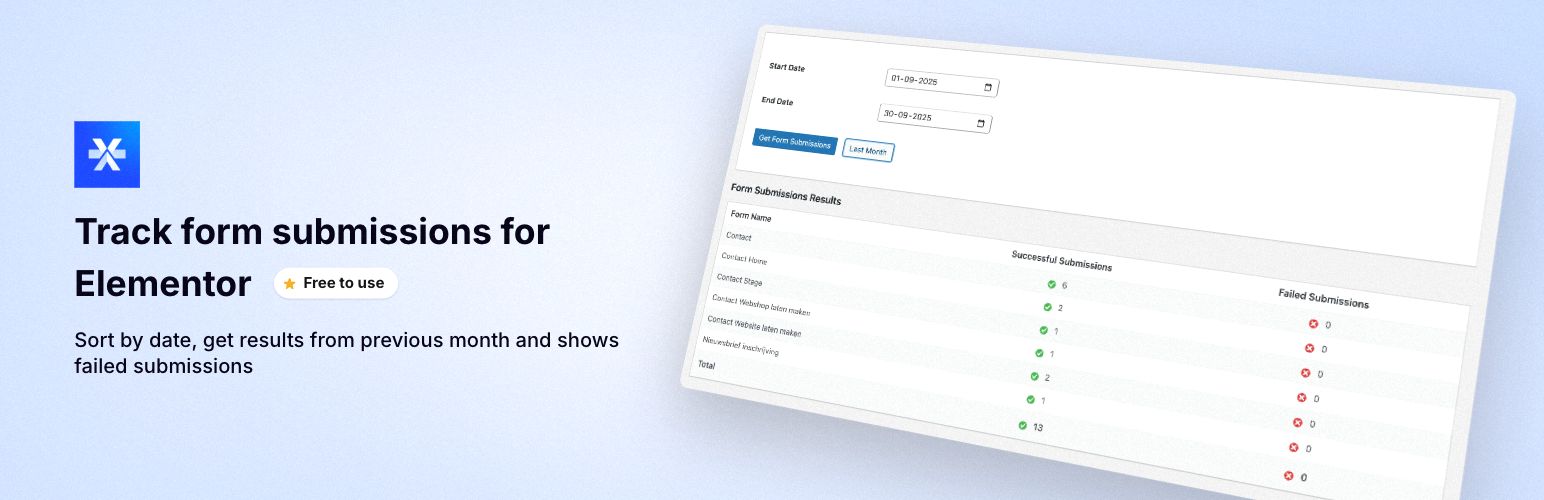
<li>Forms Overview for Elementor 提供了一個集中式儀表板,可在一個方便的位置監控所有 Elementor 表單提交。非常適合需要快速跟踪表現並快速識別提交問題的管理員!🚀
<ul>
<li>由 Kreatix WordPress Agency 創建,專業於自定義 WordPress 開發和 Elementor 解決方案。</li>
</ul>
</li>
<li>主要功能
<ul>
<li>統一儀表板 - 在一個地方查看整個站點中來自 Elementor 的所有表單提交</li>
<li>日期範圍篩選 - 按自定日期範圍篩選提交以分析特定時間段</li>
<li>上月按鈕 - 一鍵快速訪問上個月的提交</li>
<li>提交狀態跟蹤 - 區分成功和失敗的提交</li>
<li>視覺指示 - 綠色勾號(✓)表示成功提交,紅色叉號(✗)表示失敗</li>
<li>總數摘要 - 自動計算總成功和失敗的提交</li>
<li>簡潔界面 - 與 WordPress 管理設計無縫集成</li>
<li>AJAX 动力 - 快速、反應靈敏的界面,無需重新加載頁面</li>
<li>性能優化 - 內置快取以改善性能</li>
</ul>
</li>
<li>適用對象
<ul>
<li>管理多個表單的網站管理員</li>
<li>監控表現和成功率的表單</li>
<li>識別失敗率高的表單</li>
<li>快速提交特定日期範圍的報告</li>
<li>隨時間跟蹤表單使用模式</li>
<li>管理客戶網站的代理商擁有者</li>
<li>擁有多個聯繫表單的電子商務店</li>
</ul>
</li>
<li>如何操作
<ul>
<li>安裝和啟用 - 簡單安裝並啟用插件</li>
<li>訪問儀表板 - 在您的 WordPress 管理選單中找到“Forms Overview for Elementor”</li>
<li>選擇日期範圍 - 選擇您想要的日期範圍或點擊“上個月”</li>
<li>查看結果 - 查看所有表單提交,包括成功/失敗次數</li>
</ul>
</li>
<li>系統要求
<ul>
<li>WordPress 5.0 或更高版本</li>
<li>Elementor Pro(帶有表單小部件)</li>
<li>PHP 7.2 或更高版本</li>
</ul>
</li>
<li>隱私和安全
<ul>
<li>無外部連接 - 所有數據都留在您的服務器上</li>
<li>只讀訪問 - 只讀取現有 Elementor 數據,永不修改</li>
<li>無需額外的數據庫表格 - 使用 Elementor 的現有提交數據</li>
<li>設計安全 - 遵循 WordPress 編碼標準和最佳安全實踐</li>
</ul>
</li>
<li>其他信息
<ul>
<li>支持和反饋 - 如需支持、功能請求或錯誤報告,請使用此插件在 WordPress.org 的支持論壇。我們在這裡幫忙!</li>
<li>如果您認為此插件有幫助,請考慮:
<ul>
<li>在 WordPress.org 上留下 5 星評價</li>
<li>與其他 WordPress 用戶分享</li>
<li>報告您發現的任何錯誤以幫助我們改進</li>
</ul>
</li>
</ul>
</li>
<li>相關連結
<ul>
<li>插件主頁</li>
<li>支持論壇</li>
<li>作者網站</li>
</ul>
</li>
<li>免責聲明
<ul>
<li>此插件與 Elementor 或 Elementor Pro 無關或未經認可。Elementor 和 Elementor Pro 是 Elementor Ltd 的商標。</li>
</ul>
</li>
<li>許可證
<ul>
<li>此插件根據 GPL v2 或更高版本許可。您可以根據 GPL 許可條款自由使用、修改和分發此插件。</li>
</ul>
</li>
</ul>
外掛標籤
開發者團隊
② 後台搜尋「Forms Overview for Elementor」→ 直接安裝(推薦)
原文外掛簡介
Forms Overview for Elementor provides a centralized dashboard to monitor all your Elementor form submissions in one convenient location. Perfect for administrators who need to track form performance and identify submission issues quickly! 🚀
This plugin is created by Kreatix WordPress Agency, experts in custom WordPress development and Elementor solutions.
✨ Key Features
🎯 Unified Dashboard – View all Elementor form submissions from across your entire site in one place
📅 Date Range Filtering – Filter submissions by custom date ranges to analyze specific time periods
⏮️ Previous Month Button – Quick access to last month’s submissions with one click
✅ Submission Status Tracking – Separate tracking of successful and failed submissions
🎨 Visual Indicators – Green checkmarks (✓) for successful submissions, red X (✗) for failed ones
📊 Totals Summary – Automatic calculation of total successful and failed submissions
🎭 Clean Interface – Seamlessly integrates with WordPress admin design
⚡ AJAX-Powered – Fast, responsive interface without page reloads
🚀 Performance Optimized – Built-in caching for improved performance
💼 Perfect For
✓ Website administrators managing multiple forms
✓ Monitoring form performance and success rates
✓ Identifying forms with high failure rates
✓ Quick submission reporting for specific date ranges
✓ Tracking form usage patterns over time
✓ Agency owners managing client websites
✓ E-commerce stores with multiple contact forms
🎬 How It Works
Install & Activate – Simply install the plugin and activate it
Access Dashboard – Find “Forms Overview for Elementor” in your WordPress admin menu
Select Date Range – Choose your desired date range or click “Previous Month”
View Results – See all your form submissions with success/failure counts
📋 Requirements
WordPress 5.0 or higher
Elementor Pro (with Form widget)
PHP 7.2 or higher
🔒 Privacy & Security
No External Connections – All data stays on your server
Read-Only Access – Only reads existing Elementor data, never modifies it
No Additional Database Tables – Uses Elementor’s existing submission data
Secure by Design – Follows WordPress coding standards and security best practices
Additional Information
🤝 Support & Feedback
For support, feature requests, or bug reports, please use the WordPress.org support forum for this plugin. We’re here to help!
⭐ Like This Plugin?
If you find this plugin helpful, please consider:
– ⭐ Leaving a 5-star review on WordPress.org
– 💬 Sharing it with fellow WordPress users
– 🐛 Reporting any bugs you find to help us improve
🔗 Links
Plugin Homepage
Support Forum
Author Website
⚠️ Disclaimer
This plugin is not affiliated with or endorsed by Elementor or Elementor Pro. Elementor and Elementor Pro are trademarks of Elementor Ltd.
📄 License
This plugin is licensed under GPL v2 or later. You are free to use, modify, and distribute this plugin according to the GPL license terms.