內容簡介
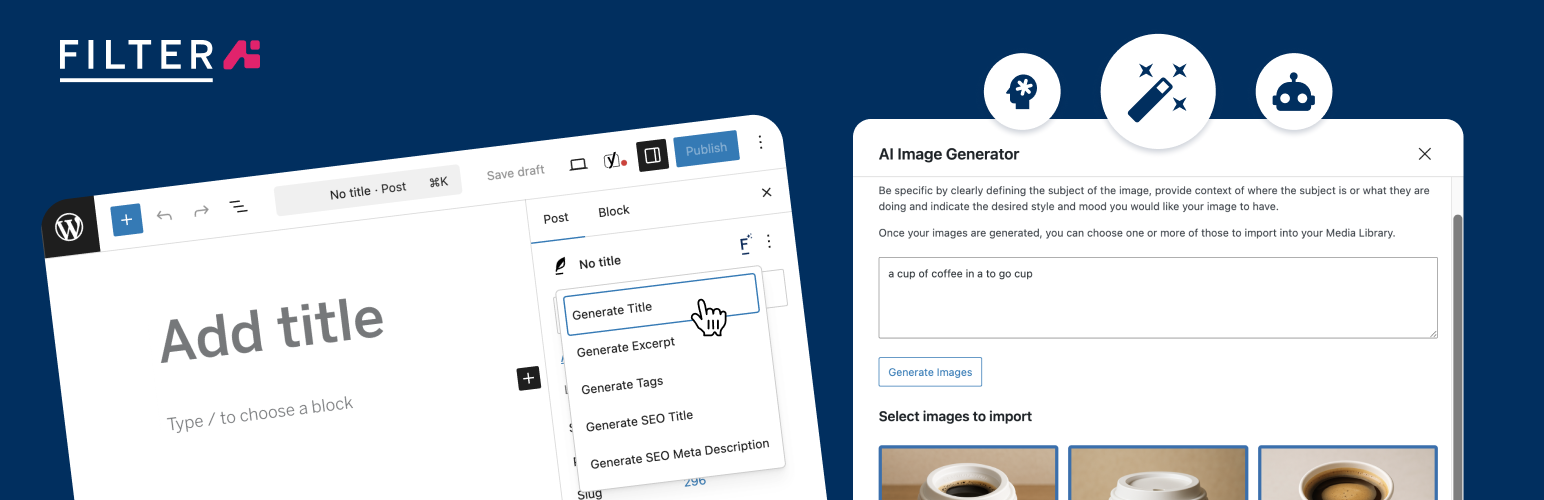
Filter AI 將 AI 驅動的內容工具直接整合進 WordPress 控制台,幫助用戶提升內容產出效率、改善 SEO 表現,並維持一致的品牌聲音,無需離開網站。
【主要功能】
• 設定品牌聲音與停用詞
• 生成 SEO 友好的文章標題
• 自動生成圖片的 ALT 文字
• 產生 Yoast SEO 元標題與描述
• 撰寫 WooCommerce 產品描述
• 內容重寫與語調調整
外掛標籤
開發者團隊
原文外掛簡介
Filter AI brings AI-powered content tools directly into the WordPress admin so you can scale content production, improve SEO, and maintain a consistent brand voice without leaving your site.
Key capabilities include:
Brand voice and stop words
Configure a brand voice and global stop words so every AI result follows your style and avoids unwanted terms.
Post and page titles
Generate SEO-friendly, click-focused titles based on the content’s core value proposition.
ALT text generation
Automatically create descriptive ALT text on image upload and bulk-generate ALT text for existing media to improve accessibility and SEO.
Yoast SEO metadata
Generate meta titles and descriptions (single or batch), respecting character constraints and best-practice recommendations for SEO plugins such as Yoast.
WooCommerce product descriptions
Produce product descriptions that highlight benefits, address customer needs and include natural SEO keywords.
Image generation
Create images from prompts, save to the Media Library with metadata, and use them instantly in posts and products.
Content rewriting and tone adjustment
Expand, condense, summarise or rewrite content and change tone while preserving context and meaning.
Excerpts and tag suggestions
Auto-generate concise excerpts and suggest relevant tags to improve discoverability and site structure.
Choice of AI provider and BYO API key
Bring your own API key and choose from supported providers; switch providers without disrupting workflows. On WordPress 7.0 and later, Filter AI uses the built-in WordPress AI Client and you manage provider API keys in Settings → Connectors — no extra plugin required. On earlier WordPress versions, Filter AI uses the AI Services plugin.
Batch processing and workflow controls
Apply actions across many posts, pages or media items to save time and ensure consistent output.
Filter AI is designed to integrate with the WordPress editor and common workflows. You remain in control of every output with editable suggestions, prompt templates and global defaults.
About Filter
Filter is a leading digital agency dedicated to creating innovative solutions that help businesses leverage technology effectively. We’re deeply invested in helping businesses leverage AI effectively, developing custom solutions that solve real business challenges.
Our approach to AI focuses on practical, implementable solutions that solve real business challenges – and Filter AI embodies this philosophy perfectly. By making AI accessible within the familiar WordPress environment, we’re helping content teams work more efficiently without sacrificing quality or control.
Check out our other WordPress plugin, PersonalizeWP, which allows you to display personalised content on your WordPress website using the Block Editor.