內容簡介
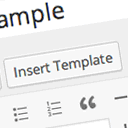
這個外掛的主要目的是啟動關於如何改進 WordPress 編輯器的討論。因此這個外掛是一個非常具有主觀性的工具。按鈕的選擇是根據可重複使用的內容而設計的,所有會導致有害標記的按鈕都會被移除。
這個外掛也移除了廚房水槽按鈕。取而代之的是一個有三個點的圖示。按下這個圖示會展開一個欄位,裡面包含了所有可用的按鈕。這比一行行硬編排的按鈕更適合回應式的頁面,因為有些寬度下按鈕會斷成四個獨立的行。
更詳細的設計決策說明可以在我的博客中找到。
外掛標籤
開發者團隊
原文外掛簡介
The main purpose of the plugin is to start a discussion on how we could improve the editor in WordPress. This plugin is thus a very opinionated one. The button selection is done with reusable content in mind. All buttons that would results in harmful markup are removed.
The plugin also removes the kitchen sink button. Instead, there is an icon with three dots. Pressing that expands the row to contain all the available buttons. This works better with a responsive page than hard coded lines of buttons which in some widths break into four separate lines.
A detailed description of design decisions can be found on my blog.