內容簡介
Easy Symbols & Icons 是一款專為管理和使用圖示字型而設計的外掛,提供集中化的管理方式,提升性能並減少混亂。適合開發者、設計師及代理商,讓 WordPress 的圖示系統更具擴展性和效率。
【主要功能】
• 動態字型子集化 - 僅加載頁面上使用的圖示
• 集中管理圖示字型 - 從一處控制所有字型
• 單一圖示區塊工作流程 - 簡單且一致的使用方式
• 原生 React 基礎的 Gutenberg 區塊
• 支援舊版短碼
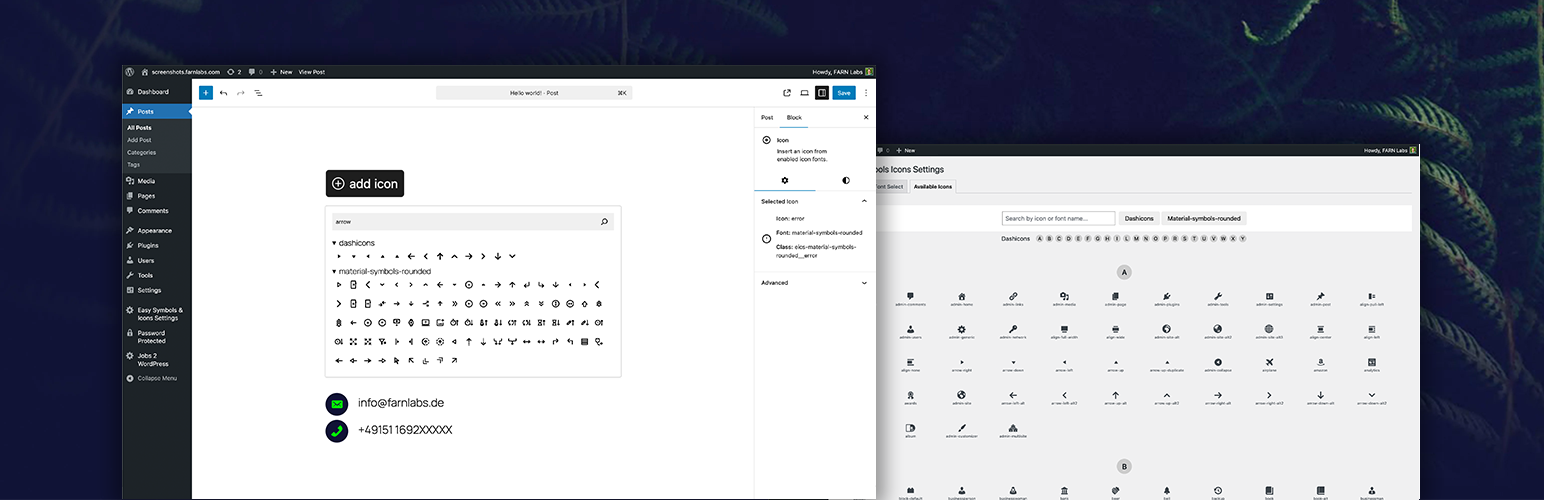
• 內建圖示選擇器,具備搜尋功能
外掛標籤
開發者團隊
原文外掛簡介
“Easy Symbols & Icons” is a plugin for managing and using icon fonts in a centralized and performance-oriented manner. This is achieved through a centralized design to handle fonts instead of leaving each to their own usage format, thereby introducing chaos. Fonts are parsed, icon names are extracted, and fonts are subsetted to include only used icons.
Perfect for developers, designers, and agencies who want a scalable and efficient icon system in WordPress.
Demo Video
Key Advantages
Dynamic font subsetting – only loads the icons used on the page
Centralized icon font management – control all fonts from one place
Single icon block workflow – simple and consistent usage
Native React-based Gutenberg block
Legacy shortcode support
Built-in icon picker with search
Reduces chaos from each icon font using its own usage format – replaced by centralized handling for all
Features
Upload custom icon fonts (.ttf, .otf)
Centralized management of all icon fonts
Enable or disable fonts globally
Gutenberg icon block with picker UI
Shortcode for selecting hardcoded icons
Search icons by name inside the editor
Dynamic subsetting for minimal file size on the frontend
Instant availability after upload
Usage
Navigate to “Easy Symbols & Icons Settings” -> “Font Select”
Upload .ttf or .otf icon font files
Enable the fonts you want to use
Save your changes
To add icons:
Open the WordPress block editor
Add the “Icon” block or use the [eics-icon] shortcode
Click the block to open the icon picker
Search or browse icons
Select an icon and customize styling