內容簡介
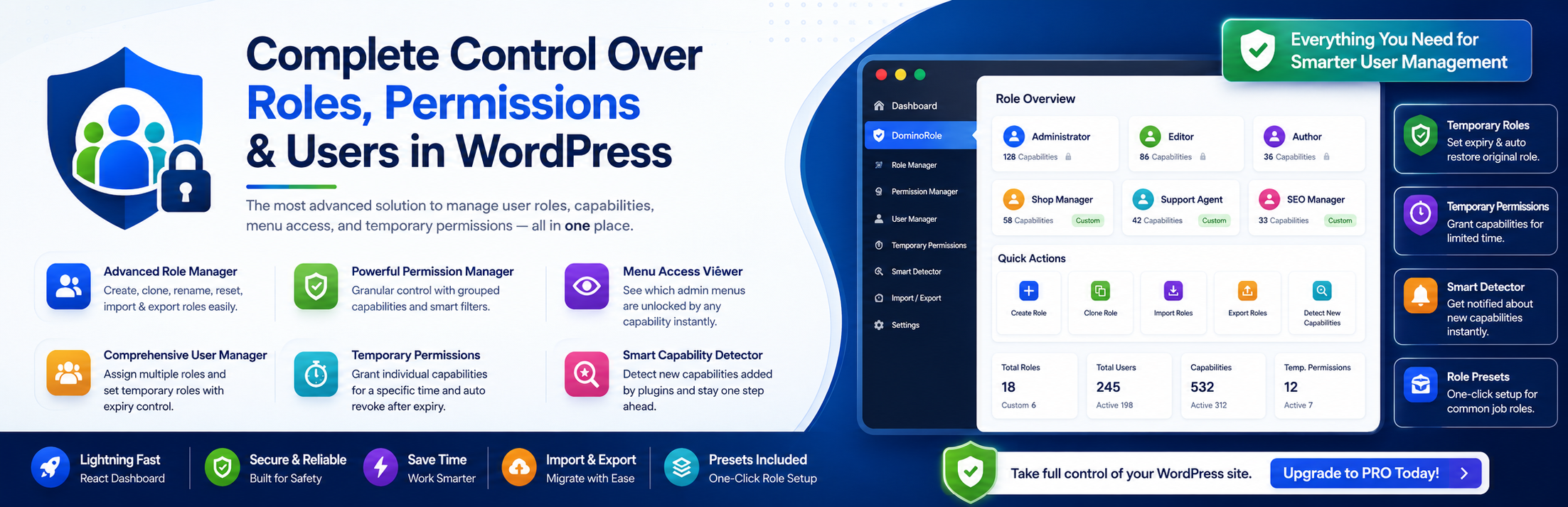
DominoRole 是一款功能強大的 WordPress 外掛,專為管理用戶角色、權限及管理菜單可見性而設計。透過快速的控制台,使用者可以輕鬆掌控網站的用戶權限,無論是簡單的部落格還是複雜的 WooCommerce 商店。
【主要功能】
• 先進的角色管理器
• 自訂角色創建功能
• 複製現有角色
• 角色即時重命名
• 角色重置功能
• 角色的匯入與匯出
外掛標籤
開發者團隊
② 後台搜尋「DominoRole – Advanced User Role Permission Manager」→ 直接安裝(推薦)
原文外掛簡介
DominoRole is the most comprehensive and modern WordPress plugin for managing user roles, capabilities, users, and admin menu visibility — all from a single lightning-fast dashboard. Built with React and Chakra UI, it provides a seamless, interactive, and visually stunning admin experience.
Whether you’re running a simple blog, a complex WooCommerce store, or an extensive membership site, DominoRole gives you absolute granular control over what your users can and cannot do. Stop relying on outdated interfaces and embrace the future of WordPress user management.
Features & How They Help You
🛡️ Advanced Role Manager
The core of DominoRole is its robust Role Manager, designed to give you full control over your site’s hierarchy without the fear of breaking default configurations.
* Clean & Responsive Dashboard: View all user roles with capability counts in a clean, two-column grid layout. Default WordPress roles (like Administrator and Editor) are safely separated from custom roles.
* Create Custom Roles: Build new roles from scratch. Example: Create a “Community Manager” role specifically for someone who only needs to moderate comments and manage users, keeping them out of your site’s sensitive settings.
* Clone Existing Roles: Easily duplicate any existing role with all its capabilities intact. Why it helps: If you need a role almost identical to an Editor but with slightly fewer permissions, simply clone the Editor role and remove the specific capabilities.
* Role Renaming: Rename any non-protected custom role on the fly.
* Reset Roles: Instantly reset a role to its default state (removes all capabilities except read).
* Import & Export Roles: Easily migrate your perfectly configured roles between a staging site and a production site via JSON files.
🔐 Powerful Permission Manager
Managing what a user can actually do shouldn’t be a guessing game. Our Permission Manager is built for clarity and speed.
* Multi-Tabbed Interface: Easily manage capabilities with organized tabs.
* Most Used Permissions: A curated list of top capabilities (read, edit posts, upload files, etc.) with detailed tooltips explaining their exact functions.
* Admin Menu Permissions: Manage capabilities tied directly to core WordPress admin menu areas.
* All Permissions: A comprehensive view with bulk action checkboxes and live search filters.
* Active Permissions: A quick review tab showing only the active permissions for the role, with interactive toggle-to-revoke buttons.
* Grouped Capabilities: View all capabilities intelligently grouped by category (Posts, Pages, Media, Users, WooCommerce, Plugins, etc.). Why it helps: Instead of scrolling through hundreds of alphabetical capabilities, you can instantly find all WooCommerce-related permissions in one block.
🧭 Dynamic Menu Access Viewer
Ever enabled a capability and wondered what it actually unlocked in the sidebar?
* See What You Unlock: Every permission row in the Permission Manager includes a unique “Menu Access” button.
* Visual Confirmation: Clicking this button opens a modal displaying exactly which WordPress admin menus and submenus will become accessible when that capability is enabled.
* Clear Table Layout: Menus are displayed in a clean two-column table (Main Menu and Sub Menu). Why it helps: It completely removes the guesswork from permission assignment. You’ll know exactly what your users will see before you even save.
🔥 Ready to unlock the full potential of your WordPress site? Upgrade to DominoRole Pro today for advanced migration tools, unlimited custom roles, role cloning, and premium support! 🔥
👥 Comprehensive User Manager
Managing individual users is just as important as managing their roles.
* Intuitive User Grid: View all users with advanced search, role filters, and lightning-fast pagination.
* Instant Role Assignment: Change a user’s primary role with a single click.
* Multiple Roles: Assign multiple different roles to a single user simultaneously. Example: A user can be both an “Author” and a “Shop Manager” at the same time, inheriting the combined capabilities of both roles.
* Temporary Roles: Set a temporary role with an automatic expiry date and time. When it helps: If you hire a freelance developer to fix your site, give them a Temporary Administrator role set to expire in 48 hours. Once expired, their access is revoked automatically—no manual cleanup required.
⏱️ Temporary Permissions
Sometimes changing a whole role is too broad; you just need to grant one specific ability temporarily.
* Granular Time-Limited Access: Grant individual capabilities to specific users for a limited time.
* Precision Expiry: Set exact expiry dates and times using a built-in datetime picker.
* Status Tracking: View all temporary permissions with real-time status indicators (Active, Expired, Revoked).
* Example Use Case: An author needs to publish their own post (a capability usually reserved for Editors) just for today. You can grant them the publish_posts permission temporarily for 24 hours.
🧠 Smart Capability Detector
WordPress plugins often add hidden capabilities that go unnoticed by site admins.
* Auto-Discovery: Automatically detects brand new capabilities when third-party plugins are installed or activated on your site.
* Plugin Attribution: Shows exactly which plugin registered the new capabilities.
* Admin Notifications: Displays a gentle admin notice when new capabilities are detected, keeping you informed of security changes.
* Why it helps: If a newly installed gallery plugin adds a manage_galleries capability, DominoRole will detect it instantly, allowing you to assign it to your custom roles right away.
🚀 One-Click Permission Presets
Don’t want to build roles from scratch?
* Instant Setup: Create perfectly configured roles with a single click using predefined templates:
* Content Writer (Can write but not publish)
* Editor (Full content control)
* SEO Manager (Access to SEO tools)
* Support Agent (Customer management)
* Shop Manager (WooCommerce control)
* Teacher (LMS management)
* Accountant (Financial reporting access)
* Why it helps: Saves you hours of researching which specific capabilities correspond to common real-world jobs.