內容簡介
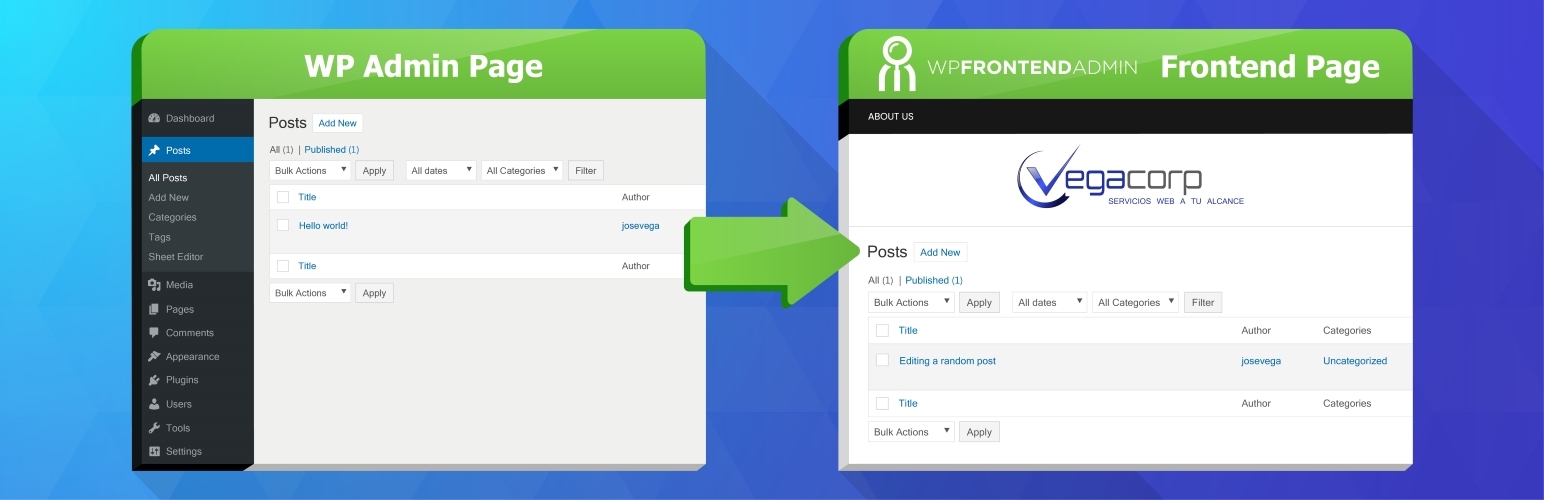
WP Frontend Admin 是一款讓使用者能夠從前端管理網站的外掛。它可以顯示 WP 管理頁面於前端,並讓使用者輕鬆創建自訂儀表板,提升使用者體驗和管理效率。
【主要功能】
• 在前端顯示管理頁面
• 使用 Gutenberg 編輯器提交文章
• 創建自訂儀表板給客戶
• 編輯文章、分類和標籤
• 隱藏 WordPress 使用痕跡
• 更改管理頁面 CSS 以符合佈景主題設計
外掛標籤
開發者團隊
② 後台搜尋「WP Frontend Admin – Display WP Admin Pages in the Frontend」→ 直接安裝(推薦)
📦 歷史版本下載
原文外掛簡介
WP Frontend Admin is a plugin for managing your site from the front end, Display WP Admin Pages in the Frontend, and Create custom dashboards in the frontend.
When you are in wp-admin you will see a “View in the frontend” option in the toolbar.
When you click the option you can automatically see the same page in the frontend as a normal user.
Yes. It´s that easy.
One click is all you need to display an admin page in the frontend and share the link with your clients, employees, or users.
Show Gutenberg in the Frontend
You can allow your users to submit posts in the frontend using the Gutenberg editor. So they can create beautiful posts easily.
Use cases
View and edit posts from the frontend
View and edit blog categories from the frontend
View and edit blog tags from the frontend
Publish and edit posts from the frontend
Create custom dashboards for your clients
Create apps using WordPress. Just display the admin pages required by your app.
Hide the fact that you use WordPress
Change the CSS of the admin pages , so they look the same as your theme design.
Limitation
The free plugin is for blogs, it lets you view these pages in the frontend only:
The list of blog posts
The blog post editor
The list of blog categories
The list of blog tags
Go Premium
The premium version lets you display ANY admin page in the frontend:
View settings pages in the frontend.
View theme settings in the frontend
View WooCommerce settings in the frontend
View WooCommerce sales stats in the frontend
Allow your users to Edit WooCommerce Products in the Frontend
Allow your users to publish Events from the Frontend
Allow to Manage your WooCommerce Store in the Frontend
Basically you can display the pages of ANY PLUGIN in the frontend. For example, Jetpack, WooCommerce, etc.
Try Premium Version for FREE – 7 Days
Try the plugin without worries.
Try Premium Version for FREE – 7 Days
Try the plugin without worries.
Free version examples
Allow Post Submissions from the Frontend View tutorial
Premium version examples
Change Permalink Settings from the Frontend in WordPress View tutorial
Change Site Settings from the Frontend in WordPress View tutorial
Create and Manage Users from the Frontend View tutorial
Create WooCommerce Coupons from the Frontend View tutorial
Create WooCommerce Products from the Frontend View tutorial
Install Themes from the Frontend in WordPress View tutorial
Install Updates from the Frontend in WordPress View tutorial
Install WordPress Plugins from the Frontend View tutorial
Manage Nav Menus from the Frontend View tutorial
Manage User Comments from the Frontend in WordPress View tutorial
Manage Widgets from the Frontend in WordPress View tutorial
Manage WooCommerce Settings from the Frontend View tutorial
Setup a Theme from the Frontend in WordPress View tutorial
View and Dispatch WooCommerce Orders from the Frontend View tutorial
View WooCommerce Sales Reports from the Frontend View tutorial