內容簡介
Debug Log Manager 是一款方便的外掛,讓使用者能夠輕鬆啟用和管理 WordPress 的錯誤日誌,無需手動編輯設定檔。它提供安全的日誌管理和易於閱讀的錯誤資訊,幫助開發者快速排除問題。
【主要功能】
• 一鍵啟用 WP_DEBUG,無需編輯 wp-config.php
• 自訂 debug.log 檔案名稱及位置,增強安全性
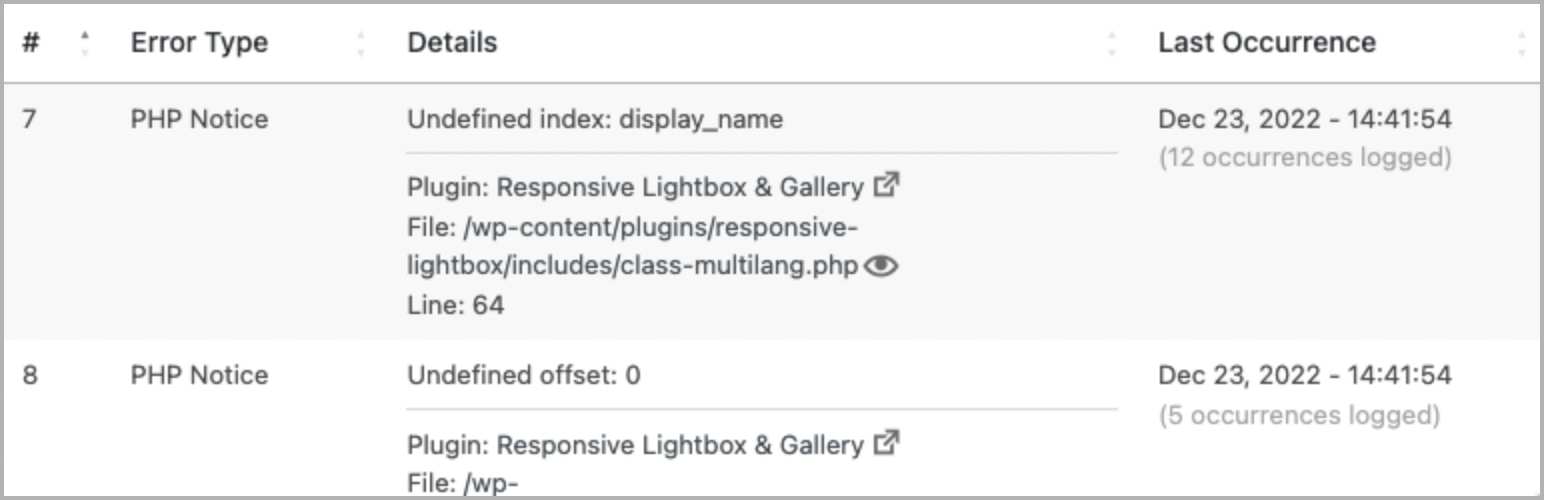
• 解析 debug.log,顯示錯誤及發生時間
• 快速篩選特定錯誤,提升除錯效率
• 自動刷新日誌,無需手動重載頁面
• 清除 debug.log 檔案,節省磁碟空間
外掛標籤
開發者團隊
② 後台搜尋「Debug Log Manager – Conveniently Monitor and Inspect Errors」→ 直接安裝(推薦)
📦 歷史版本下載
原文外掛簡介
Debug Log Manager allows you to:
Enable WP_DEBUG with one click to log PHP, database and JavaScript errors when you need to, and disable it when you’re done. No need to manually edit wp-config.php file.
Create the debug.log file for you in a non-default location with a custom file name for enhanced security.
Copy the content of the default / existing debug.log file into the custom debug.log file, and delete the default / existing debug.log file. So there is continuation in logging and enhanced security going forward.
Parse the debug.log file and view distinct errors and when they last occurred, which is better than looking at the raw log file (potentially) full of repetitive errors.
Quickly find and filter more specific errors for your debugging work.
Make error details easier to read by identifying error source (core / plugin / theme) and separating file path and line number.
Easily view files where PHP errors occurred. This includes WordPress core, plugin and theme files.
Enable auto-refresh to automatically load new log entries. No need to manually reload the browser tab, or to tail -f the log file on the command line.
Easily clear the debug.log file to save disk space and more easily observe newly occurring errors on your site.
Show an indicator on the admin bar when error logging is enabled.
Add a dashboard widget showing the latest errors logged.
Use error_log() to output error info into your debug log. e.g. error_log( $error_message ) for simple, string-based error message, or error_log( json_encode( $error ) ) when inspecting a more complex error info, e.g. array or object.
Auto-trim debug.log file size so it does not grow larger than the available memory. This prevents out-of-memory error when trying to parse and view the debug.log file.
A simpler and more compact version of Debug Log Manager is included as part of the System Dashboard plugin, should you prefer a single plugin that does more.
What Users Say
“This is a great plugin for dev especially for people who tinker in the code.” ~PK Son
“I have used a couple of other logger plugins and this is by far the best one.” ~Brian Henry
“Another massive time-saving tool.“ ~Jeff Starr
Give Back
A nice review would be great!
Give feedback and help improve future versions.
Help translate into your language.
Github repo to contribute code.
Sponsor my work.
Check These Out Too
System Dashboard: Central dashboard to monitor various WordPress components, processes and data, including the server.
Variable Inspector: Inspect PHP variables on a central dashboard in wp-admin for convenient debugging.
Admin and Site Enhancements helps you to easily enhance various admin workflows and site aspects while replacing multiple plugins doing it.
WordPress Newsboard: The latest news, articles, podcasts and videos from 100+ WordPress-focused sources.