內容簡介
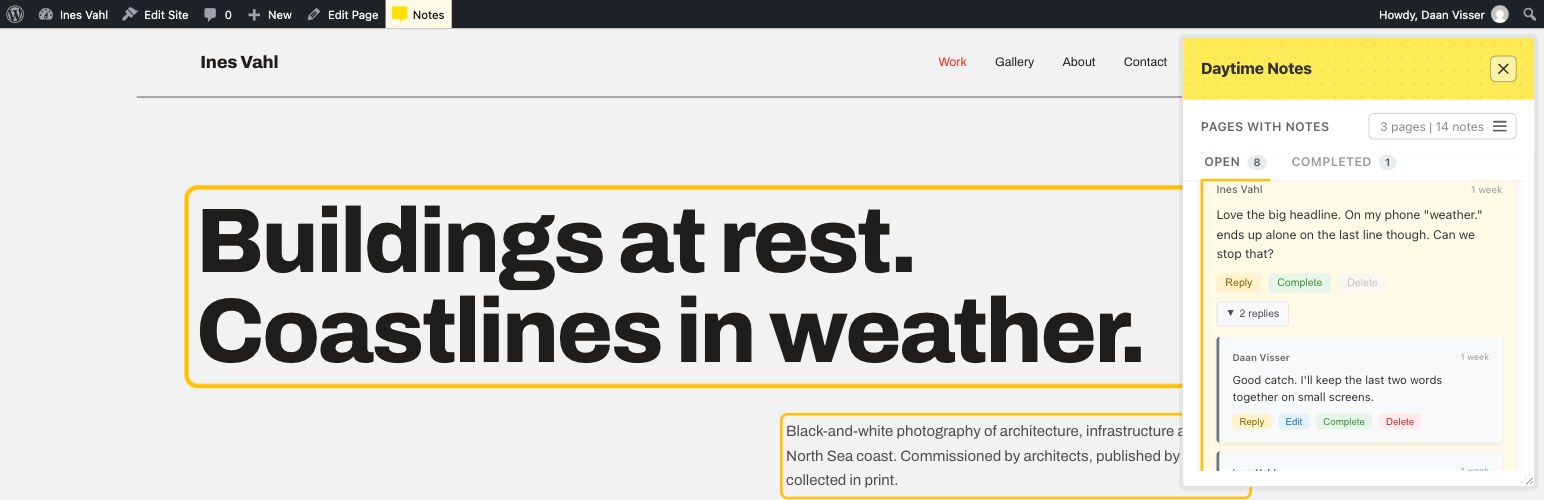
Daytime Notes 讓授權使用者能夠在任何頁面或文章的特定元素上附加註解,旨在促進內部協作,改善反饋溝通,減少混淆與時間浪費。
【主要功能】
• 元素特定註解:可視化高亮顯示的註解功能
• 雙向高亮:滑鼠懸停可顯示相關元素或註解
• 開放與完成標籤:分開顯示未完成與已完成的註解
• 頁面選單:列出所有有註解的頁面及未完成數量
• 線上對話:對註解進行回覆,保持討論上下文
• @提及功能:使用 @username 指派責任
外掛標籤
開發者團隊
原文外掛簡介
Daytime Notes lets authorised users attach notes to specific elements on any page or post. Notes are context-aware, threaded, and support @mentions, task status, and optional email notifications.
This plugin is designed for internal collaboration: content review, QA, design feedback, and coordinating changes without long email threads.
Daytime Notes was created to address a common communication gap when working with clients and teams — particularly when feedback arrives as vague or fragmented requests that are hard to interpret out of context. Having previously used similar element-based annotation systems, the goal was to bring that clarity into WordPress as a standalone, builder-agnostic tool. By attaching feedback directly to the page elements being discussed, Daytime Notes helps reduce confusion, save time, and keep discussions grounded in the actual content being worked on. It’s shared publicly to support other developers, designers, and teams facing the same challenges.
Core Features
Element-Specific Notes – Attach notes to any HTML element with visual highlighting
Two-Way Highlighting – Hover a note to see its element on the page, or hover an element to find its note in the panel
Open & Completed Tabs – Outstanding and finished notes on separate tabs, with live counts
Pages Menu – A compact menu listing every page with notes and how many are still open
Threaded Conversations – Reply to notes and keep discussions in context
@Mentions – Mention users with @username to assign responsibility
Task Status – Mark notes as completed or reopen them to track progress
Email Notifications – Manual “Send Notifications” button plus an automatic 4-hour catch-all; notifications are held until a recipient opts in, then delivered as one summary email
Character Limits – Admin-configurable per-note character limit
Reviewer Role – A front-end-only “Daytime Notes Reviewer” role for clients, with no access to wp-admin
Anyone-Can-Complete Toggle – Optionally let any user complete unassigned notes
Daytime Notes Pro
Everything above is free, with no limits on notes, pages or users. For individuals, teams or agencies that need more, Daytime Notes Pro adds:
File Attachments – Attach screenshots and documents to notes
Personal Notes – Private working notes that only you, anyone you mention and the Notes Manager can see
Notes Manager – One person who can see every note and look after the settings
Role Access – Choose which user roles can use Daytime Notes
More Email Options – Instant emails, a choice of send intervals, completion emails, task reminders and a daily activity digest
Export – Download all notes as CSV or JSON
Notes About Email Notifications (Opt-in)
Email notifications are conservative by default — nothing is sent instantly:
New notes, replies, and completions are queued as they happen.
Pending notifications can be sent immediately at any time using the Send Notifications button in the panel.
Pending notifications are also sent automatically every 4 hours as a catch-all.
Notifications are only ever sent to a user who has Daytime Notes enabled on their profile — if disabled, the notification stays queued and is delivered as a summary email as soon as they re-enable it.
All emails use WordPress wp_mail(). No third-party email service is used unless your site is configured to route mail externally.
Privacy & Data Handling
No external API calls
No tracking or analytics
No telemetry
No third-party services
localStorage is used only for UI preferences
All plugin data is stored within your WordPress database
The Privacy Policy section below lists exactly what is stored, and how to remove plugin data when needed.
Privacy Policy
Daytime Notes stores data in your WordPress database, including:
Note content and selectors
Page IDs/URLs for context
User IDs (authors and assignments)
Timestamps
Plugin settings and user preferences
Daytime Notes does NOT:
Send data to external servers
Use tracking or analytics
Make external API calls
Share data with third parties
Set tracking cookies
Emails (if enabled) are sent using WordPress wp_mail(), which respects any SMTP plugins or mail configuration on your site.
To support privacy requests and data deletion, administrators can:
Delete notes (via the Daytime Notes panel on relevant pages)
Remove plugin user meta/preferences as needed
Enable full data removal on uninstall in Settings > Daytime Notes > Data Management
Support
For questions, problems or feature requests, please post in the Daytime Notes support forum.
When reporting a problem, it helps to include your WordPress version, your theme or page builder, and any errors shown in the browser console.