內容簡介
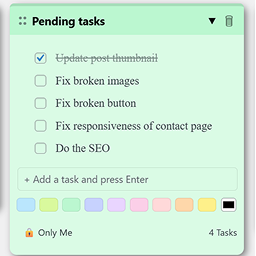
Dashboard To-Do List 是一款方便的工具,幫助網站設計師和開發者在 WordPress 控制台中集中管理任務。它提供了可編輯的待辦事項清單,並可選擇在網站前端顯示為可摺疊的浮動面板。
【主要功能】
• 直接在控制台新增、編輯和刪除待辦事項
• 標記完成項目,前端顯示刪除線
• 批次編輯模式,快速整理多個項目
• 前端顯示可摺疊的浮動面板
• 自訂前端面板的顏色和位置
• 控制不同使用者角色的可見性
外掛標籤
開發者團隊
原文外掛簡介
Are you a web designer or developer? Or are you creating a plugin or a theme? Are you finding hard to keep track of your tasks or your notepad is just untidy?
Add this useful tool to keep your project tasks in one place, right inside WordPress. Dashboard To-Do List adds a widget to your Admin Dashboard where you can write and manage a to-do list, then optionally show it as a collapsible floating panel on the frontend of your site.
Plugin Features
Add, edit, and delete to-do items directly from the Admin Dashboard
Mark an item as complete (shown with a strikethrough on the frontend but stays in your list) or delete items to remove them from your list
Bulk Edit mode for pasting or reorganising multiple items at once
Display the list as a collapsible floating panel on your website
Choose left or right positioning for the frontend panel
Pick a custom colour for the frontend panel
Control which user roles can see the dashboard widget
Control which user roles (including guests) can see the frontend panel