內容簡介
總結: Dashboard Summary 是一個與 WooCommerce 無縫整合的 WordPress 外掛,能夠直接從管理儀表板提供全面的商店表現概覽。監控關於您的 WooCommerce 商店和部落格的關鍵指標,協助您在不離開主要管理區域的情況下追踪您的業務。
**問題與答案:**
1. Dashboard Summary 是什麼樣的 WordPress 外掛?
- Dashboard Summary 是一個與 WooCommerce 無縫整合的 WordPress 外掛,用於提供全面的商店表現概覽。
2. 可以從 Dashboard Summary 哪些地方直接監控 WooCommerce 商店和部落格的關鍵指標?
- 您可以直接從管理儀表板監控 WooCommerce 商店和部落格的關鍵指標,無需離開主要管理區域。
3. Dashboard Summary 的主要功能有哪些?
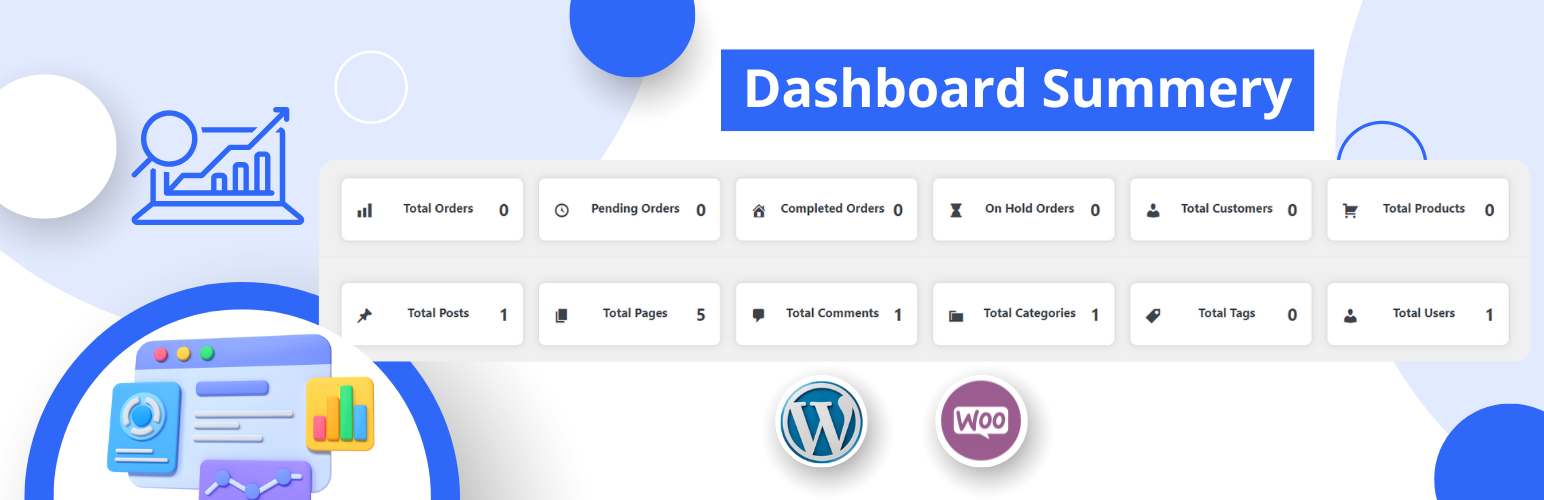
- WooCommerce Summary: 獲取商店狀態的快速總覽,包括總訂單數、待處理訂單、已完成訂單和暫停訂單。
- Customer and Product Summary: 查看商店中客戶和產品的總數。
- Blog Summary: 監控部落格的帖子總數、頁面、評論、分類、標籤和用戶。
- Easy Settings: 透過簡單的設置頁面啟用或停用 WooCommerce 和部落格摘要。
- Localization Support: 完全本地化以支援不同語言,使用的文本域: 'dashboard-summary'。
外掛標籤
開發者團隊
原文外掛簡介
Transform your WordPress admin dashboard with beautiful, modern gradient cards that display key metrics at a glance. Dashboard Summary provides a visually stunning way to monitor your WooCommerce store and blog performance without navigating away from your main admin area.
✨ Key Features
🎨 Beautiful Design
– Colorful Gradient Cards: Modern gradient backgrounds with 6 unique color schemes
– Customizable Colors: Full control over card gradient colors via settings page
– Professional Icons: Clean, modern icons with glassmorphism effects
– Smooth Animations: Hover effects and smooth transitions for better UX
📊 WooCommerce Statistics
– Total Orders with quick link to orders page
– Pending/Processing Orders tracking
– Completed Orders count
– On-Hold Orders monitoring
– Total Customers overview
– Product Count display
📝 Blog Statistics
– Total Posts published
– Total Pages created
– Comments count
– Categories overview
– Tags summary
– User count
⚙️ Advanced Settings
– Toggle WooCommerce and Blog summaries independently
– Professional toggle switches (iOS-style)
– Color picker for each card (start and end gradient colors)
– Live gradient preview
– Reverse color system: WooCommerce uses colors 1-6, Blog uses 6-1
📱 Fully Responsive
– Desktop: 6 cards per row (large screens), 4 cards per row (medium screens)
– Tablet: 3 cards per row with optimized spacing
– Mobile: 2 cards per row with compact design
– Adaptive font sizes and padding for all screen sizes
🔗 Smart Navigation
– All cards are clickable and link to relevant admin pages
– Direct access to orders, products, posts, pages, comments, etc.
– Seamless navigation without leaving dashboard context
🎯 Perfect For
WooCommerce store owners who want quick insights
Blog administrators monitoring content metrics
Agency owners managing multiple sites
Anyone who wants a beautiful, functional dashboard
🌐 Translation Ready
Fully localized with text domain ‘dashboard-summary’. Ready for translation into any language.
License
This plugin is free software; you can redistribute it and/or modify it under the terms of the GNU General Public License as published by the Free Software Foundation; either version 2 of the License, or (at your option) any later version.