
內容簡介
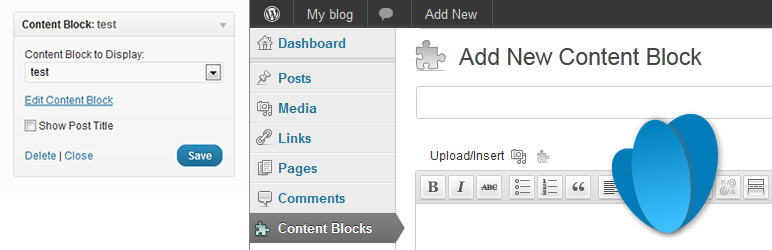
Content Blocks 外掛允許用戶在側邊欄小工具或使用短碼顯示自訂文章類型的內容,並提供 WYSIWYG 編輯器,讓內容編輯更為方便,適合不具管理員權限的內容編輯者使用。
【主要功能】
• 支援 WYSIWYG 編輯器編輯內容
• 允許非管理員用戶編輯內容
• 可在小工具中顯示特色圖片
• 與 WPML 多語言外掛相容
• 可使用短碼在文章和頁面中嵌入
外掛標籤
開發者團隊
② 後台搜尋「Content Blocks (Custom Post Widget)」→ 直接安裝(推薦)
📦 歷史版本下載
原文外掛簡介
The Content Blocks allows you to display the contents of a custom post type in a sidebar widget or using a shortcode.
Even though you could use the text widget that comes with the default WordPress install, this plugin has some major benefits:
The Content Blocks plugin enables users to use the WYSIWYG editor for editing the content and adding images.
If you are using the standard WordPress text widgets to display content on various areas of your template, this content can only be edited by users with administrator access. If you would like to give content editors access without exposing them to the whole WordPress admin, this plugin solves that problem.
You can even use the featured image functionality to display them in a widget.
The Content Blocks plugin is compatible with the WPML Multi-Language plugin and automatically shows the correct language in the widget area.
The Content Blocks can be included in posts and pages using the built-in shortcode functionality.
This plugin creates a ‘content_block’ custom post type. You can choose to either display the title on the page or use it to describe the contents and widget position of the content block. Note that you can easily hide the title if you want a cleaner layout.
To add content to a widget, drag it to the required position in the sidebar and select the title of the custom post in the widget configuration.
Includes the following translations:
Swedish (sv_SE) by Andreas Larsson
Spanish (es_ES) by IBIDEM GROUP
Portuguese (pt_BR) by Ronaldo Chevalier
Polish (pl_PL) by Kuba Skublicki
Dutch (nl_NL) by Johan van der Wijk
Czech (cs_CZ) by Martin Kucera
More translations are very welcome!











