內容簡介
Scroll to Top 外掛能提升網站的使用者體驗,提供平滑的「回到頂部」按鈕及閱讀進度條,幫助用戶輕鬆導航長頁面,並顯示其在頁面上的位置。
【主要功能】
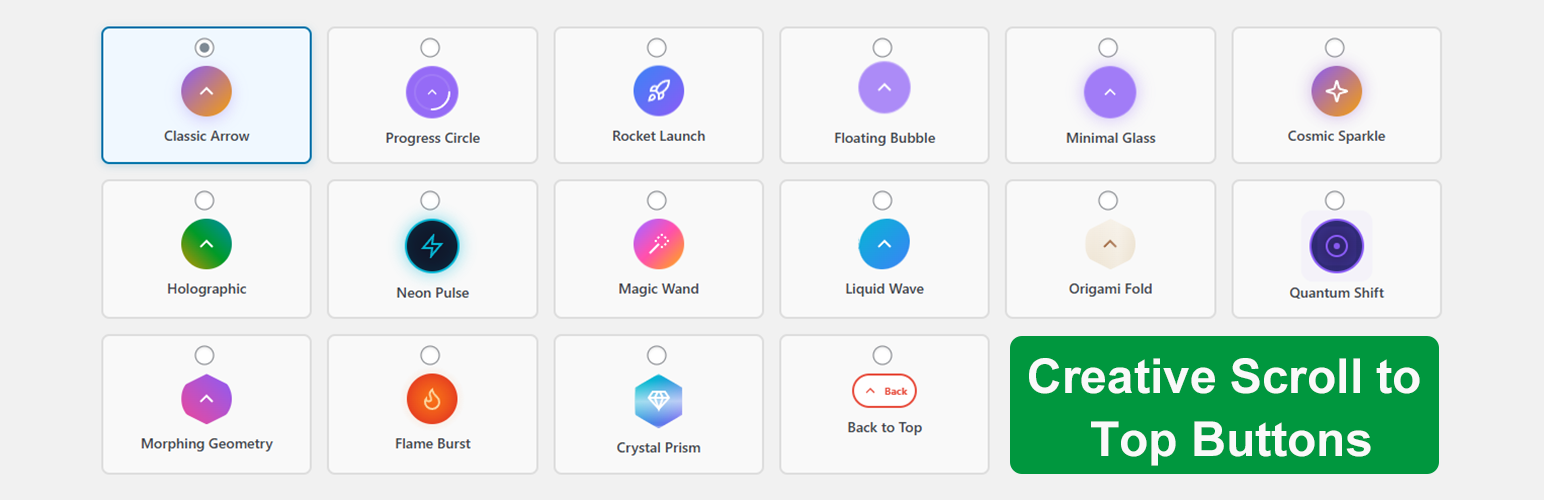
• 16 種獨特樣式可選擇
• 平滑的滾動技術
• 可視化的閱讀進度條
• 完全自訂顏色選項
• 行動裝置友好設計
外掛標籤
開發者團隊
② 後台搜尋「Scroll to Top – Smooth Scroll Up, Back to Top & Reading Progress Bar」→ 直接安裝(推薦)
原文外掛簡介
Improve your website’s user experience with Scroll to Top, a lightweight and feature-rich plugin that adds a smooth “Back to Top” button and a Reading Progress Bar.
Long pages can be frustrating. This plugin helps users navigate seamlessly with a single click. Unlike basic scroll plugins, we offer 16 professionally designed styles, ranging from minimal arrows to gamified animations like Rocket Launch and Cosmic effects.
It also includes a visual Reading Progress Bar, perfect for blogs and long-form content to show readers their position on the page.
🚀 Why Choose This Scroll to Top Plugin?
Every website needs smooth navigation. Our plugin boosts user experience by allowing visitors to return to the top of your page instantly, reducing bounce rates and keeping them engaged. We prioritized performance, ensuring the plugin is lightweight and fast, loading assets only when necessary so your site speed remains unaffected. You can fully customize the extensive color options to match your brand identity, complete with live previews. Plus, it’s designed to be mobile-responsive, working perfectly on phones, tablets, and desktops.
Boost Navigation: Reduce bounce rates by making it easy to scroll back up.
Lightweight & Fast: Optimized for performance; assets load only when needed.
Fully Customizable: Match your brand with unlimited colors and live previews.
Mobile Responsive: Designed to work perfectly on phones, tablets, and desktops.
✨ Key Features
Unlock a suite of powerful features designed for modern websites. Choose from over 16 unique styles, ranging from minimalist designs to fun animations. The integrated Reading Progress Bar gives users a clear visual indicator of their position, while the smooth scroll technology ensures a polished feel. You have full control over positioning, scroll triggers, animation speed, and page targeting to ensure the button appears exactly when and where you need it.
16+ Unique Styles: Choose from minimalist arrows, rockets, bubbles, neon effects, and more.
Reading Progress Bar: A sleek vertical bar that fills as users read down the page.
Smooth Scroll Up: Customize the scroll speed (Slow, Normal, Fast) for a polished feel.
Smart Positioning: Place the button Bottom-Right, Bottom-Left, or Bottom-Center.
Scroll Trigger: Auto-show the button after scrolling a specific distance (e.g., 300px).
Page Targeting: Display on specific post types (Homepage, Posts, Pages) or exclude as needed.
Accessibility Ready: WCAG compliant with keyboard support and ARIA labels.
🎨 Styles Included
We understand that every site has a unique design language. That’s why we’ve included a diverse library of button styles. Whether you need an essential arrow for a professional business site, a visual indicator for a blog, or a fun animation for a creative portfolio, you’ll find the perfect match. Our styles include everything from neon pulses and holographic effects to classic, minimal designs.
Essential: Classic Arrow, Minimal Glass, Floating Bubble.
Visual Indicators: Progress Circle, Side Progress Bar.
Fun Animations: Rocket Launch, Magic Wand, Floating Bubble.
Modern Effects: Neon Pulse, Holographic, Cosmic Sparkle.
♿ Accessibility First
Web accessibility is at the core of our development. We believe navigation should be seamless for everyone. The plugin is built with strict WCAG compliance, offering full keyboard navigation support (Tab key) and proper ARIA labels for screen readers. It also respects user preferences for reduced motion, ensuring a comfortable experience for all visitors.
Keyboard Support: Full keyboard navigation support (Tab key).
Screen Readers: Proper ARIA labels for screen readers.
Reduced Motion: Respects user “Reduced Motion” settings in browsers.
💡 Pro Tips:
* Use the progress circle style for long-form content
* Match button colors to your brand palette
* Enable the side progress bar for visual feedback
* Adjust bottom offset to avoid conflicts with other fixed elements
* Position buttons based on your site’s layout