
內容簡介
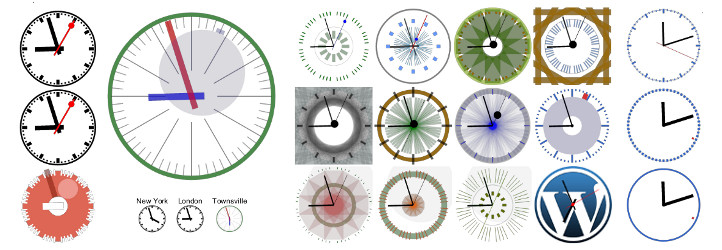
CoolClock 外掛將 JavaScript 模擬時鐘整合到您的 WordPress 網站中,您可以將其作為小工具添加到側邊欄,或使用短碼插入到文章和頁面中,提供多樣化的時鐘樣式選擇。
【主要功能】
• 可透過小工具、短碼或主題功能添加
• 兼容平板及大多數支援 JavaScript 的行動裝置
• 提供 22 種不同的時鐘外觀選擇
• 支援自訂外觀選項以創建個性化樣式
• 顯示日期或 24 小時數位時間
• 進階短碼參數以自訂背景圖像和外觀
外掛標籤
開發者團隊
原文外掛簡介
This plugin integrates CoolClock – The Javascript Analog Clock into your WordPress site. You can add it as a widget to your sidebar or insert it into your posts and pages with a shortcode. See the FAQ’s for available shortcode parameters and how to build the clock into your theme.
Features
Can be added via a widget, shortcode or theme function
No flash, meaning compatible with tablets and most other javascript enabled mobile devices
22 different skins to choose from or
Custom skin option to create your own skin style
Linear or logarithmic time scale
Read more on the CoolClock homepage or see the FAQ’s to learn how to configure your own skin settings.
Pro features
Show date or 24h digital time
Background image or color
Border radius (rounded corners for background)
Advanced positioning options (relative to background)
Advanced shortcode parameters (including background image and custom skin)
One extra clean skin for use with background image
Support on the CoolClock Pro forum
Pro features come with the CoolClock – Advanced extension.
Privacy / GDPR
This plugin does not collect any user or visitor data nor set browser cookies. Using this plugin should not impact your site privacy policy in any way.
Known Issues
When IE 8 is manually put or forced (through X-UA-Compatibility meta tag or response header) into Compatibility mode, the Clock will –even though the canvas area is put in place– remain invisible.
When a shortcode is not placed on its own line but on the same line with text, image or even another shortcode, then the output (div with canvas tag) will be wrapped inside a paragraph tag. While most browsers do not have a problem displaying the clock, this will cause a validation error.
Please report any other issues on the Support page.











