內容簡介
段落摘要:
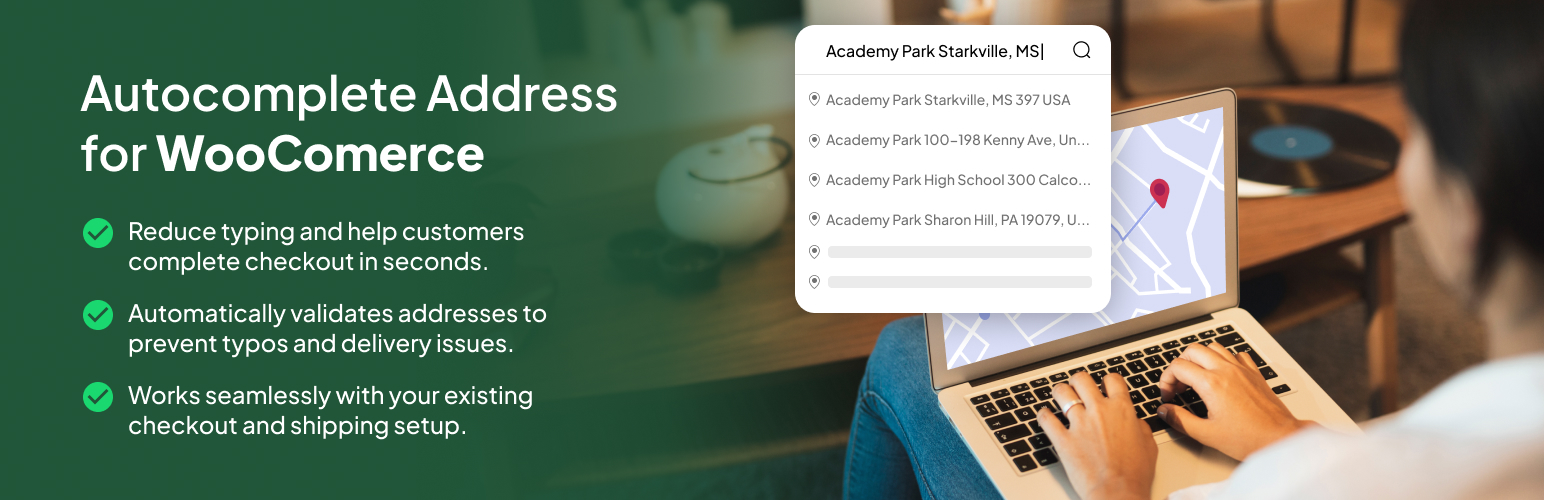
CodePros Autocomplete Address for WooCommerce 將 Google Places API 整合到 WooCommerce 結帳表單中,提供客戶智能地址建議,隨著他們輸入即時顯示。該外掛大幅改善結帳體驗,減少填寫時間並降低地址輸入錯誤。
問題與答案:
1. 這個外掛的主要功能是什麼?
- 外掛整合了Google Places API,提供客戶智能地址建議,以簡化結帳過程並減少錯誤。
2. 客戶在輸入地址時會看到什麼?
- 當客戶開始輸入地址時,他們會看到來自Google Places的相關建議,並在選取地址後,自動填入城市、郵遞區號和州等相關欄位。
3. 這個外掛能在哪些地方支援地址自動填入?
- 外掛支援在帳單地址和送貨地址欄位啟用地址自動填入功能。
4. 外掛需要什麼樣的環境運作?
- 外掛需要安裝並啟用 WooCommerce 插件(版本 5.0 或更高)、Google Places API 金鑰、PHP 版本 7.4 或更高、WordPress 版本 6.6 或更高。
5. 這個外掛可能會連接到哪個外部服務?
- 這個外掛將連接Google Maps/Places API,以提供地址自動填入功能,並向Google的伺服器發送地址查詢。
```html
<ul>
<li>這個外掛的主要功能是什麼?
<ul>
<li>外掛整合了Google Places API,提供客戶智能地址建議,以簡化結帳過程並減少錯誤。</li>
</ul>
</li>
<li>客戶在輸入地址時會看到什麼?
<ul>
<li>當客戶開始輸入地址時,他們會看到來自Google Places的相關建議,並在選取地址後,自動填入城市、郵遞區號和州等相關欄位。</li>
</ul>
</li>
<li>這個外掛能在哪些地方支援地址自動填入?
<ul>
<li>外掛支援在帳單地址和送貨地址欄位啟用地址自動填入功能。</li>
</ul>
</li>
<li>外掛需要什麼樣的環境運作?
<ul>
<li>外掛需要安裝並啟用 WooCommerce 插件(版本 5.0 或更高)、Google Places API 金鑰、PHP 版本 7.4 或更高、WordPress 版本 6.6 或更高。</li>
</ul>
</li>
<li>這個外掛可能會連接到哪個外部服務?
<ul>
<li>這個外掛將連接Google Maps/Places API,以提供地址自動填入功能,並向Google的伺服器發送地址查詢。</li>
</ul>
</li>
</ul>
```
外掛標籤
開發者團隊
② 後台搜尋「CodePros Autocomplete Address for WooCommerce」→ 直接安裝(推薦)
原文外掛簡介
CodePros Autocomplete Address for WooCommerce integrates Google Places API into your WooCommerce checkout form, providing customers with intelligent address suggestions as they type. This plugin significantly improves the checkout experience by reducing form completion time and minimizing address entry errors.
Compatible with both classic and block-based WooCommerce checkout.
Key Features
Google Places Integration: Seamless integration with Google Places API for accurate address suggestions
Block Checkout Support: Full support for WooCommerce Blocks (Gutenberg) checkout alongside classic checkout
Billing Address Support: Enable autocomplete for billing address fields
Shipping Address Support: Enable autocomplete for shipping address fields
Auto-fill Fields: Automatically populates city, postcode, and state fields when an address is selected
Country Restrictions: Respects WooCommerce country restrictions for address suggestions
Dynamic Country Support: Automatically updates autocomplete restrictions when country selection changes
Easy Configuration: Simple settings page to configure API key and enable/disable features
Lightweight: Minimal code footprint with efficient script loading only on checkout pages
Performance Optimized: Scripts only load on checkout pages, ensuring no impact on other pages
WooCommerce Integration: Native WooCommerce settings tab integration for seamless configuration
License Management: Built-in license system with a free 7-day trial — no account required to get started
How It Works
Once configured with your Google Places API key, the plugin adds autocomplete functionality to the address fields on your WooCommerce checkout page. As customers start typing their address, they’ll see relevant suggestions from Google Places. When they select an address, the plugin automatically fills in the city, postcode, and state fields based on the selected address data, saving time and reducing errors.
The plugin supports both the classic WooCommerce checkout and the modern WooCommerce Blocks (Gutenberg) checkout. It automatically detects which checkout type your store is using and loads the appropriate implementation.
The plugin intelligently respects your WooCommerce store’s country restrictions, ensuring address suggestions only appear for countries you’ve enabled in your WooCommerce settings. The autocomplete dynamically updates when customers change their country selection, providing accurate suggestions for the selected country.
Free Trial & Licensing
The plugin includes a 7-day free trial — no license key required. After the trial period, a license key is required to continue using the autocomplete functionality. License keys can be purchased from codepros.ai. License status and remaining trial days are displayed in the plugin settings page.
Requirements
WooCommerce plugin must be installed and active (version 5.0 or higher)
Google Places API key (get one from Google Cloud Console)
PHP 7.4 or higher
WordPress 6.6 or higher
External services
This plugin connects to Google Maps/Places API to provide address autocomplete functionality. It’s needed to show address suggestions as users type in the checkout form.
When the autocomplete feature is enabled and users type in address fields, the plugin sends address queries to Google’s servers. Google may also automatically collect the user’s IP address and approximate location data to provide relevant address suggestions.
This service is provided by Google LLC. For more information about how Google handles data, please review:
* Google Maps Platform Terms of Service
* Google Privacy Policy
This plugin also connects to the CodePros License API (https://api.wp-plugins.codepros.ai) to validate and activate license keys. License validation requests include the license key and the site URL. No personal user data is transmitted.
Example usage in the plugin:
include/AutocompleteAddress.php – Loads Google Maps JavaScript API with Places library
include/LicenseManager.php – Validates license keys against the CodePros License API