內容簡介
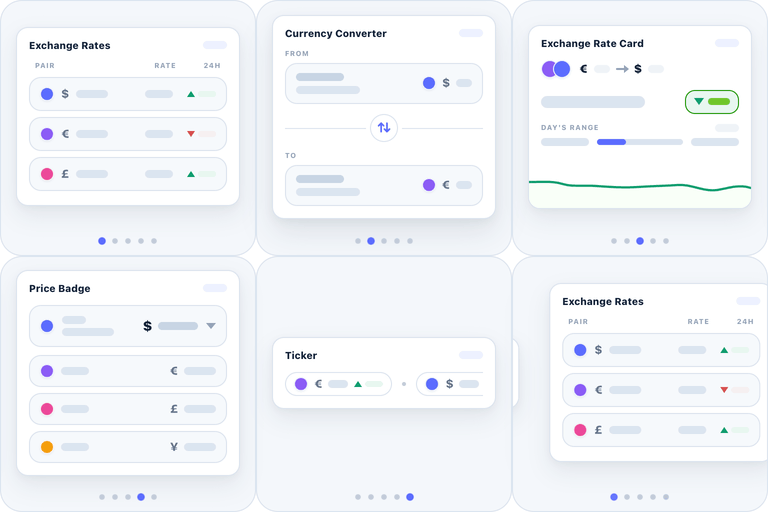
這個「Universal Currency Converter and Rate Display」外掛可以透過插件和短碼計算和顯示貨幣匯率,且提供四種顯示版型和支援全球幣值(目前支援94種),同時可以顯示10種貨幣匯率。
由Codeboxr開發的「CBX Currency Converter」
📺線上示範 | 🌟升級至專業版 | 📋使用手冊 | 👨💻免費支援 | 🤴專業支援 | 📱聯繫我們
歡迎提供任何反饋,如果您覺得缺少任何功能,請聯絡我們,我們將會在核心或套件中新增。
🛄 核心插件
🎁功能
顯示貨幣轉換器和即時匯率
支援117多種貨幣
顯示國旗以便快速查找
同時顯示最多10種貨幣
設定計算器的預設貨幣和金額
缺少希望新增的貨幣?請聯絡我們。
✅版型和功能
* 4種版型
* 支援經典小工具和短碼
* 支援Elementor小工具(自版本2.7.2)
* 支援Gutenberg區塊(自版本2.7.2)
* 支援WPBakery小工具(自版本2.7.6)
* 基於AJAX的計算器
* 雙向簡單轉換(上下計算)
* 2種安全調用數據的方法( CURL和fopen)
* 小數點或顯示幾位數
貨幣API
核心 - Alphavantage.co - 需要專業方案
核心 - openexchangerates.org - 免費方案(僅基幣美元)
核心 - Currencylayer.com - 免費方案(僅基幣美元)
專業套件 - Openexchangerates.org Pro方案(無限制方案)
專業套件 - Exchangeratesapi.io Pro 方案(至少基本方案)
專業套件 - Currencylayer.com Pro 方案(至少基本方案)
專業套件 - xe.com Pro方案 - 專業附加版版本1.6.10中的新功能
專業套件 - abstractapi.com Pro方案 - 專業附加版版本1.6.10中的新功能
專業套件 - getgeoapi.com Pro 方案 - 專業附加版版本1.6.10中的新功能
**$ Rest Api(新) **
Pro Adddon - 貨幣轉換的新 REST API 端點-用於單一貨幣(計算器)
Pro Adddon - 貨幣轉換的新 REST API 端點-用於多種貨幣(清單)
▶ 設置金融 API 的方法
🧮短碼
一個短碼即可應用於計算器、清單或兩者。請檢查短碼參數。
[cbcurrencyconverter]
💎專業版
👉 獲取專業附加版
在有庫存的商品頁面中選擇整合「WooCommerce」和「WP eCommerce」,以商品幣值作為預設金额和商品貨幣作為默認貨幣。
外掛標籤
開發者團隊
📦 歷史版本下載
原文外掛簡介
Universal Currency Converter and Rate Display is capable to calculate and display current exchange rates via Widget and Shortcode. It has four display layouts. Supports almost all global currency (94 supported so far) and display up to 10 currency rates simultaneously.
CBX Currency Converter by Codeboxr
📺 Live Demo | 🌟 Upgrade to PRO | 📋 Documentation | 👨💻 Free Support | 🤴 Pro Support | 📱 Free Support
Any kind of feedback is welcome. Any feature missing that you think it should have contact us, we will try to add in the core or addon.
🛄 Core Plugin
🎁 Features
Displays Currency Converter and Live Exchange Rate
Support most currencies
Display multiple Currencies at the same time
Set Default Currency and Amount for Calculator
Any currency missing that you need to add ? Contact us.
✅ Layouts & Functions
* 4 layout
* Classic Widgets & Shortcodes support
* Elementor Widget support (New From V2.7.2)
* Gutenberg Block support (New From V2.7.2)
* WPBakery Widget support (New From V2.7.6)
* AJAX based Calculator
* Decimal point or how many digits to show
$ Currency Apis
Core – Alphavantage.co – Need pro plan
Core – openexchangerates.org – Free Plan(only base USD)
Core – Currencylayer.com – Free Plan(only base USD)
Pro Addon – Openexchangerates.org Pro Plan(The Unlimited Plan)
Pro Addon – Exchangeratesapi.io Pro Plan(at least Basic Plan)
Pro Addon – Currencylayer.com Pro Plan(at least Basic Plan)
Pro Addon – xe.com Pro Plan – New in pro addon version 1.6.10
Pro Addon – abstractapi.com Pro Plan – New in pro addon version 1.6.10
Pro Addon – getgeoapi.com Pro Plan – New in pro addon version 1.6.10
** Rest Api(New) **
Pro Adddon – New REST API endpoint for currency conversion – for single currency(calculator)
Pro Adddon – New REST API endpoint for currency conversion – for multi currencies(list)
▶️ How to set Finance Api
🧮 Two Shortcodes
01. Shortcode for both calculator , list or both feature. Please check the shortcode params.
[cbcurrencyconverter]
Shortcode for displaying the rate directly [cbcurrencyconverter_rate from=”USD” to=”BDT” amount=”1″ decimal_point=”2″]
💎 Pro Version
👉 Get the Pro addon
Optional integration in woocommerce product page if product is in stock,takes product price as default amount and product currency as default from currency
Can give every widgets and shortcodes different look
Widgets can take its own setting or global settings
Custom currency rate
Bitcoin Currency Support
Add extra % to currency rate(From V1.6.2)
👍 Liked Codeboxr?
Join our Facebook Page
Learn from our tutorials on Youtube Channel
Or Rate us on WordPress
🔩 Installation
How to install the plugin and get it working.
Upload cbcurrencyconverter folder to the /wp-content/plugins/ directory
Activate the plugin through the ‘Plugins’ menu in WordPress
From ‘Setting’ menu see sub menu ‘Currrency Converter’, save setting
Select view, default amount, currency and css colors from the plugin setting